Four content types, four separate jobs
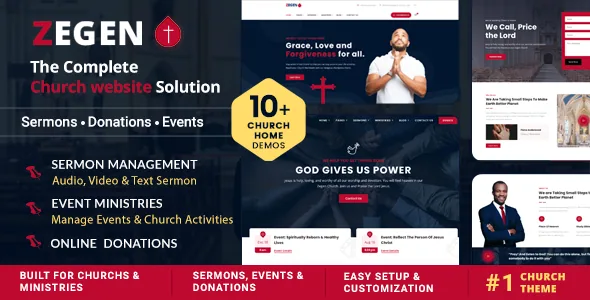
Most theme descriptions begin with a homepage. Zegen's vendor description begins with a set of record types: sermon archive pages, ministry showcase layouts, event sections, donation and fundraising pages, and volunteer registration areas. That order is the useful part. A congregation does not run on one long page; it runs on a handful of things that change every week and a few that change once a year.
The pieces answer different questions. A sermon archive holds teaching you want people to return to. An event section answers what is happening next. A giving page asks for money, a volunteer section asks for time. The vendor claims a dedicated layout for each instead of one blog template reused five ways.
How different those layouts really are is a demo question, because the description names the categories without explaining how each one is structured. What it does commit to is that demo content is organised around church and nonprofit goals rather than generic business pages.
Editing, and the split between page content and site chrome
The vendor describes Zegen as built entirely with Elementor, with live front-end editing and custom Elementor widgets. Sections are dragged into place and styled in the editor rather than written as templates.
Headers and footers sit outside that workflow. The vendor describes a header and footer builder with multiple layout variations, plus page-level layout customisation. In practice that means a one-off campaign page can carry its own arrangement without rebuilding the site-wide navigation, and a menu change lands in one place rather than on every page.
The vendor answers one question directly: Elementor Pro is not required, and the free version is described as sufficient for the theme's editing, even though Elementor Pro also appears in the compatibility list. If a demo section you want turns out to depend on a Pro widget, that would contradict the vendor's own statement, so check it on the demo if you intend to run free Elementor only.
Giving and volunteering are layouts, not a payment system
The description mentions donation-optimised layouts, volunteer registration sections, event signups, prayer requests and contact sections, and lists Contact Form 7 among compatible plugins. Nowhere does it claim the theme processes payments or ships a giving platform.
That distinction decides how much of the work lands on you. The theme can present a giving page and a sign-up form; whatever collects the money or stores the submissions is a plugin or an external processor you choose and configure. WooCommerce 8.x and 9.x are listed as compatible, which gives you a shop and checkout route if the organisation sells books, tickets or merchandise, but the theme is not presented as a donation gateway.
If recurring giving, gift aid or annual receipts are requirements, settle the mechanism before you pick a theme. Layout will not be the hard part.
Multilingual and RTL as declared compatibility
WPML and RTL support both appear in the vendor's compatibility list, framed as a way to reach international audiences and communities. For a parish running services in two languages, or a ministry publishing in a right-to-left script, those two declarations are the ones that matter.
The theme's WordPress metadata file makes a broader and vaguer claim — that it works "in many languages, for any abilities, and on any device". That is a general statement, not a translation workflow. WPML is the concrete item, and it is listed as compatibility rather than as a bundled plugin.
Multilingual problems tend to surface in menus and archive pages, which is exactly where a church site puts its structure. Test the theme with your own language pair rather than trusting the bullet point.
Branding controls and the rest of the styling tools
The branding half of the description is the most specific: Google Fonts integration, flexible image control, and colour settings that work both globally and per page. Global typography and colour decisions carry through the theme's styling, while a page-level override lets a single campaign page break from the palette without touching anything else.
The theme is widget-ready with four or more columns. The vendor also describes church and nonprofit widgets and shortcodes alongside the Elementor widgets, so some reusable pieces exist outside the page builder too. The ThemeForest file list names PHP, CSS and JS files, and documentation is marked as well documented — the vendor's claim about scope, not a quality judgement.
The vendor further describes one-click demo import covering church, charity and ministry layouts. Import sets up pages and settings to resemble the demo; it does not fill in your sermons or giving details.
What the version data and file list actually tell you
The marketplace attributes observed on 3 November 2026 record the theme at version 3.0.1 and declare support for WordPress 6.2 through 7.0, WooCommerce 8.x and 9.x, WPML, Contact Form 7, Elementor, Elementor Pro, Bootstrap 5.x, and current desktop browsers. Gutenberg Optimized is marked Yes. That attribute says the theme is described as working with the block editor; it does not say the demos are built there, and the vendor describes the build as Elementor throughout.
Treat all of that as vendor declaration. Nothing there is a record of the theme running against your PHP version, caching layer or plugin set, and a long WordPress range mostly says the product has been kept current across several releases. The vendor's changelog is where you learn what changed and when.
Bootstrap 5.x in that list is worth noticing if you or a developer plan to touch templates directly, because markup expectations follow from it.
Where Zegen stops earning its place
Zegen suits a congregation that wants church-specific page types available from the start and is comfortable doing layout work in Elementor, free version included. The named sermon, ministry, event and donation layouts remove the blank-page problem for a team publishing weekly.
It fits less well if you expect donation processing inside the theme, since the description offers layouts and form integration but no payment handling. It also fits less well if the block editor is meant to be your main design surface, or if a developer will rewrite templates and you would rather not work within Bootstrap 5.x conventions.
Questions & answers
Do I need Elementor Pro to edit Zegen?
According to the vendor, no. The description states the free version of Elementor works for the theme, even though Elementor Pro is listed among compatible plugins. Confirm on the demo whether any section you want to keep relies on a Pro widget.
Does Zegen collect donations itself?
The vendor describes donation and fundraising page layouts plus Contact Form 7 integration, not a built-in payment system. The giving mechanism comes from a plugin or an external processor you set up. WooCommerce is listed as compatible if the organisation needs a shop-style checkout.
Is the site editable from the block editor?
The marketplace marks Gutenberg Optimized as Yes, but the vendor describes the theme as built with Elementor. Read that attribute as a compatibility note and plan day-to-day page editing in Elementor unless you test the block workflow yourself.