Campaign collection is a plugin decision, not a theme setting
The vendor's feature list names the fundraising engine before it describes anything visual: users can start raising money "Powered by WP-Crowdfunding and WooCommerce," or through Growfund – Ultimate Donation & Crowdfunding Solution. The third-party integration list is more explicit still — both are the free versions of those plugins.
So the first thing to settle in a Krowd project is which plugin owns the campaigns. Campaign records, progress figures, donation or pledge handling and whatever backend the chosen plugin provides belong to that software; Krowd is presented as the presentation and account layer around it. If a project depends on a particular fee model, payout flow or recurring-donation arrangement, read that plugin's documentation, because Krowd's description does not describe those mechanics at all.
The choice also shapes the data. The WP-Crowdfunding route puts campaigns into WooCommerce-shaped content, while Growfund uses its own structure. The vendor presents the two as alternatives rather than one bundled system, so swapping later is not a theme-level change.
Sign-up and sign-in happen on the site itself
Krowd lists "Frontend Login/Registration," which keeps campaign creators and donors out of the WordPress admin login screen. For a charity or crowdfunding site that is usually what you want: the people raising money are members, not administrators.
The vendor publishes demo credentials for the preview site — username demo, password demo — which lets you look at the logged-in state rather than the public pages. That's the state worth inspecting, since it shows what a campaign creator actually sees after signing in and where the account area sits relative to campaign listings. The description does not spell out the registration flow beyond the existence of front-end forms, so the demo is the practical way to see what a new account can reach.
Three homepage styles, and what the one-click import really gives you
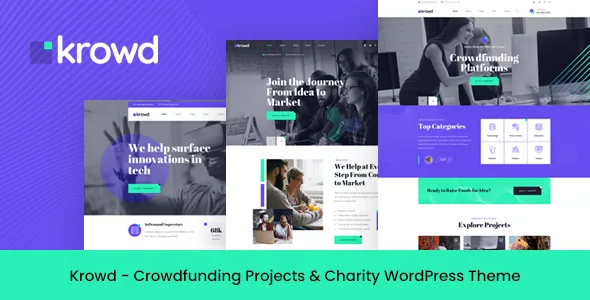
Three homepage designs are listed alongside one-click demo import. Importing puts the vendor's layouts and sample content into your installation, so you can inspect a working front page instead of an empty preview.
Use it as a starting state, not a finished site. Demo pages carry the demo's copy, campaign names and images, and replacing those is the launch work. Where the import earns its keep is in showing how the sections are put together: which parts are Elementor rows you can rearrange, which pull from the crowdfunding plugin's data, and which are widgets in theme sidebars. Knowing that before you rebuild a layout saves doing the job twice.
The three styles also indicate what the vendor expects a crowdfunding front page to contain — typically a campaign grid, a progress or donation element and a prompt to start a campaign. Check which of those pieces is theme content and which arrives from the plugin, because only the first is yours to restructure.
Layouts in Elementor, colours and fonts in Redux
Krowd is described as coming with the free Elementor page builder, so pages are assembled visually. Site-wide styling is handled separately: the vendor credits the Redux framework with "unlimited color and Google fonts options," and the feature list adds a choice between Google Fonts and standard fonts.
That division is sensible, but it means a rebrand touches two places. A new accent colour set in Redux will not override a colour that was already set on a button inside an Elementor element. Plan for both when you scope visual changes.
For template-level work, the vendor states the theme is child-theme compatible and ships a basic child theme, with default template files overridable from it. That is the safe route for PHP edits, since changes to the parent theme are lost when it updates.
The other integrations, and one detail that affects custom work
WPML support and .pot files for custom translations are listed, so a multilingual build has a documented path. The integration list continues with Slider Revolution, The Events Calendar, Contact Form 7 and MailChimp for WP. Treat these as plugins the vendor has built around rather than requirements for every page — an organisation running fundraising events will want the calendar, while a small charity site may never install it.
Two entries are worth noting for anyone extending the theme by hand. A custom icon font is included, and the front-end framework is Bootstrap 4. Bootstrap 4 is an older major version; it says nothing about whether the theme works, but it does tell you which grid classes and utility conventions the markup uses if you write your own templates or add sections.
How to read the compatibility declarations
The marketplace attributes, observed on 3 November 2026, record WordPress 6.0.x through 7.0.x, WooCommerce 5.x.x through 9.x.x, and compatibility with WPML, Events Calendar and Bootstrap 4.x. Browsers are listed as Firefox, Safari, Opera, Chrome and Edge, and the included files as PHP, CSS, SCSS and JS.
Gutenberg Optimized is marked No. That means the vendor has not declared block-editor optimisation; it is not a statement that the block editor stops working. It fits a theme whose page-building story runs through Elementor.
All of these are vendor declarations, not results from running Krowd on your server with your caching layer and plugin stack. If the project involves an unusual hosting setup or a heavy existing plugin mix, the demo is more informative than the attribute list.
Questions & answers
Does Krowd include its own crowdfunding system?
The vendor describes campaign collection as running through third-party plugins: WP-Crowdfunding with WooCommerce, or Growfund – Ultimate Donation & Crowdfunding Solution. Both are listed as the free versions. Krowd provides the site design, front-end login and registration, and the page-building and styling tools around them.
Can I see the site as a logged-in user before installing?
The vendor publishes demo credentials on the preview site: username demo, password demo. Signing in shows the logged-in state, which is the relevant one for anyone creating or managing a campaign.
Is Krowd built for the WordPress block editor?
The listing marks Gutenberg Optimized as No, meaning the vendor has not declared block-editor optimisation. That is not evidence that the block editor stops working; the theme's page-building workflow is described around Elementor.