Several campaigns, three ways to display them
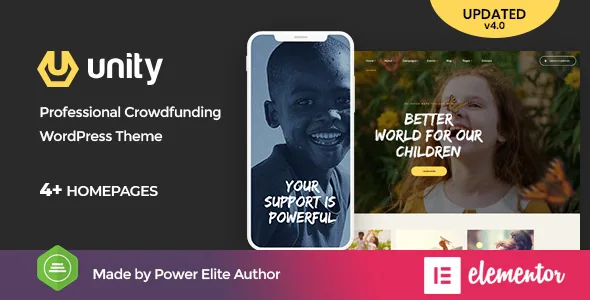
Unity's description is written for charities that promote "a single campaign or many campaigns at one time." The package names three campaign display layouts, which is the detail worth checking first: if your organisation runs an annual appeal, a building fund and a disaster response at the same time, each campaign needs its own entry and its own presentation rather than a block of text pasted into a page.
How those campaigns are stored — a custom post type, a plugin import, or content assembled in the builder — is not stated in the listing. The vendor does say the theme supports front-end forms that let visitors become backers of a campaign, and describes the setup as able to run multiple campaigns while collecting and distributing funds. Treat the fund collection itself as a promise to verify: nothing in the listing names a payment gateway or donation plugin, so the mechanism behind the forms is the question to put to the vendor before a live appeal depends on it.
Events as a second place to give
The vendor gives upcoming events their own placement in the design rather than leaving them to a widget. The stated purpose is that people can see when events happen, join, and then donate — so an event page acts as another entry point into fundraising instead of a calendar nobody reads.
No events plugin appears anywhere in the compatibility attributes, which list Elementor and nothing else. If your events need recurrence rules, ticketing, or calendar feeds, plan for a plugin that supplies them and expect to style it yourself. What the theme provides, per the description, is the space and the presentation layer for those listings.
The site frame is edited in the Customizer
Pages are built in Elementor, but the parts that repeat across every page are not. The vendor describes WordPress Customizer options grouped by area: main options, side area, social links, post lists, portfolio, styling, layout, footer and header. Advanced toggles let you switch individual features on or off, and site width can be set to full-width or boxed.
Headers and footers get a builder of their own, with multiple layouts offered. A sidebar generator lets you create as many sidebars as you need, and the theme lists different sidebar variations alongside it. That split is practical: change a logo position or a global colour once in the Customizer instead of rebuilding it in every Elementor template. Buttons have manual height and shape controls, with additional CSS available for anything beyond the presets.
Fonts, and what some demos will look like without Adobe
One line in the description matters more than its length. Some demos use Adobe Fonts (formerly Typekit), and the vendor states plainly that if those fonts are unavailable, they are substituted with default fonts or Google Fonts. Licensing Adobe Fonts for web use is a separate arrangement from buying the theme.
If typography carries your brand — a wordmark-adjacent serif in a headline, a distinctive sans across campaign titles — decide early whether you will license the original faces or accept the substitute. This is the kind of change that shifts line breaks and card heights, so it is cheaper to settle before you build out campaign pages.
Builder and declared environment
Elementor is the only compatible plugin recorded in the marketplace attributes, and the vendor describes the theme as built on Elementor's drag-and-drop interface. Gutenberg Optimized is marked No. Read that narrowly: it describes the editing path the vendor prepares layouts for, not a claim that the block editor stops working.
Files included are listed as PHP, CSS, JS and PSD, so the design source arrives with the theme. As observed on 3 November 2026, the software version attribute spanned WordPress 5.0.x through 7.0.x, and the vendor's last update is recorded as 3 March 2026. The same listing still carries the older line "WordPress 5.2.x tested and approved" from the original description, which no longer matches that range. Take the lower and upper ends as vendor declarations and confirm the versions you actually need against the copy you install.
Galleries, blog and the surrounding pages
Galleries are described as beautiful and unlimited, with gallery styles to choose between — useful for campaign photo reports and event recaps, where the visual record is part of the appeal. The description also lists functional inner pages and a blog area for charity news, which is the standard way to keep supporters returning between campaign pushes.
The description's speed and SEO claims, including a high loading score, come with the vendor's own caveat: page speed depends on the selected demo, the server and the content, and some features can lower the score. Sample photography in the live preview is demo material only and must be replaced with your own licensed images.
Questions & answers
Does Unity handle donations itself, or does it need a donation plugin?
The marketplace listing does not name a donation or payment gateway plugin. The vendor says the theme supports multiple campaigns and front-end forms for visitors to become backers, but the machinery behind the forms is unspecified. Ask the vendor which plugin or integration their demos use before a live campaign relies on it.
Can I use Unity with the block editor?
The marketplace marks Gutenberg Optimized as No, and Elementor is the only listed compatible plugin. That flag describes the editing path the vendor's layouts and documentation target; it does not state that core blocks are disabled. If your team writes mainly in blocks, test a few representative pages before committing.
Why do some demos look different from the preview screenshots?
The vendor says some demos use Adobe Fonts, and that those fonts are replaced with default or Google Fonts when unavailable. Substituting a typeface changes spacing and line lengths. Licensing the original fonts is separate from the theme purchase.