Location data is the spine of a Trawell post
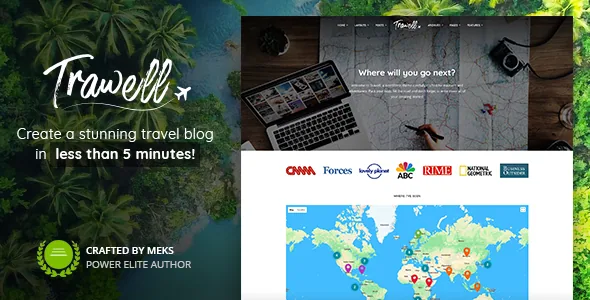
The vendor's feature list leads with Google Maps location integration, and the changelog shows it was handled as a post-level tool rather than a homepage ornament. Version 1.3 added a choice of placing the map above or below the post content, and version 1.4 added a switch to hide the map on single posts entirely. Read together, those two options describe the intended workflow: a destination write-up carries a pin, while an opinion piece or a packing list can drop it without leaving a hole in the layout.
Categories do the organising work alongside the map. The vendor describes customizable categories "to give your destinations a personal touch", and names travel listing directories, city guides and destination guides among the site types the theme targets. If you want a reader to move from a country page to a city post to a single beach write-up, that category structure is worth designing before you touch the demo import.
One limit is worth stating plainly. The maps are vendor-described integration, and the marketplace tags mention both Google Maps and OpenStreetMaps. Whether a given demo needs an API key, and how a map behaves on your hosting, is not something the feature list settles.
A home page built from configured sections, not a canvas
Trawell does not ship a drag-and-drop page builder. Its front page is assembled from a sequence of sections managed in Theme Options, and the changelog records how that set grew: a second posts listing called Posts 2, a second category listing called Categories 2, a custom HTML section for ads or shortcodes, and counters that can be animated. Version 1.6 let you increase the number of custom content areas and pull their content from a chosen page, which turns those areas into reusable blocks rather than one-off text fields.
The Cover area has its own controls. You can autoplay a posts slider, keep slide posts from repeating further down the page, enable a parallax effect on cover images, and upload a background image for mobile devices where background video does not play. There is also an option to replace the default title-description-buttons format with your own HTML or shortcodes.
The escape hatch is the Blank page template introduced in version 1.2. It disables the page title, header and footer so you can build a standalone landing page. Use it for a campaign or a booking pitch and keep the sectioned front page for the blog. Choosing between the two early saves rework later, because the Blank template is not a front-page layout; it is a page that opts out of the theme's chrome.
Widgets and sharing arrive through companion plugins
This is the detail most likely to surprise someone installing Trawell for the first time. Version 1.5 records mandatory changes made to meet marketplace requirements: all widgets bundled with the theme were removed, and social sharing was removed from the theme as well. To get the widgets back you install and activate the Trawell Buddy plugin from Appearance → Trawell plugins, and social sharing comes from the Meks Easy Social Share plugin. The same release moved the Additional JS field out of theme options and relocated Additional CSS into the WordPress Customizer's own field.
The feature list still advertises multiple widget styles and bonus custom widgets, and a version 1.5.3 entry records new social sharing style options in the Meks Easy Social Share settings screen. Read together, they describe a theme where the widgets exist but arrive through a plugin step. Budget for that step in your launch plan, and confirm the plugin screen lists what you expect before building sidebars around a widget that has not loaded.
The practical consequence for sharing: the option to display share buttons below single post content sits in Theme Options → Single Post, but the networks and styling are configured in the separate plugin's settings.
Ad slots you can switch off per page
Predefined ad slots are listed as a monetisation feature, and version 1.2.1 added the ability to disable ads on specific pages such as a contact page or the 404 template. That is a small option with a real effect on a travel blog: an affiliate-heavy destination post can carry ad placements while a sponsored landing page stays clean.
Affiliate use is described rather than demonstrated. The vendor says the theme is fully compatible with booking plugins for travel affiliate websites, and lists WooCommerce support for a shop. Treat both as compatibility claims made at the time of writing; the description does not document the checkout or booking flow in detail.
Details that shape a publishing routine
Article reading time is a listed feature, which suits long trip reports. Featured image size and ratio are customizable, so a mixed set of portrait phone shots and wide camera frames can be normalised at the theme level instead of cropped by hand. Post formats are supported, and the changelog records the theme's own gallery styling being kept compatible with the WordPress Gallery block from version 5.9 onward.
On the listing side, the vendor names unlimited sidebars with a sticky option, multiple pagination types, widget styles and an Instagram feed whose auto-refresh interval is set in Theme Options → Footer. According to the changelog, category screens can override layouts and posts per page, which is how a photo-heavy destination category can look different from a text-heavy tips category. Translation readiness and RTL support are both listed for non-English travel sites.
Declared compatibility and the version to know
The marketplace listing captured on 4 November 2026 records WordPress 4.9.x through 7.0.x and WooCommerce 5.x.x through 10.x.x as compatible, with the marketplace's latest version at 1.8.3 and package files listed as PHP, CSS and JS. Those are vendor and marketplace declarations about ranges, not results from running the theme against your PHP build or plugin stack, and the most recent compatibility note in the supplied changelog is a PHP 8 and WordPress 6.3 test entry in 1.8.2.
One-click demo import and one-click theme updates are both listed, along with documentation and vendor support. None of this is proof of how the theme behaves on your host, and nothing here replaces testing the demo import against your own plugin set before committing to a design.
Questions & answers
Does Trawell include a drag-and-drop page builder?
The front page is assembled from sections configured in Theme Options, and the changelog documents custom content areas and a Blank page template rather than a builder. The marketplace attributes mark Gutenberg Optimized as no, but that attribute alone does not mean the block editor is unavailable; the vendor describes the theme as compatible with editor blocks.
Where did the widgets go?
Version 1.5 removed the theme's bundled widgets and social sharing to meet marketplace requirements. Widgets come back by installing and activating the Trawell Buddy plugin from Appearance → Trawell plugins, and sharing comes from the Meks Easy Social Share plugin.
Can I hide the map on posts that aren't tied to a place?
Yes. Version 1.4 added an option to hide the map on single posts, in Theme Options → Single Post. Version 1.3 had already added a choice of placing the map above or below the post content.