A tour record, not a blog post with a photo
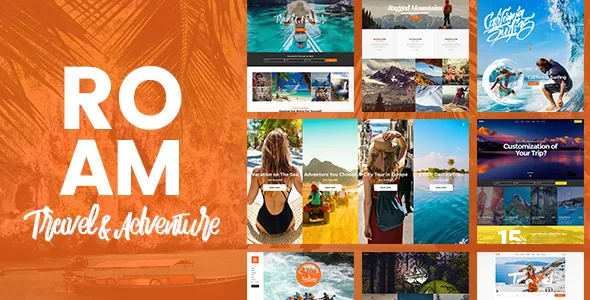
The vendor's feature list gives Roam two custom content types: a Tour and a Destination. That distinction is the foundation of the whole theme. A trip is its own object you fill in once, then display in several places, rather than an article you retype into a landing page.
What you can do with those objects is described through shortcodes. The vendor lists Tours List, Tours Carousel, Tour Type List, Destinations Grid, Destination Masonry Carousel and Top Reviews Carousel, plus a Tours Filter shortcode. Read them as a set: the filter is the piece that turns a pile of trips into something a visitor can narrow, while the others control presentation in grids, carousels and a destination wall. The description does not say which fields the filter queries, so how closely it matches your own catalogue structure needs checking in the demo or documentation.
The destination type matters for the same reason. Grouping tours under a destination lets you publish a place page and a trip page that stay distinct, instead of forcing every location into a category archive.
Booking, reviews and the logged-in side
The marketplace description claims booking functionality, a PayPal connection, custom review criteria and a user dashboard for logged-in users. Those four belong together, because they describe a loop: a visitor finds a tour, submits a booking, pays through PayPal, and later returns to an account area where their activity lives.
Review criteria are the detail worth pausing on. The vendor says the criteria are customisable, which suggests you can decide what a reviewer scores rather than accepting a single star rating. For a trip business, that could be guide quality, itinerary accuracy or value, but the description does not enumerate fields, so treat the criteria as something to define once you see the tour settings screen.
One thing the vendor text does not explain is how departure dates, group sizes or per-person pricing are stored and validated. Booking forms and tour single pages exist, but the mechanics behind them are not documented in the listing. If your operation sells fixed departures with limited seats, confirm that behaviour before committing.
The frame around the trip pages
Tour pages sit inside a section-based layout. The vendor lists parallax sections, video background sections, background images in sections and anchor links for one-page builds, all assembled with the bundled WPBakery Page Builder. Slider Revolution is also described as included for hero sliders.
The header is a real choice rather than a fixed shell: four types are listed, standard, minimal, tabbed and vertical, with separate logos for regular, sticky and mobile states and light and dark logo variants. If you want a booking call-to-action in a horizontal bar above the main navigation, the description names separate header top and header bottom widget areas, and says the mobile header can be styled independently.
Typography runs through 800+ Google Fonts according to the vendor, with a boxed layout option and footers of up to four columns plus a separate footer bottom area. Treat the font figure as a vendor claim; it tells you the option exists, not that every font suits a photo-heavy travel site.
What the change log says about third-party features
Roam's written history is unusually candid about features being taken away. Version 2.0 removed the Twitter plugin because of Twitter API changes. Version 2.1.1 removed the Instagram plugin for the same reason. Version 2.1 removed Google+ social login.
That pattern is useful when you weigh the social widgets in the feature list. Instagram and Twitter widgets appear in the vendor's feature list, but the changelog shows both being pulled from the theme as the platforms closed their old access routes. Assume any social feed you want is your own integration to maintain, not a permanent part of the theme.
The most relevant entry for a booking site is the most recent. Version 2.3, dated 21 October 2026, records that tour search returning no results was fixed, and that the Countdown shortcode's year options were extended to 2032. A search bug in the tours layer is exactly the kind of failure that costs bookings quietly, so the entry is worth knowing about: it tells you the tour filter is a component the vendor still patches, and that you should test your own query combinations after any update.
Compatibility as declared, and one planning cost
The marketplace attributes observed on 4 November 2026 record compatibility with WooCommerce 10.x and 9.x, WPBakery Page Builder and WPML, with WordPress versions from 7.0.x back to 6.5.x. The listed files are PHP, CSS and JS. These are declarations stored with the listing, not results from running the theme on any particular host, so the versions you can rely on are the ones you verify yourself.
The bundle claims need the same caution. The vendor says WPBakery and Slider Revolution are included with stated values; whether a copy you obtain carries those plugins is a separate question from what the listing says.
Finally, the description states plainly that the photography in the demos is not licensed for your site and must be purchased from a stock provider if you want it. If Roam's imagery is what drew you in, that cost belongs in the budget from the start, not after launch.
Where the described machinery earns its keep
Roam fits an operator who sells trips: a set of tours grouped by destination and type, presented through filterable listings, booked by visitors who then hold an account. The theme's own objects carry that content, and the vendor has kept patching the tours layer.
It fits less well if the site is mainly a travel journal with a contact page. The destination structure, booking form, review criteria and dashboard would sit unused, and you would be paying in setup time for a data model you do not need. A theme without a tour object would leave you with less to configure.
Questions & answers
Does Roam let visitors book a tour and pay online?
The vendor lists booking functionality and a PayPal connection, plus a user dashboard for logged-in users. The description does not explain how departure dates, capacity or pricing are stored, so confirm those mechanics in the demo before you rely on them for real bookings.
Can a visitor filter tours by type or destination?
The vendor lists a Tours Filter shortcode alongside Tour Type List and destination shortcodes. The listing does not specify which fields the filter queries, so test the combinations your catalogue needs.
Do the Instagram and Twitter widgets still work?
The change log records the Twitter plugin being removed in version 2.0 and the Instagram plugin in version 2.1.1, both cited as platform API changes. Plan on handling social feeds through your own tooling rather than treating the widgets as a permanent feature.
Can I use the photos from the demo site?
No. The vendor states the demo images are for presentation only, are not licensed for your site, and must be purchased separately from a stock image provider.