One settings panel instead of a page-building canvas
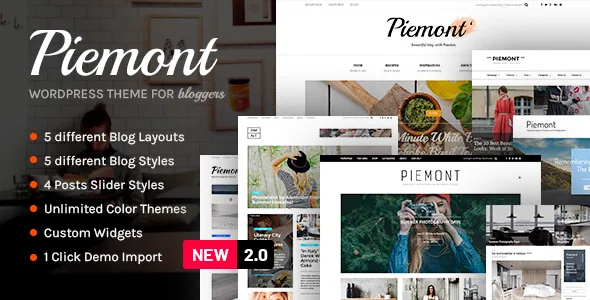
Read the vendor's feature list closely and no page builder appears in it. What appears instead is an "Advanced Piemont Control Panel" where "dozens of configurable options" are handled with a click, and a catalogue of layouts the theme already contains: 20+ header style combinations, 20+ footer styles and layouts, five blog listing layouts, five blog styles and a featured posts slider with four layout variations.
That shapes the work more than any single feature. There is no empty canvas on which you assemble a homepage from blocks. You choose among arrangements the theme ships with, then write. If a bespoke, section-by-section homepage is the plan, this is the wrong shape of theme; if the goal is a travel or lifestyle blog with a distinctive header and listing rhythm without touching CSS, the panel is the point.
Two details from the vendor description are outside the changelog: the theme's layouts are described as built on Bootstrap 3 with retina support, and the configuration is described as needing no CSS or HTML knowledge. Treat both as the seller's framing of how the theme is put together rather than as a promise about your own edits.
Picking a listing layout changes the archive, not the post
The five listing layouts — default, vertical, two column, compact list and masonry — are the archive-side controls. They decide how a stream of posts is presented: a two-column grid, a tight compact list, an uneven masonry wall. Swapping one for another is a settings change, so the same set of articles can be re-presented when the site's mix of content shifts from short link posts to long photo essays.
Keep the distinction between listing layout and blog style. The vendor lists five blog styles separately from the five listing layouts, and both are further separable from the featured slider's four variations. In practice that means the arrangement of your post stream, the styling of the entries themselves and the slider band at the top are three independent decisions, which is more flexibility than a theme that bundles them into a single demo page.
The numbers are a menu, not a multiplier. Piemont does not generate a new layout from your combination; it delivers a fixed set the vendor has already built and styled.
The sidebar decision is made per post
"Dedicated sidebars management for every page and post (Left/Right/Fullwidth)" is the quietest line in the feature list and probably the most useful one for a working blog. An individual article can run with a left sidebar, a right sidebar or none at all, without creating a separate template for it.
That matters when your posts are not uniform. A photo-heavy travel entry reads better full width; a link round-up with sponsor blocks or a newsletter box benefits from a column beside it. Five widget-ready areas — left, right, footer light, footer dark and offcanvas — give the sidebar content somewhere to live, and the vendor also lists its own custom widgets, so the modules you drop into those areas do not have to be generic ones.
One relationship is worth verifying in your own install rather than assuming: the evidence describes the per-post sidebar setting and the blog listing templates separately, without stating how the two interact when a listing view is involved.
Navigation: four positions and an offcanvas drawer
The vendor lists four menu positions with different styles — top, header, footer and offcanvas — plus a sticky header option. The offcanvas menu is described as opening from a header button and floating in, animated, from the right. Because it is one position among four rather than a replacement for the others, a site can keep conventional header navigation and still park secondary material behind that drawer: category links, archive pages, social profiles.
Colour and type sit in the same panel. Eleven predefined skins ship with the theme, and the vendor says further combinations can be created. Fonts come from an integrated Google Web Fonts library listed at 650+, which is a catalogue to choose from rather than advice about how many typefaces a readable blog should use.
Publishing formats and two service-dependent integrations
Post formats are supported for gallery, video, audio, quote, link and status — the format set a link-heavy or photo-driven blog tends to use. Lightbox and lightbox gallery integration is described as working for any images in your posts, so a photo set opens over the page instead of navigating away from the article.
The vendor also lists an Instagram feed and a MailChimp newsletter signup as integrations. Both depend on the outside service and your account there, and third-party APIs change independently of theme releases; the feature list states that they exist, not that they are currently authenticated against today's endpoints. The same caution applies to social share and social follow, which are listed as integrations rather than described in detail.
Two smaller items round out the feature list: a built-in coming soon or maintenance mode with a custom page, and contact form support.
Five demos, and the imagery they do not include
One-click demo import is described as bringing in all demo data and demo pages from the preview site, with five demo sites to choose from. For a theme whose value lies in option combinations, importing one is the fastest way to see how a header arrangement, a listing layout and a slider variation behave together before you replace the copy.
The credit note at the end of the vendor description is the constraint to plan for: the photographs are used for demonstration only and are not provided with the theme. Importing a demo gives you pages, structure and settings — not the travel and interior imagery in the preview. Budget for your own photography or licensed stock, and note that the credits list a separate photographer for the interior shots.
The marketplace file list names PHP files only, so do not assume design sources arrive with the theme. Documentation is described by the vendor as included, with an installation and configuration guide.
What the seller declares, and what the changelog shows
The marketplace attributes, observed on 4 November 2026, mark the theme compatible with WordPress versions from 6.9.x back to 5.0.x, with WooCommerce 6.x through 9.x and WPML. Those are the seller's declared ranges, not a record of how the theme behaves against your plugin set, PHP version and caching setup.
The changelog is the more informative record. Version 2.4.2 in June 2025 added PHP 8.3, WordPress 6.8.x and WooCommerce 9.9.x support; version 2.4.3 added WordPress 7.x support and updated bundled plugins. Earlier entries show the same maintenance pattern, with PHP 8 work in 2022 and 2023 and WordPress 6.x support in 2023. Nothing in this tells you the theme is fast or slow on your host — the vendor's own speed figure is a description of a demo, not your site with your plugins.
Separately, "Gutenberg Optimized" is marked No. That describes how the theme is tuned for the block editor, not whether the block editor can be used. If your writers compose in blocks, build one full article and one archive view in the theme before committing a publication to it.
Questions & answers
Does Piemont need a page builder to set up a homepage?
No page builder appears in the vendor's feature list. Layout variety comes from pre-built header, footer, blog listing, blog style and slider options managed in the Piemont Control Panel.
Can a single post drop the sidebar?
The vendor lists dedicated sidebar management for every page and post with left, right and fullwidth choices, so one article can run full width while others keep a column.
Are the demo photographs part of the theme?
No. The vendor states the photos are for demo purposes only and are not provided with the theme, so plan for your own imagery even after importing a demo.
Does the block editor work with the theme?
The marketplace marks Gutenberg Optimized as No, which reflects the level of block-editor tuning rather than removing the editor. Testing one article is the practical check.