A destination is a content type, not a tag
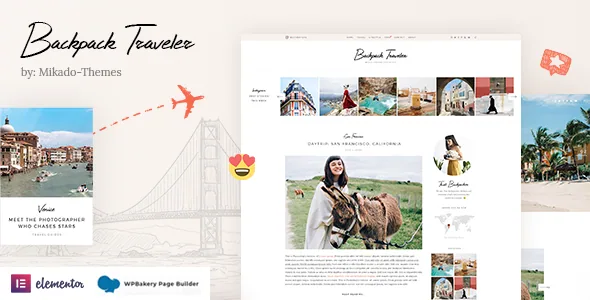
Travel themes usually give you post categories and a map widget. Backpack Traveler registers a Destination custom post type and then builds a family of elements around it: Destination List, Destination Category List, Destination Slider, Destination Full Screen Slider, Destinations List and Map With Destinations. The vendor's feature list names all of them.
The consequence is structural. A place can be described once as its own entry, then pulled into a homepage slider, a regional category listing and a map without being retyped as a page each season. If you already think of your site as a set of places that many trips refer back to, this saves duplication. If your travel writing is loosely organised around dated posts, the same structure will feel like an extra step.
It also means deciding what a destination entry holds before you import demo content, since those elements display whatever fields the post type offers.
Map elements come with a Google dependency you manage
The feature list names both customizable Google Maps and a Customizable Google Map shortcode, and Map With Destinations makes the plotting intent explicit.
The changelog shows what that costs in upkeep. Version 2.8 records a fix for a Destination Map JavaScript error and initialisation problem "when Google Maps Api Key not present," plus a fix to the admin map callback. Versions 2.10.2 and 2.12 record improved Google Map API compatibility. Read that sequence plainly: the map elements are built on Google Maps, so you supply a key, and you accept Google's terms and quotas for your project. The theme cannot do either for you.
A third-party mapping service also ages. This changelog treats API compatibility as recurring maintenance rather than a finished setup step.
Three blog layouts fed by six post formats
The vendor names three blog layouts — Standard, Masonry and Chequered — and pairs them with Blog List, Blog Category List and Blog Slider shortcodes plus a Blog List widget. Custom post formats are listed for Standard, Gallery, Link, Quote, Video and Audio posts.
The combination is the point. A gallery-format post carries a photo-heavy trip; a video format suits a route recap; a quote format gives you a short pull line between longer pieces. The layout then decides the reading shape: single-column for Standard, a staggered grid for Masonry, alternating columns for Chequered.
What the feature list does not settle is whether every layout behaves identically inside both page builders, or how the Blog Slider differs from the Destination Slider in motion. Settle those against the demo rather than assume them.
Where the shortcodes live, and where Elementor stands
WPBakery Page Builder and Slider Revolution are described as included with the theme rather than bought separately, and both appear in the changelog as updated components over many releases.
Elementor is listed as compatible, not bundled, and the changelog dates that compatibility to version 2.0 in April 2020, with later Elementor entries reading as fixes: WooCommerce shortcode styles in the Elementor editor in 2.11, general Elementor compatibility in 2.7, and a JavaScript error fix when Elementor is not installed back in 2.0.1. The vendor also declares compatibility with Qi Addons for Elementor and Qi Blocks for Gutenberg, which extend the Elementor side through a third-party library rather than through the theme's own elements.
The asymmetry is the useful signal. The theme's large shortcode collection — galleries, sliders, pricing tables, team and client carousels, infographics, product lists — is written in WPBakery's language, and years of changelog entries describe WPBakery plugin updates. Nothing in the feature list promises those elements behave the same in the Elementor editor. If Elementor is fixed in your workflow, treat that as the first thing to verify.
The changelog contradicts the feature list on social feeds
Two entries disagree between the two documents. The feature list still names Twitter and Instagram widgets and an Instagram List shortcode. The changelog removes the BackpackTraveler Instagram Feed in 2.10.2 "due to Instagram API changes" and the Twitter Feed in 2.8 for the same reason, and 2.12 removes a twitter-connect script and its enqueue.
Where they conflict, the newer record wins. Plan on social links and icon widgets rather than automatic feeds pulled from either platform, and check the documentation for whatever replaced the removed feed plugins if social aggregation matters to you.
The rest of the changelog is ordinary maintenance worth knowing about: repeated security improvements, social icon widget and WPBakery backend editor performance work, updated Google Fonts lists, and a Countdown shortcode extended to 2026–2032 years. Slider Revolution and WPBakery versions move forward release after release, so the bundled plugins stay in step with their own upstream.
Headers, logos and the shop side
Eight header types are named — Bottom, Centered With Down Logo, Centered, Divided, Minimal, Standard, Top Menu and Vertical — along with multiple header behaviours, separate logos for regular, sticky and mobile headers, and separate logo variants for dark and light header skins. A header top area carries its own widget regions.
For a photo-led travel site this is practical, not decorative. A vertical or divided header changes how much horizontal room the navigation takes beside a wide image, and a separate mobile logo lets you swap a full wordmark for a compact mark on small screens. The header top widget areas give a tagline or subscribe prompt somewhere to live.
Commerce is present but clearly secondary. WooCommerce is listed as compatible, with a dropdown shop cart widget and WooCommerce product list shortcodes, and the vendor describes QODE Wishlist for WooCommerce compatibility for shareable product lists; the changelog added that plugin as required in 2.9 and QODE Quick View in 2.10. If you plan to sell prints or guides, the path exists; the description does not present Backpack Traveler as a shop theme first.
Declared compatibility, as recorded
The marketplace attributes recorded on 4 November 2026 declare WordPress 6.5.x through 7.0.x, WooCommerce 9.x.x and 10.x.x, and list Elementor, WPBakery Page Builder and WPML under compatible with. Package files are given as PHP, CSS and JavaScript.
Those are vendor and marketplace declarations, not a record of the theme being tested on your stack. Nothing in the listing promises a particular PHP version either, which is worth checking before you plan an upgrade.
Questions & answers
Do the map elements work without a Google Maps API key?
Version 2.8 of the changelog records a fix for destination map initialisation when the Google Maps API key is not present, and later entries record improved API compatibility. The elements are built on Google Maps, so expect to supply a key and manage it yourself.
Is Elementor a full substitute for WPBakery here?
Elementor is declared compatible and the changelog dates that support to 2020, with later Elementor fixes. WPBakery and Slider Revolution are the bundled builders, and the theme's shortcode collection is described in WPBakery terms. The feature list does not claim every element behaves the same in Elementor.
Does the theme still display Instagram and Twitter feeds?
The changelog removes the Instagram Feed in version 2.10.2 and the Twitter Feed in version 2.8, both citing API changes. The feature list still mentions Instagram and Twitter widgets, but it is the older of the two documents.
What do I gain from the Destination post type over categories?
Destinations are their own entries with dedicated list, category list, slider and map elements. One place record can feed several layouts, instead of existing only as a tag on individual trip posts.