The install step is a trade choice, not a blank canvas
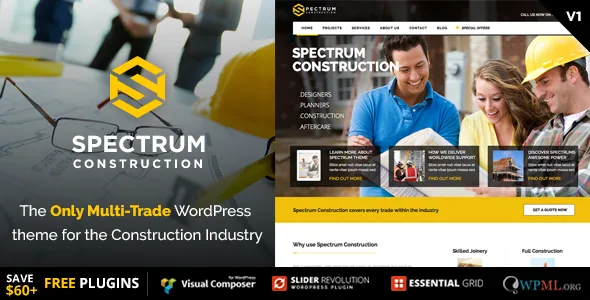
Spectrum's vendor frames the theme around a single idea: packaging "all the major skills in the construction industry into one WordPress install". The way that shows up in use is the setup screen. During a one-click install you pick the industry you work in, and the demo that lands on your site is written for that trade.
The listed demos are Construction, Joinery, Landscape Gardener, Electrician, Plumber, Windows & Conservatories, Online Shop Tools & Supplies, Building Supplies / Online Shop, Skip & Plant Hire, Painter & Decorator, Roofing Company, Flooring Company, Interior Design, and Kitchen & Bathroom Company.
That makes the starting point a decision you make once, early. Nothing in the vendor material describes a clean way to swap demos on a site that already holds content, so treat a change of trade as a fresh install rather than a toggle.
Three of the fourteen demos are shops, not service brochures
Most entries in the list describe work you have done and a quote you want the visitor to request: a joiner, a roofer, a flooring fitter. Three point elsewhere. Online Shop Tools & Supplies, Building Supplies / Online Shop, and Skip & Plant Hire all imply inventory someone browses and orders, with the hire demo covering plant and equipment rather than stock on a shelf.
That split decides which demo you study first, but it also changes page inventory. A service demo lives on portfolio pages and an enquiry form; a supplies demo lives on product listings, prices and a cart. The compatibility field names WooCommerce from 5.x through 10.x, which is the e-commerce plugin these demos would lean on. The vendor does not state that every shop demo is built on WooCommerce, so open the demo itself if commerce is the point of your site.
The trade list was assembled over a few months in 2015
The changelog is more informative than usual here because it dates each demo. Version 1.0.4 added Conservatories and shipped in late March 2015. Version 1.0.5 added a Home Shop page. Version 1.0.7 brought Skip & Plant Hire and a painter homepage together. Version 1.0.8 added the Roofer demo, 1.0.9 added Flooring and Interior, and 1.1.0 added Kitchen and Supplies.
So the catalogue was not one layout recoloured fourteen times. Each trade got its own design pass, and they did not all get the same amount of follow-up. A trade that arrived in version 1.1.0 had less time in the release cycle than one that shipped at launch, which is worth remembering when you compare how many subpages a given demo carries. The vendor's description also ends the list with "plus many more coming soon", which is an intention rather than a commitment.
Per-page layout and sidebar controls do the work of keeping pages different
Fourteen demos on one install would be pointless without ways to diverge from them, and the vendor's feature list puts several of those controls at page level rather than site level. Boxed or fullwidth layout can be set globally or per page. Sidebars can be moved left, moved right, or removed for a fullwidth page, again either site-wide or per post and page. Colour options are described as unlimited.
The sidebar switch is the one you will use most. A services page often benefits from a contact column running alongside the copy, while a portfolio grid or a shop listing usually wants the full width. Deciding that page by page lets one install hold all three patterns without a plugin. Parallax image and video sections are also listed, for the background bands that separate service blocks on a trade site.
Pages are built in WPBakery, and the package lists design files
Composition runs through WPBakery. The vendor's feature list names Visual Composer as included with the theme, alongside Slider Revolution and Essential Grid, and the marketplace compatibility field lists WPBakery Page Builder as the supported builder. Elementor is not named, so expect imported demo layouts to be builder content you edit in WPBakery.
Around that, the vendor lists Contact Form 7 styling, WPML for translation, shortcode support, and CSS written with Less. The ThemeForest file list covers PHP, CSS and JS files plus layered PSD and PSD source files, which matters if a designer is adapting a demo to a specific brand. One limit is stated plainly: the photographs in the live preview are demonstration only and are not included with the theme, so every imported demo needs its own image set.
The changelog stops in March 2020, which shapes how you scope the build
The marketplace listing recorded in November 2026 declares WordPress compatibility from 5.7.x through 7.0.x, WooCommerce 5.x through 10.x, Bootstrap 5.x, and marks the theme as Gutenberg optimised and widget ready. Those are declarations about supported ranges. They are not the result of running this theme against a current WordPress release.
The vendor's changelog tells you what was actually logged. Its newest entry is 14 March 2020, version 3.1.2, which refreshed Slider Revolution to 6.2.2, updated WPBakery to 6.1 and fixed bugs. The marketplace item's vendor-updated date sits later, in July 2021, but the changelog itself records no feature work after that 2020 entry.
That gap is the practical question for your project, and it does not have one answer. A roofing brochure site that leans on layout, images and a contact form is a different risk from a supplies shop running WooCommerce checkout. Import the demo you intend to use on a copy of your own stack, then check the builder, the shop pages and the forms before you build content you would have to move later.
Questions & answers
Can I switch from one trade demo to another after installing?
The vendor describes a one-click install where you select the industry you want to use, which frames the demo choice as a setup step. Nothing in the supplied material promises a clean swap on a site that already holds content, so decide the trade before importing and treat a change of direction as a fresh install.
Do the shop demos need WooCommerce?
The Tools & Supplies, Building Supplies and Skip & Plant Hire demos imply browsable inventory and ordering, and WooCommerce is the e-commerce plugin named in the compatibility field, from 5.x through 10.x. Whether each of those demos is built on it is not stated in the vendor material, so check the demo when commerce is central to your site.
Are the demo photographs usable on my site?
No. The vendor states that the sample images in the live preview appear for demonstration only and are not included with the theme. Plan a licensed photo set or your own project photography alongside the demo import.