Copying finished layout between pages and between sites
Most page builders let you duplicate a section inside one site. The Bold Builder feature list that BoldThemes publishes for Amwerk goes further: it names "full clipboard functionality with copy /paste from one page to another or from one website to another" as a backend editor feature.
That is the detail to weigh first, because it changes how you build. A contractor with three regional branches can assemble one services row, paste it into each branch page, and then edit the text. A studio reusing a block of headline, icon and counter across separate client installs can carry the block between them rather than rebuilding it from screenshots.
The practical caveat is styling. A block pasted into another website inherits whatever colours, fonts and spacing that site defines, so treat the clipboard as a way to move structure and copy, not a promise that a design transfers intact. Nothing in the vendor's material describes how the clipboard stores its data, so test it on your own stack before you plan a build around it.
Content that appears on a schedule, or only on some screens
Two entries in the same list give you control over when and where a block shows up. "Time limited content appearance" lets you give a row a window in time; "hide/appear on screen resolutions option" lets you decide which viewport sizes render it.
Used together they answer ordinary industrial-site needs. A recruitment banner can run through a hiring period and then stop without anyone editing the page. A dense spec table that reads badly on a phone can be held back on small screens while a shorter summary row takes its place. These are authoring decisions made per element in the builder, so a marketing coordinator can set them without code.
The same list includes an "override global settings option (change settings for individual pages)", which is the quieter but more consequential control. Header style, sidebar position and footer choice can be set once for the site and then replaced on the pages that need something different, instead of the site-wide setting being compromised to suit one page.
The rest of the backend feature list follows that pattern: full-width or boxed layouts, multiple header and menu styles including a sticky header, left or right sidebars, colour schemes with a picker, parallax and transition effects, custom icon sets and Google Fonts.
The AI text generator inside Bold Builder
BoldThemes dates one builder feature precisely: from October 2023, the vendor states, Bold Builder includes an "AI Content Generator" that produces text from input data.
Read that as one more element in the editor rather than the reason to buy. The vendor does not state in this material which AI service sits behind it, whether an API key or paid account is required, or what the running cost would be. Those are the questions to settle before you put generated copy into a launch schedule. The vendor's own description frames it as a way to draft text efficiently for design and development work, which is a fair description of a drafting aid — the output still needs a human read before it goes on a company site.
A cost calculator bundled with the theme
The plug-in section is where Amwerk's industrial positioning becomes concrete. BoldThemes states that its Cost Calculator plugin comes free with the theme, described by the vendor as a $29 saving, and that Bold Timeline Lite is bundled as well. Both are the vendor's own products, and the calculator normally sells separately on CodeCanyon.
For a contractor, a calculator is a different kind of page from a contact form. A contact form collects an enquiry; a calculator collects the parameters of a job — quantity, material, options — and returns a number the visitor can act on. That turns a services page into something closer to a quoting tool, and it is the sort of feature that decides whether the theme fits a fabrication or installation business at all.
Because these are vendor bundle claims, treat them as a description of what the theme is designed to work with rather than a statement about any particular package you receive. The same section lists Bold Builder itself and the BoldThemes WordPress Importer, the one-click demo import tool.
Supported plugins named separately are Contact Form 7, WPML, WooCommerce, W3 Total Cache, Yoast and RTL.
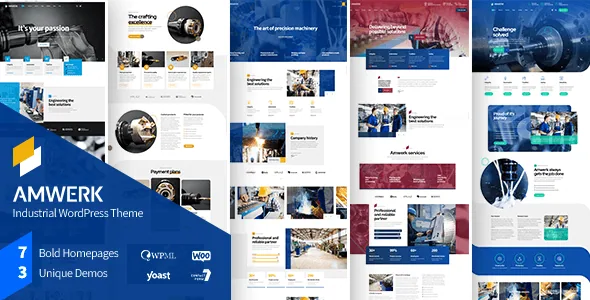
Three demos, one homepage each
The vendor describes three fully developed demos, each built around a single homepage plus a set of pre-built inner pages. Amwerk's stated audience is construction, building, contracting, property development and property management companies, and the vendor extends the fit to oil, metallurgy, manufacturing, factory and renewable energy work.
A single homepage per demo is a modest library next to themes that advertise dozens of front-page variants. The trade-off is consistency: each demo is a complete site argument — services, projects, company background, contact — rather than a collection of interchangeable homepages. If your site structure resembles one of those three, the import saves real time. If it does not, you are building your own pages in Bold Builder, and the three demos become reference material.
One licensing point is stated plainly by the vendor and is easy to miss: images on the demo sites are not licensed for use on production sites and must be licensed separately. Plan for your own photography of plant, sites and staff.
Version and compatibility as declared
As observed on the marketplace listing on 4 November 2026, the latest marketplace version is 1.3.2, with the vendor's last update dated 28 May 2026. The declared software compatibility runs from WordPress 6.0.x through 7.0.x, and WooCommerce 6.x.x through 9.x.x. The package is listed as containing PHP, CSS and JavaScript files, widget ready, high resolution, well documented, and Gutenberg Optimized is marked Yes — which means the block editor remains usable, not that the designed pages are built with blocks.
These are vendor and marketplace declarations, not results from testing Amwerk against your plugins or PHP build. The browser list still includes IE11, a sign of when that list was assembled rather than a requirement for a current build.
Questions & answers
Can I move a Bold Builder section from one Amwerk site to another?
The vendor lists full clipboard copy and paste between pages and between websites as a backend editor feature. Structure and text can be carried across; colours, fonts and spacing will follow the destination site's settings, so expect to restyle after pasting.
Do I need the Cost Calculator plugin separately?
BoldThemes states that its Cost Calculator plugin comes free with Amwerk. That is the vendor's bundle claim, and the plugin is also sold on its own elsewhere.
Can I hide a block on mobile without rebuilding the page?
The feature list includes a hide/appear option based on screen resolution, set per element in Bold Builder. That lets you suppress a wide table or heavy visual on small screens while keeping it on desktop.
Are demo images included for use on my site?
No. The vendor states the demo images are not licensed for third-party production use and must be licensed separately.