Nine built-in widgets do the work a page builder usually does
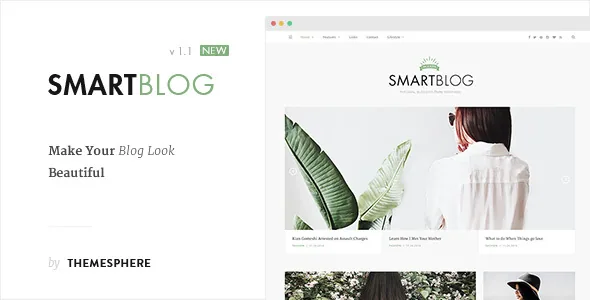
The vendor's feature list puts custom widgets near the centre of Smart Blog, and that placement says more about the theme than any single option. Nine are named: About Me, Social Icons, Popular Posts, Latest Posts, Social Count Plus, Quotes, Advertisement, Call to Action and an Instagram footer widget. Each is a self-contained block you drop into a widget area — an author card, a follow-me strip, a most-read list, an ad slot, a quote.
That set is aimed at a particular publishing rhythm: posts go into categories, and the sidebar and footer carry the supporting furniture. The theme is also marked widget-ready, so standard WordPress widget areas remain available alongside the vendor's own.
Configuration lives in the Live Customizer, which the vendor describes as managing the whole backend, with options to show or hide most page elements. There is no drag-and-drop canvas in the feature list and no block template library. If you want to design a landing page section by section, this is the wrong tool; if you want to style a blog once and then publish, the Customizer is the surface you will actually use.
Layout names, and the masonry addition that changes the grid maths
The vendor names seven homepage layouts: Standard Blog, List, Full Post and Grid, Full Post with Sidebar and Grid, List Layout Full Width, Simple Grid Layout and Blog Layout Full Width, plus further unnamed options. The repeated words are the useful part. List layouts favour headlines with short summaries; grid layouts favour photo-led posts; the sidebar variants narrow the image area, and the full-width versions remove that constraint.
Version 1.2 of the changelog adds a masonry listing style for the blog index and category archives. This is the setting that matters when your posts carry images of uneven heights, because masonry packs them instead of leaving the gaps a fixed grid produces. The same release introduced an option to disable image cropping on Classic listings and single posts, which shows your uploaded proportions rather than a uniform card shape.
The vendor also lists retina graphics and a custom justified post gallery — both consistent with an image-heavy travel blog, though what your own mix of portrait and landscape shots looks like is best judged from the demo rather than a description.
Four post formats, and the per-post extras worth deciding on
Smart Blog supports Gallery, Video, Audio and Standard post formats. On a travel blog that mixes written diaries, photo sets and the occasional clip, the format you pick changes how the entry is presented without requiring a separate template per type.
Around the post, the vendor lists a scrollable related-posts carousel, social sharing with counters and a post Like feature. Two of those deserve a decision rather than a default. The sharing counters are public, so a new blog shows low numbers to every reader until traffic builds. The Like button is a signal kept on your own site rather than on a social platform, which is useful if you want engagement data you own, but it is a feature readers have to be shown.
Navigation gets its own treatment: a sticky top bar with the logo, a top-bar hamburger for secondary navigation, multiple custom menus, and an off-canvas mobile menu with a separate mobile logo. For a blog whose archive is organised by country or region, that secondary menu is where the structure fits.
The declared WordPress range stops at 5.6.x — resolve it first
The marketplace's software-version field, observed on 5 November 2026, lists WordPress 4.9.x through 5.6.x and nothing newer. The changelog's latest written entry, version 1.2.1, mentions bringing libraries up to date and compatibility with "the latest version of WordPress" without naming a release, and the marketplace records version 1.2.0 as its latest. None of that tells you how the theme runs on a current install.
Treat the declared range as the vendor's statement of tested ground. If you are on anything newer, the honest answer is that the outcome is unknown until you try it — on a staging copy with your own plugins active, checking the front end, the Customizer panel and the widget screens, since configuration for this theme lives entirely in those last two.
Gutenberg Optimized is marked No. That records that the theme was not built around block templates; it does not establish that the block editor fails to load. If block-editor post writing is part of your workflow, test that path directly rather than reading the attribute as a verdict.
Travel positioning, plugin relationships and what the files contain
ThemeSphere states that buyers most often choose Smart Blog for travel blogs while pointing out it works on any blog; the marketplace files it under personal blog and magazine. Take that as positioning rather than a restriction. The travel association tells you what the demo photography and slider styling are tuned for, not who is allowed to use it.
Plugin mentions are integrations, not bundled dependencies. The vendor lists Yoast SEO and Contact Form 7 as compatible and includes a MailChimp subscribe form — MailChimp in that context implies an account and a list, since the theme supplies the form's place in the layout, not the mailing service. Translation readiness is listed too.
The marketplace file list names PHP, CSS and JavaScript. There are no layered design files among them, so restyling means working in CSS and in the Customizer's typography and colour options rather than in a design application. Since those settings also cover showing and hiding elements, much of the visual work happens there before you write any code.
Questions & answers
What is the difference between the named homepage layouts and the masonry option?
The seven named layouts are fixed arrangements such as Standard Blog, List and Full Post with Sidebar and Grid. Masonry, added in version 1.2, is a listing style for the blog index and category archives that packs images of uneven heights instead of aligning them to a rigid grid.
Can I turn off image cropping on post thumbnails?
Yes. Version 1.2 added an option to disable image cropping on Classic listings and single posts. With cropping off, the theme shows your uploaded image proportions rather than a uniform card shape, which suits blogs where framing differs from photo to photo.
Does Smart Blog need Yoast SEO, Contact Form 7 or MailChimp?
The vendor lists the first two as compatible and includes a MailChimp subscribe form, but compatibility is not dependency and nothing in the supplied description says the theme breaks without them. The custom widgets, post formats and layouts come with the theme itself.