Filtering and product display decide the shop
The vendor's feature list gives its clearest detail to browsing rather than to decoration. Poco ships a predefined filtering system that lets shoppers narrow the product list without leaving the page, and several styles for displaying shop products. For a menu where the same customer might want a burger, a side and a drink in one order, filters do more work than any hero image: they turn a long grid into a short list.
Those two items belong together when you plan the shop. Pick a product display style first, then decide which filters sit above it, and the changelog note about the Elementor products carousel in the WooCommerce list layout tells you that arrangement has been maintained.
The purchase path pages come premade
Poco lists inner page designs for the whole checkout journey: cart, checkout, my account and orders, plus 404 and FAQ. Styling these pages against WooCommerce's default output is the repetitive part of running a food shop, and a theme that already handles them saves you from editing templates for pages customers reach at the moment money changes hands.
Ordering itself runs on WooCommerce, which the vendor names among the supported plugins. Poco is the layer that presents the shop, not a separate ordering platform.
Header and footer choices with a builder behind them
Several premade header and footer options are listed, and the vendor also describes a header and footer builder function for assembling your own. On a restaurant site that usually answers two practical questions: whether the phone number and opening hours stay visible while someone scrolls the menu, and whether the footer can hold address, hours and social links without turning into a block of text.
Settle on a header and footer pair early. Changing them later means revisiting every layout you built around them.
Reviews come from a third-party plugin
The vendor states compatibility with the Widgets for Google Reviews plugin. That is an integration, not a reviews system inside the theme. Without the plugin installed and connected to your Google listing, there is nothing to display.
Worth knowing before you promise a review section on the site: the reviews live wherever the plugin pulls them from, so the theme's job is presentation only.
Elementor and the demo layouts
Pages are built with Elementor, and the vendor lists premade widgets to make content assembly quicker. The marketplace marks the theme as not Gutenberg-optimized, which is a statement about where the vendor's design work sits rather than proof that the block editor is unavailable.
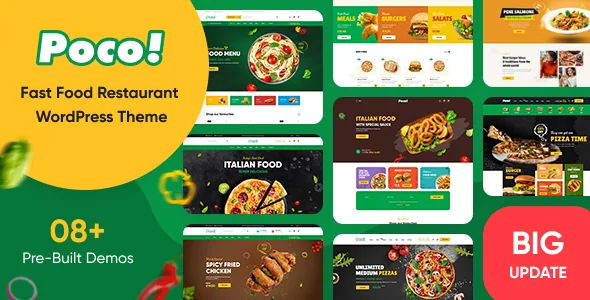
The description advertises 04+ prebuilt homepages imported in one click. A changelog entry for version 2.0.0 records that homepages 5, 6, 7 and 8 were added, which explains the deliberately vague count. Those layouts cover plenty of ground between a burger counter, a pizza shop and a cafe.
The vendor's feature list also mentions a bundle of plugins, naming Elementor, WooCommerce, Contact Form 7, MailChimp and Slider Revolution. What your own site needs installed and licensed is a separate question from what the vendor's demo runs, so treat the bundle mention as a list of the plugins the theme is designed around.
Why the changelog is worth reading before you commit
The release notes are the most concrete evidence about how this theme is maintained. The latest entry resolves compatibility issues with WooCommerce 11.1.0, fixes the Elementor products carousel in the WooCommerce list layout and clears a PHP 8.4 deprecation notice from Elementor. Earlier entries follow the same rhythm, with WooCommerce compatibility fixes and template updates recurring across releases.
For a store that will keep taking orders through several WooCommerce versions, that upkeep is the substantive part of the offer. The listing's declared compatibility stops at WooCommerce 9.x.x, observed on 4 November 2026, while the release notes have moved further. Test the version pairing you intend to run on a staging copy rather than relying on either claim.
What Poco does not do for you
The theme assembles a food shop; it does not fill it. Products, prices and photography are yours to supply, and the demo images in the preview are not licensed for use on your site.
If your site is a brochure for one restaurant with a menu page and a phone number, the filtering, display styles and account pages sit mostly unused. Poco makes most sense when the shop is the point.
Questions & answers
Does Poco include its own online ordering system?
No. Ordering runs through WooCommerce, which the vendor lists as a supported plugin and the changelog tracks release by release. Poco styles the shop, cart, checkout, account and order pages around it.
Can I build pages without Elementor?
The vendor builds Poco around Elementor and lists premade widgets for it, and the marketplace marks the theme as not Gutenberg-optimized. Nothing in the description says the block editor is unavailable, but the demo layouts and page-building guidance assume Elementor.
How many homepage demos does the theme ship?
The description says 04+, and a changelog entry for version 2.0.0 records the addition of homepages 5 through 8, so eight layouts at the current release. The vendor states they import in one click.
Do the Google reviews come from the theme?
No. The theme is stated as compatible with the Widgets for Google Reviews plugin, which supplies the reviews. You need the plugin installed and connected to your Google listing for a review section to show anything.