A menu that is a product catalogue
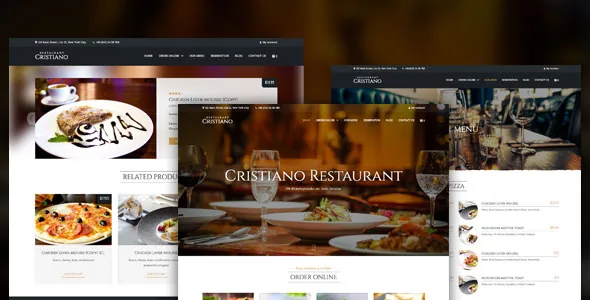
WooCommerce restaurant themes usually split the work: the menu is a styled list of dishes, and the shop is something else bolted beside it. Cristiano, by UkrDevs, describes a single catalogue instead. The marketplace description calls it a premium WordPress theme for restaurant businesses "with online ordering functionality" and says visitors view menu items and place orders on the same site.
The widget set shows how that is meant to work. Of the 15 Elementor widgets the vendor lists, six are food views rather than generic content: Restaurant Menu, Menu Categories, Menu Featured Items, Menu Preview Items, Random Menu Items and Promo Slider. Because those are presentations of the same underlying products, a featured strip on the homepage and a full menu page do not need to be maintained as separate text. Everything below comes from the vendor's marketplace description and changelog; nothing here was tested on a running install.
Column count, image styles and price variants
Two settings shape how a menu reads before any colour decision. The vendor lets you choose one or two columns inside menu categories, and offers six style variations for product images in those categories. One column with large images suits a short, photographed menu; two columns with restrained image styles suits a long price list. The feature list also names multiple price variations for menu items, which covers dishes sold in more than one size or portion.
Recent updates add presentation options on top. Version 3.8 introduced daily menu functionality, and 4.1.0 added a new menu template, so a recurring specials menu and a standing menu can exist as different templates over the same products. Version 4.1.4 also added a column count setting for the gallery and colour controls for the Hero slider, alongside a fullwidth button style and boxed styles for the call-to-action slider and short information block.
Toppings and variable products
Product toppings arrived in version 4.2.0, and 4.2.1 lists improved toppings for variable products — the combination that matters for a pizzeria or burger kitchen, where a customer picks a base dish and then adds extras. The same 4.2.1 entry records fixes for the single menu item limit and a WooCommerce variable products bug.
The theme ships a companion plugin the changelog calls Restorator, updated repeatedly through the 4.2.x releases. 4.2.0 also added PHP 8+ compatibility, and 4.1.0 named PHP 8.2+. How toppings, variable products and Restorator behave against your payment, tax and delivery setup is a question for a staging install, not something the description settles.
Two reservation widgets that mean different things
The Elementor list includes both Reservation by Email and Open Table Reservation. They are separate widgets, so this is a per-placement choice rather than a global setting. Reservation by Email depends on a mailbox someone actually reads plus a working form; the OpenTable widget depends on your account with that service. Version 3.9.28 added locations for the reservation, and 3.9.5 added the ability to change reservation hours.
Locations became a real feature in 4.1.0, which added multiple location functionality and a Location Map widget, with a fix for closed status arriving in 4.1.4. Opening hours have their own controls: version 4.2.4 added an option to change the text in the Open Hours table and an option to show or hide opening hours in the header. For one restaurant that is convenience; for several branches it is often the deciding feature.
Elementor, WPBakery and the typographic starting point
Both builders are supported, and the changelog shows them developed in parallel: Elementor compatibility and 15 Elementor widgets in 3.9.22, then WPBakery compatibility and 15 WPBakery widgets in 3.9.25. Elementor Container support followed in 4.1.0, as did a Testimonials widget, and 4.2.3 added support for multiple buttons in the Hero widget.
The visual tone is partly settled by the stock fonts: Cinzel, Allura and system-ui. Cinzel is a lettering-derived serif and Allura a script, so the default pairing reads as a printed menu card rather than casual signage. If your brand is closer to a canteen or a takeaway counter, expect to change both. Custom font options were improved in 4.1.0, and the theme also offers four header layouts, wide and boxed page layouts with 11 boxed backgrounds, and unlimited colours through a colour picker. The bundled scripts are VenoBox 2, Rellax and Swiper; theme options run on the Codestar Framework.
What the listing declares, and what it leaves out
The marketplace record shows version 4.2.4 updated on 4 March 2026 — which corresponds with the 4.2.4 changelog entry listed there — compatible with WordPress 6.6.x through 7.0.x and WooCommerce 7.x through 9.x, with Contact Form 7, Elementor, Elementor Pro, WPML and WPBakery named. Those are vendor declarations observed on 4 November 2026, not test results against any particular PHP version, caching layer or plugin stack.
The scope is restaurants, cafés, fast food, pizzerias and cafeterias. What the description does not cover is table-management software, delivery-driver logistics or point-of-sale integration. Ordering through WooCommerce is included; the operational systems behind it are not.
Questions & answers
Can Cristiano show a menu without WooCommerce running?
The changelog records a fix in 4.0.2 for Theme Options tabs when WooCommerce is disabled, which suggests the options panel stays reachable without it. That is not the same as a menu displaying. The dish views are built on product data, so check a staging copy before committing to a theme that carries no shop.
Can a site use both reservation widgets?
They are separate widgets, so you can place both if the front desk watches two channels. The practical question is who monitors what: the email route needs someone reading the inbox during service, while the OpenTable widget depends on your account and setup with that service.
Does the demo content include the restaurant photography?
The listing does not say what the demo import includes or how images are licensed, so treat the preview photography as an unknown until you check the documentation or the import result. Plan on supplying your own dish photography for the six product-image styles to look right.