A menu module before a page builder
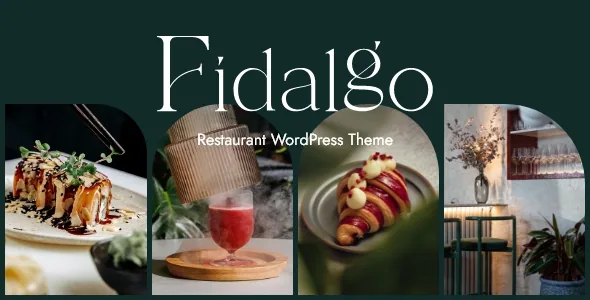
Plenty of WordPress themes can be made to look like a restaurant. Fidalgo's marketplace description argues something narrower: that the food itself gets a content structure. The vendor lists a "Dedicated Restaurant Menu module" and, separately, a "Restaurant Menu List shortcode". Those two lines describe the same job from different angles — a place to hold menu items, and a repeatable front-end block that renders them.
That distinction decides how a menu page is built. Instead of typing dish names and prices into text blocks, you add items to the module and drop the list shortcode where the menu should appear. Changes then happen in one place rather than in every paragraph of a long page.
Bookings get the same treatment. A "Reservation Form shortcode" is listed among the theme features, so a booking request can sit inside a page you compose rather than arriving through a separate plugin's shortcode syntax. The changelog is the reason to believe the form is maintained rather than shipped and forgotten: version 1.0.1, from June 2024, records "Fixed reservation form using incorrect date".
The vendor does not say how a submitted reservation is stored or routed, so treat the form as the request surface and confirm the handling your restaurant actually needs before you rely on it.
The shortcode vocabulary is where the theme's character sits
Fidalgo's feature list runs long, and most of it is the ordinary furniture of a commercial theme — buttons, icons, separators, tabs, testimonials. The entries worth your attention are the ones dealing with images and motion, because food photography is the one asset every restaurant site lives or dies by.
The vendor names a Circular Slider, a Clip Path Image shortcode, an Interactive Image Switch, Free Flowing Images, a Frame Slider, a Horizontal Showcase, a Horizontal Scroll Showcase, a Stacked Images shortcode and a Text Marquee. Read as a group, these are presentation devices for plates and interiors: a clipped image that breaks the grid, a switch that swaps between two photographs, a frame that presents one shot at a time.
That is a design decision you inherit. If your plan is a conventional stacked layout with a hero image and three columns of text, most of this toolkit will sit unused. If you want a menu page where the photography moves, it gives you more to compose with than a generic theme's image block.
The vendor's copyright note also matters here. The demo photographs are licensed for presentation only and cannot be used on your site; you need your own photography or stock licences. The shortcodes decide the shape of the frame, not the contents.
Thirteen homepages, aimed at different kinds of venue
The feature list puts the count at 13 predesigned homepages. The description is more useful than the number, because it names the venue types the vendor built for: fine dining, café, seafood restaurant, cocktail bar, night club and bistro, with the wording extended to bakeries, sushi bars, patisseries, pizza parlors and steakhouses.
Those are not interchangeable briefs. A cocktail bar's homepage leans on atmosphere and late hours; a bistro's leans on a short menu and a booking prompt; a seafood restaurant usually wants provenance and the day's catch. Having separate starting layouts means you choose a structure that already assumes the right content, rather than stripping a steakhouse page down into a café.
A one-click demo import is listed alongside, which is the standard way these layouts arrive — the structure and sample content are placed so you can edit in place. Your own dishes, prices and photographs still replace the placeholders.
Seven headers, including two vertical ones
Headers rarely decide a purchase, but they decide daily editing comfort. Fidalgo lists seven types: Centered, Minimal Centered, Minimal, Split Left to Right, Standard, Vertical Sliding and Vertical.
The vertical options are the interesting ones for a restaurant site, since they free the full width of the page for wide food photography while keeping navigation permanently visible. The vendor also lists optional separate logos for the mobile header, for light and dark header versions, and for the sticky header, plus separate styles for the mobile header. On a site with a dark hero image and a light menu page, that is the difference between a legible logo and one that disappears.
Supporting pieces include Header Top and Header Bottom widget areas, a customizable mega menu, a side area and integrated search. Widget areas and a child theme both ship, so menu structures and small layout adjustments can live outside the parent theme.
Editing path, plugins and the practical checks
Content is edited with Elementor, which the vendor lists as a compatibility in the feature list and the description. The observed attributes, recorded on 4 November 2026, also mark Gutenberg Optimized as Yes — worth knowing if part of your team works in the block editor, though the vendor's own emphasis is on Elementor.
Slider Revolution is stated in the feature list as included, with a "$109 value" attached, and the changelog tracks it release by release up to 6.7.51 in version 1.3. Bundling is a vendor claim about the marketplace product; check the plugin's licensing terms for your own site rather than assuming an unlimited arrangement.
Elsewhere in the observed compatibility attributes: WooCommerce 9.x.x and 10.x.x, WPML, Contact Form 7 and WPBakery Page Builder are named, with WordPress versions from 6.5.x through 7.1.x. WooCommerce support matters if you intend to sell vouchers, merchandise or takeaway orders; the attributes say the theme is compatible, not that a particular homepage demo includes a working shop.
One uncertainty worth stating. The marketplace listing carries a version number and an update date, and a theme installed months ago may not match either. If you are chasing a specific fix — the reservation-date correction, the pagination and fonts helper improvements in 1.3, or the Elementor container options fix from version 1.1 — confirm which build you are working from before concluding it is missing.
Questions & answers
Does the reservation form take actual bookings?
The vendor lists a Reservation Form shortcode as a theme feature but does not describe how submissions are stored, confirmed or routed. Treat it as the request form on the page and confirm the handling matches how your restaurant processes bookings.
Can I use the demo food photographs on my own site?
No. The vendor states the demo images are licensed for presentation only and must be replaced with your own photography or stock licensed separately.
Is the restaurant menu a WordPress post type I can restyle?
The vendor describes a dedicated Restaurant Menu module plus a separate Restaurant Menu List shortcode, which implies items are managed in one place and rendered by the shortcode. The description does not spell out the underlying data structure or which templates style it.