Three content types come before any design decision
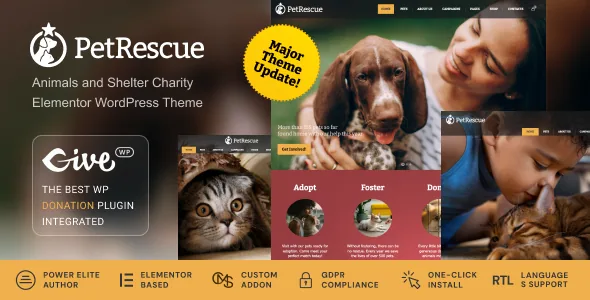
Most niche themes are a skin over standard posts and pages. The cmsmasters description for Pet Rescue claims something different: the theme registers three of its own content types — Profiles for volunteers, a Pets post type "to display the necessary information about the animals," and a Campaigns post type for fundraising with set goals.
That changes the planning order. A shelter's site usually needs an animal list where each entry is a record, not an essay: name, age, breed, status, temperament. A Pets post type is the vendor's answer to that, and whether it is worth using depends on whether you want adoptable animals managed as their own archive or scattered through blog posts.
Campaigns are the second half. A campaign tied to a fundraising goal is a different object from a blog post announcing a fundraiser, because the goal is a number the page reports on. Volunteer Profiles complete the set: people get their own records rather than being described inside an About page paragraph.
If your site is a single shelter with a dozen animals, this structure is more scaffolding than you need. If you coordinate fosters, transports and rotating intakes, having animals, campaigns and volunteers as separate types is the difference between a browsable record and a page you hand-edit every week.
Events get their own template layer, and one plugin is not bundled
Events are treated as a full subsystem rather than a shortcode dropped onto a page. The vendor says you can build templates for Events in three scopes: Singular Event, Events Archive and Events Entry. Eleven widgets are supplied for displaying events.
That triad maps onto how event content actually splits from editorial content. An archive needs a listing with dates and venue hints; a single event page needs the schedule, location and sign-up detail; an entry template controls how each event appears inside listings. Building all three means a consistent events section without hand-styling each page.
The vendor specifically ties the events styling path to the basic Events Calendar plugin plus the CMSMasters Elementor Addon, and states plainly that the PRO addon for Events Calendar must be purchased separately because it cannot be redistributed with a theme. Plan for that cost and that dependency if your events need recurring-rule logic or ticketing that sits behind the paid plugin. The marketplace compatibility attributes name Events Calendar and Events Calendar Pro, but a listed compatibility is a declaration, not proof that every paid feature is wired into the theme's widgets.
What the CMSMasters addon and template builder cover
The Elementor side is described as a custom premium addon included with the theme, plus ready content templates that extend beyond ordinary pages — the vendor names headers, single post types, entries and category archives.
Headers and archives matter more than they sound. On a charity site, the header carries a donate button on every page, and the archive is where animal listings and event lists live. If those are template-builder jobs in Elementor, a single edit fixes the whole site; if they are not, each new archive inherits whatever the theme defaults to.
Global colour and font settings are the vendor's other answer to repetition: adjust type and palette once and the theme applies them across the site. The practical value is that you can adopt your organisation's existing colours instead of rebuilding the demo's green palette screen by screen.
The vendor also describes a one-click demo importer that reproduces the demo site's appearance, and says all icons and images ship with the demo content. Importers are a starting point rather than a finished site, and how completely the demo's campaign or volunteer records arrive populated is not described — worth checking in a staging install before you plan around it.
Donations through Give, and what the compatibility list actually settles
The vendor states the theme comes with the Give plugin for donation functionality, and the marketplace metadata repeats Give WP as the donations route. Combination matters here: donations live in a dedicated plugin with its own forms and payment gateways, and the theme's job is to present campaigns and giving links well.
WooCommerce appears separately in the compatibility attributes at 9.x.x and 10.x.x. That is support for selling through WooCommerce, not a statement that donations run through it. If you plan to sell merchandise alongside a donation form, those are two systems to configure.
WPML is also listed as compatible, which is relevant if a rescue operates across language regions. The attribute records declared support; it does not mean the theme's custom post types already have translated field labels or that every demo layout has been checked in a second language.
The same caution applies to the WordPress versions the vendor declares — 7.0.x, 6.9.x and 6.8.x — as recorded in the listing when it was observed in early November 2026. Declared support describes the vendor's tested range, not how the theme behaves on your host with your plugin stack.
Package contents and where the theme's limits sit
The marketplace file list names PHP, CSS and JS files. There is no layered design source in that list, so plan on adapting the theme through Elementor, its global settings and the templates rather than editing artwork at source.
Beyond that, the useful conclusion is a short one. Pet Rescue makes structural bets: animals, campaigns and volunteers are first-class records, events get archive and single templates with eleven dedicated widgets, and donations are delegated to Give. If your shelter's work fits those shapes, the theme saves you from building the model yourself. If your site is essentially a news feed with a donate button, the structure adds vocabulary you will spend time working around.
Questions & answers
Do I have to use Elementor to edit Pet Rescue?
The vendor describes the theme as fully customisable through Elementor with its own addon. The marketplace attributes also mark Gutenberg Optimized as Yes, which records how the theme was built for the block editor rather than a guarantee that every demo layout works identically in blocks. If your team writes in Gutenberg, build one page yourself before committing.
Is the Events Calendar Pro addon included?
No. The vendor explicitly states the PRO addon must be purchased separately because the plugin cannot be redistributed with a theme. The theme's events templates are described as working with the basic Events Calendar plugin plus the CMSMasters Elementor Addon.
Are the demo images licensed for my live site?
The vendor says all icons and images are included in the demo content. That describes what arrives with the import, not a licence for using stock photography in production. Replace imagery with your own shelter photos wherever licensing is unclear.