The search engine, not the homepage, is the product
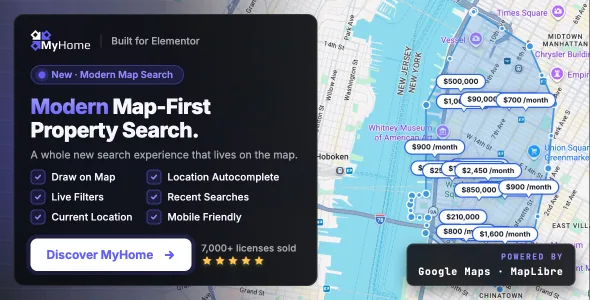
TangibleWP spends the most concrete paragraphs of the MyHome listing on search. The theme's engine returns property results without a page reload, and the vendor says it automatically creates SEO-friendly landing pages for every property category, location and filter combination, complete with pretty URLs and custom H1 titles.
That claim is worth reading carefully because it changes what a build involves. Instead of hand-writing one page per neighbourhood, you define the filters and the theme produces addressable pages for the permutations. According to the vendor, the search also offers keyword autocomplete that looks beyond titles into property descriptions, pulling suggested terms from your own listing database.
Whether generated pages read well to search engines on your content is a separate question from whether they exist. Titles and URLs come from your taxonomy and field labels, so naming those carefully is part of the work, not an afterthought.
Eleven field types decide what visitors can filter
The vendor lists 11 custom field types for listings: taxonomy, text, rich text, number, price, salary, location, embed, gallery, attachments and link. Fields can be connected as parent and child, and visibility can change based on those relationships, so a field can appear only when the relevant category is selected.
The practical consequence is that the search form is only as good as the data model behind it. An embed field is how a video tour gets attached; attachments carry floor plans and documents; gallery holds images. If you sell commercial space and residential homes from the same install, parent-child structures are what keep the two from sharing a filter set that fits neither.
Build the field structure before you style anything. The listing cards, the filters and the generated landing pages all read from it.
Browsing: quick view, compare bar and autocomplete
The vendor describes listing cards in grid and row layouts, with advanced filters for location, price range, bedrooms, bathrooms and property type. A Quick View popup lets a visitor inspect a property without leaving the results page.
For a shortlist, MyHome adds a floating compare bar. The vendor says comparisons are unlimited, and the bar follows visitors as they browse, with a Lock Column option in the comparison view. That is the feature to plan around if your market expects buyers to weigh several similar properties, and it is the kind of thing a plain listing grid cannot imitate after the fact.
Autocomplete, meanwhile, is described as drawing on titles and descriptions, which matters most when listings carry rich text copy rather than a few filled-in fields.
IDX and MLS: a feed decision, not a page decision
The vendor's MyHome 4.1 update entry describes integration with IDX Plugin and IDX Broker, aimed at agents in the US and Canada who need MLS property search on their site. Connect an IDX Broker account and the theme displays auto-updated listings with combined bed and bath filters, autocomplete and a styled result layout.
This is a different route from entering your own listings. A feed means the inventory is maintained elsewhere and refreshed from there, and the vendor's setup guide is the reference for connecting it. A site built entirely on owner-submitted listings has no use for it.
One limit belongs in the decision: the vendor describes the integration as available to US and Canadian agents, which follows from how MLS data is distributed rather than from anything in the theme. Elsewhere, treat the theme's own listing system as the inventory source.
Maps, radius search and the provider you pick
MyHome supports Google Maps and OpenStreetMap as map providers, so the choice is yours rather than fixed by the theme. The vendor also references Snazzy Maps for custom map styling and shows interactive maps on individual listing pages.
Radius search runs in kilometres or miles, which means the unit setting should match your market before listings go in. Searching "within 5 miles" on a metric site, or the reverse, produces results that look wrong to visitors even when the data is correct.
Which provider to choose is a non-technical call as much as a technical one: an API key and its billing arrangement sit behind Google Maps, while OpenStreetMap avoids that account dependency but changes how the map looks and behaves.
Submissions, messaging and agent profiles
The vendor includes a front-end registration and login system, with email confirmation for new accounts. Payment packages can be attached to listing submissions, which is what turns a brokerage site into a marketplace or directory where outside agents and owners pay to list.
MyHome also ships built-in direct messaging between visitors and agents or owners, described alongside phone numbers, email calls to action and contact forms. Agent profiles are their own content type in the vendor's description, carrying social links, contact details, that agent's listings and their reviews.
Reviews are enabled for both agent profiles and individual properties, with images, a voting system that surfaces the most helpful entries, moderation controls and an option to allow guest reviews. That last setting is the one to settle early: reviews without accounts invite volume and moderation work in equal measure.
The mortgage calculator on a listing page
Each property page can carry a mortgage calculator covering purchase price, down payment, interest rate, loan term, property tax, homeowners insurance, PMI and HOA fees, with the result drawn as a chart using Chart.js.
Because it includes PMI and HOA line items, the calculator is closer to a US-style payment estimate than a generic loan widget. The vendor presents it as a buyer decision aid on the listing itself, which keeps the visitor on your page instead of sending them to an external calculator.
The figures are visitor inputs, not advice. Nothing in the vendor description suggests the theme connects to live lender rates, so the output reflects whatever the visitor types in.
Elementor widgets, demos and what the attributes settle
The vendor says MyHome includes more than 90 Elementor widgets built for property sites, covering listing grids, row and carousel layouts, a carousel with tabs, advanced search forms, agent cards, mortgage calculators, testimonials, FAQ and schedule blocks. Global colour and typography settings sit above them for site-wide consistency.
Three demos are named in the vendor text: Modern, Luxury and Legacy. The Luxury demo is described with elegant typography, gold accents, sharp geometric layouts and generous white space, and the vendor frames it for high-end property markets and boutique offices.
The marketplace listing observed on 3 November 2026 recorded version 4.4.8, a vendor update stamp of 26 September 2026, and declared support from WordPress 5.0.x through 7.0.x, with Elementor, Elementor Pro, Contact Form 7, Visual Composer and Facebook listed as compatible, Gutenberg Optimized marked yes, and PHP, CSS and JS files included. Compatible with Visual Composer does not mean the theme's own widgets appear inside that builder; the vendor's feature text is written around Elementor throughout. Declared version ranges are listing attributes, not results tested on your server with your plugin set.
Questions & answers
Does MyHome work without Elementor?
The vendor's feature text describes the theme as built on Elementor, with its 90-plus real estate widgets designed as Elementor elements. Visual Composer and Gutenberg are listed among compatible tools in the marketplace attributes, and Gutenberg Optimized is marked yes, but the listing does not describe a widget set for those editors. If your team works in a different builder, check how the property listing and search modules behave there before committing.
Can I use MyHome outside the US and Canada, including right-to-left languages?
The IDX and MLS integration is described for US and Canadian agents, but the rest of the theme is presented as market-neutral: multiple currencies, configurable number formats and measurement units, and full text translation from the dashboard. The vendor states that RTL languages are supported with a dedicated stylesheet, which matters for Arabic and Hebrew property sites.
How do payment packages for listing submissions work?
The vendor describes setting up payment packages so listing submissions can be monetised, alongside front-end registration with email verification. The listing does not detail which payment gateway processes those packages, so treat that as something to confirm from the vendor's documentation before you plan a paid-submission directory around it.
Is the mortgage calculator suitable for markets outside the US?
It covers purchase price, down payment, interest rate, loan term, property tax, homeowners insurance, PMI and HOA fees. PMI and HOA are US-specific concepts, so a site elsewhere would leave those fields empty or repurpose them. The output is a charted estimate from the visitor's own inputs, not a lender quote.