A theme built around a browsable set of properties
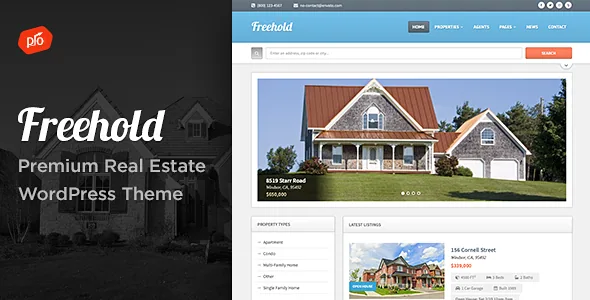
The subtitle says responsive real estate theme, but the more telling line in the vendor's feature list is "Real Estate Property Management Tools." Freehold is aimed at a site where a visitor moves among listings, not at a single brochure page for one house.
The changelog supports that reading. Its file names are property-specific: archive-property.php for the listing archive, single-property.php for an individual home, and a template-parts/property/ directory holding pieces such as the image gallery and social sharing. That is a conventional WordPress structure with house-specific templates on top.
A changelog entry from 2012 explains a limit that has carried through: version 1.4 updated single-property.php "to have unlimited images on the real estate post page." Each listing is a post with its own gallery, so twenty or two hundred homes are managed as content rather than as hard-coded page layouts. Version 1.6 later added video embedding on the property page, and version 2.0 changed the author page to pull in all listings by that author — useful when several agents publish under their own accounts.
Search that reads property attributes
A browsable inventory needs filtering, and Freehold's search is described in the changelog rather than in the marketing list. Version 2.5 records a fix to "searching for bedrooms" in archive-property.php, and the marketplace's highlight tags include advanced search. Together they point to listing search built on property fields — bedrooms among them — rather than a plain keyword box.
That distinction decides how you prepare content. Every property needs consistent values in the same fields for a filter to return sensible results; listing copy alone will not do it. Version 3.7 also mentions a "Search Term Count" fix, and version 3.6 covers search dropdowns on iOS and Android, so the search bar has had attention across releases.
The seller does not publish the full field list in the supplied material, so check the property fields in the demo import before planning your own data.
Boosted Elements, the slider element and maps
Two items in the feature list cover most of what a listing page shows. "Boosted Elements Add-on included" is described as a premium plugin for sliders, maps, popups and more. A separate "Premium Slider" feature adds slideshows to any page using a built-in slider element.
Those serve different jobs: a gallery belongs on a property page, while a homepage carousel of featured listings or an interior slideshow is a page-level decision. Maps matter for real estate specifically, since location is often the deciding detail. Version 3.0 lists "New Google Map Support," and an earlier entry records the switch to required Google Maps API keys in 2016 — expect to supply your own key.
The add-on is bundled with the theme according to the vendor, and later changelog entries record updates to it rather than leaving it frozen at its first release.
Pages composed in a builder, not fixed templates
Drag-and-drop page building arrived in version 3.0, dated 31 October 2018, alongside a one-click demo importer, a new theme options panel, font controls, mega menus, menu icons, a sticky header option and "New Page Examples/Content."
The releases since then track page builders by version number. Version 4.2 addressed Elementor 1.16.x, 4.3 covered Elementor 3.22+, 4.4 covered Elementor 3.26+, and version 4.0 introduced a Progression Elements plugin into the package to carry theme-specific building pieces. If your team composes pages in a builder, the maintenance record shows the vendor has kept pace with it.
It also helps to know where the feature development stopped. After version 3.0 the changelog turns mostly to compatibility, small fixes and plugin refreshes — a print-button fix for Firefox in 3.8, a demo import fix in 3.7 — rather than new front-end features. Judge the demo against that timeline.
Site-wide controls in the theme customizer
The settings the vendor lists are global and handled in the customizer. Unlimited colours and font adjusting change the palette and typeface across the site; the footer column count runs from one to four and can also carry a logo, icons and navigation; the header can be stuck to the top; and mega menus with drop-downs are built in.
The theme also includes a contact form for building and displaying multiple forms, and is described as translation ready. The changelog backs up the translation claim with .po file updates and, in the early releases, a folder of multi-language theme files.
These are settings, not structural components. Decide the property templates and fields first and treat the styling as the layer above them; changing branding later is then a customizer edit rather than a template rewrite.
The block editor attribute and the file list
The marketplace attributes, observed on 4 November 2026, mark "Gutenberg Optimized: No." That describes how the theme is tuned for the block editor, not whether the block editor can be used. Since the theme's composition layer is the drag-and-drop builder, the practical question for a new project is whether your team writes property pages in blocks or in the builder the theme targets.
The recorded file list names layered PSD, PHP, HTML, CSS and JavaScript files. The vendor's description adds Photoshop files for the logo and design, so the PSD layer is not only documentation — it is there for adapting the visual assets. Those are the seller's package descriptions; confirm what any specific archive contains before relying on a particular file.
What the release history suggests about longevity
The changelog reaches back to version 1.1 in September 2012, which puts the property templates in continuous use for more than a decade. The most recent entry, version 4.6 dated 12 August 2026, states updates to support WordPress 7+ plus refreshed premium plugins; version 4.5 in December 2025 covered WordPress 6.9+.
The marketplace listing, observed on 4 November 2026, declares compatibility from WordPress 7.0.x back to 5.0.x and carries version 4.6 as the latest marketplace release. Those are the seller's declarations and the listing's own numbers, not a test against your PHP build, plugin set or caching setup.
Read as a record rather than a promise, the pattern is consistent: WordPress compatibility releases roughly every six to twelve months, Elementor compatibility handled in the same entries, and the bundled plugins refreshed alongside. It also includes older groundwork — PHP 8 support in version 3.9, full SSL support in 2.8 — which is what a long-running property site tends to need.
Questions & answers
Does Freehold require Elementor?
The changelog tracks Elementor releases closely, with compatibility entries for 3.22+, 3.26+ and a dedicated Progression Elements plugin introduced in version 4.0. The supplied material never states that Elementor is mandatory for every part of the site. Build one property archive and one listing page on your own stack to see what depends on it; the demo pages are composed in the drag-and-drop builder, so expecting identical output from a plain block setup is a guess rather than a documented option.
Can I manage hundreds of listings with it?
Listings are WordPress posts with their own property templates, an archive page and a search that filters on attributes such as bedrooms. That structure scales the way any post type does, and the supplied material makes no claim about performance at a given catalogue size. The practical constraint is consistency: search returns useful results only when every listing fills the same property fields.
Are the demo photographs included?
The supplied vendor material does not say. The file list names layered PSD, PHP, HTML, CSS and JavaScript files, and the feature list mentions Photoshop files for the logo and design, but nothing about licensed stock photography. Plan on supplying your own property images and floor plans.