Four submission models decide the shape of the site
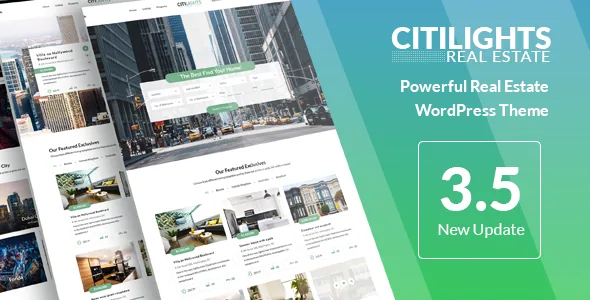
Before any homepage design matters, CitiLights asks you to choose who may publish a property. The vendor's feature list spells out four modes, and they lead to very different sites.
No Membership switches front-end registration off. Only admin-level users submit, which suits a single agency or an individual agent who does not want a public upload form at all. Free for all Users lets registered visitors submit without payment or listing caps — the model for a free portal, or for an agency that keeps registration restricted so only its own agents get accounts. Membership Packages tie an agent's permissions to an assigned plan, with the number of listings, the number of featured listings and the price set per package. Pay per Submission charges per property and per featured placement instead.
Membership Packages carries one extra switch worth knowing about: Freemium. You can give registered members a set number of free listings and free featured listings before they are asked to buy. That is the difference between a paid portal and a portal with a trial floor, and it is configured inside the theme rather than bolted on.
The agent dashboard is where listings get managed
The second half of that model is the front-end dashboard. The vendor describes properties listed there with description, featured image and the main property information, laid out much like the public list view, with one-click actions to make a property featured or mark it sold or rented. Agents can also delete their own entries.
Profiles are editable from the front end too: profile image, social network links, title, description and contact numbers. For an agency site where agents are the ones keeping stock current, that removes the need to route every status change through an administrator.
Custom property fields sit alongside the default fields on the property detail page, and the vendor says you can add or remove them freely. That is how you carry details specific to your market without waiting for a theme update.
Sold properties disappear from listings but stay on agent pages
A small but consequential behaviour is documented on its own line: properties marked as sold do not appear on the property listing page, but remain visible on the agent's page. In practice the public catalogue stays current while the agent keeps a record of completed work on their profile.
The default is adjustable. The 3.5.1 changelog entry "Show sold property on the listing via the customize config" records a setting that brings sold entries back into the main listing. If your business case is a track record of sales rather than a clean inventory, that switch is the one to look for.
Alongside it, the vendor notes a default sold label, so the status is expressed on the page rather than only in the dashboard.
Two map providers, geolocation and a widget-ready search
CitiLights ships with Google Maps integration and, per the vendor description, Bing Map alongside it. The stated purpose is showing property location precisely and supporting a radius-style search based on the visitor's current position — the geolocation feature lets a user place themselves on the map and see nearby properties.
Advanced search is the other half of that. The vendor describes a search panel with the essential property information, available both on the page and as a widget. A 3.5.8 changelog entry records dropdown styling for price and area, and 3.5.1 added an agent filter to the advanced search fields — useful when buyers arrive already working with a particular agent.
dsIDXpress is supported, not bundled
The vendor is explicit about the IDX side: dsIDXpress is compatible, with widgets and shortcodes styled to match the theme, but the plugin is not included and is downloaded from its own site. If your listing data comes from an MLS feed, that is a separate dependency and a separate decision.
Monetisation runs through WooCommerce instead. The theme's compatibility attributes name WooCommerce 9.x.x, 8.x.x and 7.x.x, and the description lists PayPal, Stripe, bank transfer and other methods as available through that integration. Payment collection belongs to WooCommerce, while the plans themselves are defined in the theme.
The pricing table shortcode connects the two: it pulls information from the membership package settings and displays it as content. You can also use WPBakery's own pricing table, which the vendor says is styled to fit the theme.
Editing, layout options and what the listing declares
Pages are assembled with WPBakery Page Builder, which the vendor includes and describes as drag-and-drop. The marketplace attributes list WPBakery as compatible. Wrapped around that, the theme supplies real-estate shortcodes: property displays in Grid, List and Slider, plus dedicated sliders for featured properties or a single property.
Two page-header variants are available per page — a slider or a video background — set in that page's own options. Colours are handled through the Theme Customizer, which the vendor describes with a live preview.
The declared attributes carry their own weight. Software version is listed from WordPress 6.9.x down to 6.5.x, WPML is named for translation with an accompanying PO file, and the package contains PHP, CSS and JS files. Gutenberg Optimized is marked No, which describes how the theme was built; it does not mean the block editor is unusable, but if your team works primarily in blocks, the builder-based workflow is the honest expectation to set. These are vendor and marketplace declarations read on 4 November 2026, not results of testing against your own plugins.
The 3.7.2 changelog of 22 January 2026 lists fixes for outdated WooCommerce templates, a PHP object injection issue, a cross-site scripting issue, the Customizer live preview and PHP 8.x — a record of what was fixed, not a statement about the current security posture of any given install.
What the theme does not hand you
Two gaps matter for planning. IDX data is not in the theme: dsIDXpress must be obtained and configured separately, so any MLS-driven catalogue depends on that plugin working with your feed. And demo content is supplied as XML with dummy images replacing the originals, so the photography in the preview is not yours to publish.
Neither gap is unusual for a real-estate theme, but both land on the two things a property site cannot fake: live listing data and credible images.
Questions & answers
Can CitiLights run an agency site without accepting public submissions?
Yes. The No Membership mode disables front-end registration entirely, so only admin-level users can submit properties. The vendor presents this as the option for an agency or an individual agent who wants full control over what appears on the site.
Do I need WooCommerce to charge agents for listings?
The vendor routes payment through WooCommerce, which the listing declares compatible with versions 7.x.x through 9.x.x. Plan limits and prices are defined in the theme's membership package settings; WooCommerce handles the transaction side. A free portal or a submissions-disabled agency site does not need that payment path.
Are sold properties hidden from the site?
By default, properties marked sold are removed from the property listing page but remain visible on the agent's page. The 3.5.1 changelog records a Customizer option that shows sold properties in the listing again if you prefer that.