Fundraising entries are content, not a button in the header
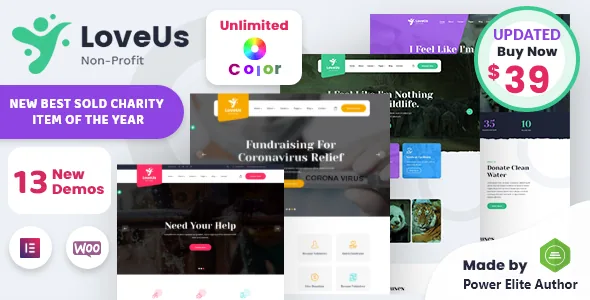
Plenty of nonprofit themes are a photography-forward layout with a donate link dropped into the header. Loveus describes something more structural. The vendor names Charitable as the donation plugin, saying it lets non-profits and developers build fundraising platforms on their own site, and that it handles creating causes, taking donations and more. The same description says the plugin is included with the theme.
That is a different proposition from a styled donate button that hands visitors to an external processor. A causes layer inside WordPress makes each appeal its own record with its own page, so a site with several live appeals is a set of campaigns rather than one page with a form.
One gap worth closing before you plan around it: the marketplace file list names only PHP, CSS and JS files. So whether Charitable arrives inside the download or installs separately is something to confirm rather than assume.
Cause and Campaign are edited beside pages and posts
The most useful technical line in the vendor description concerns the admin interface: you can add and edit pages, posts, Cause and Campaign from there. The last two are theme-level content types rather than ordinary posts — a Cause is the unit visitors browse and give to, and a Campaign is the organizing entry around it.
In practice your fundraising content behaves like any other WordPress content. A new appeal means a new entry with its fields filled in, not a page builder canvas rebuilt from scratch. When an appeal closes, you unpublish or archive the entry without dismantling a designed page.
The listing stops short of documenting the fields on those edit screens. Whether goal amounts, deadlines, progress displays or donor lists come from the theme or from Charitable's own settings is something to check on the demo or in the documentation before you build a content model around it.
The demo import is a starting point, not a finished site
The vendor says demo data imports from the admin panel once the theme is installed and activated, and the point of that import is to hand you designed pages you then fill with your own text, images and causes. The description names the pages a charity typically needs: Event, Cause, About, Contact, Donation, Shop and Blog.
That saves the layout work on screens you were going to need anyway. The cost is that imported demo content is your site's content until you replace it — placeholder causes, sample events, stock photography and all. Treat replacement as part of the build schedule rather than a tidy-up afterwards.
If you have a site running already, do the import on a clean WordPress install. Demo importers write menus, widgets and page settings, and unpicking those from a populated site takes longer than starting fresh.
Page design in Elementor, site-wide settings in Redux
Layouts are assembled with Elementor, which the compatibility attributes name and the vendor describes as drag-and-drop editing with changes visible in the live preview. Charity sections and blocks are put together there.
The site-level controls sit in a different place. The vendor states the theme is built on the Redux options framework, which is where global settings such as typography, colours, layout widths and header behaviour normally live. That split is worth knowing early: a heading font changed inside an Elementor page affects that page, while the Redux panel affects everything.
Other controls the vendor lists include wide and boxed layouts, Google fonts, advanced typography options and multiple-location Google maps. Those are described rather than inspected, so treat the panels as the place to confirm them.
The homepage count contradicts itself
The vendor prose says Loveus has 9 homepage variations and 3 header variations. Further down the same description, the feature list says 4 unique homepages and 4 header styles. Both come from the same product page, and the text does not resolve them.
The difference matters more than it looks. Nine homepages implies several genuinely distinct layouts; four implies a handful of treatments of one layout. Those are different amounts of design work and different levels of variation to choose between. Counting the layouts on the live demo is the only honest way to settle it before you commit.
Apply the same caution to header styles. Where a listing's prose and its feature list disagree, assume the smaller number until the demo shows you otherwise.
Declared compatibility, and what the file list does not say
As observed on the marketplace listing on 3 November 2026, the compatibility attributes name Contact Form 7, Elementor, The Events Calendar and WooCommerce 9.x.x. Events Calendar is the one that widens the picture for a charity: it points to an events path alongside the causes path, useful for fundraising events, volunteer days or community programmes. WooCommerce lines up with the Shop page the description lists.
These are stated compatibilities, not a test against your own plugin versions, and the listing does not say which demo pages depend on which plugin. The same observation records a declared WordPress range from 4.9.x to 6.8.x, browsers listed as Firefox, Safari, Opera, Chrome and Edge, and a responsive layout.
Gutenberg Optimized is recorded as No. That describes where the designed layouts are built — Elementor — and does not on its own mean the block editor is unusable on the site. High Resolution is also recorded as No, which affects how far demo imagery scales on large displays.
Questions & answers
Does Loveus include a donation plugin, or do I install Charitable separately?
The vendor description names Charitable as the donation plugin and says it is included, covering cause creation and donation collection. The marketplace file list recorded at the same time names only PHP, CSS and JS files, so confirm what actually arrives and whether Charitable installs as a separate plugin before you plan your fundraising content around it.
Can the site run events as well as causes?
The Events Calendar appears among the declared compatible plugins, which points to an events route alongside causes. That is a stated compatibility rather than a test of your setup, and the listing does not say which demo pages rely on it, so check the demo pages if events are central to your site.
How many homepage layouts does the theme really have?
The vendor description gives two answers: 9 homepage variations in the prose and 4 unique homepages in the feature list, with header styles listed as 3 in one place and 4 in another. Counting the layouts on the live demo is the only way to settle it.
Do I have to use Elementor to edit the site?
The designed layouts are built with Elementor, which the compatibility attributes name and which the vendor describes for drag-and-drop editing. Gutenberg Optimized is recorded as No, which reflects where the demo content is constructed rather than a statement that the block editor is unavailable.