Why the header is the first thing to understand in Kloe
Most themes treat the header as one global decision: you pick a layout, upload a logo, and every page inherits it. Kloe's vendor feature list breaks that assumption in two places. First, it states that the header type can be changed from page to page. Second, it separates the logo into distinct files for the normal, sticky and mobile header states, and then again for light and dark header skins.
That combination is what makes a lookbook or campaign site workable without repetitive setup. A campaign landing page can open with a transparent header over a full-bleed image, while the shop keeps a solid bar and the contact page drops to something plainer. Because the sticky and mobile logos are uploaded separately, you are not stuck with one lockup shrunk to fit every state; a wordmark can be wide in the header, compact in the sticky bar and reduced to a monogram on a phone.
Alongside the header types, the description also mentions multiple header behaviours and multiple header and footer widget areas, plus an optional header top widget area. Those are the controls behind the visual choices rather than separate ideas.
The Select Slider as an editorial surface
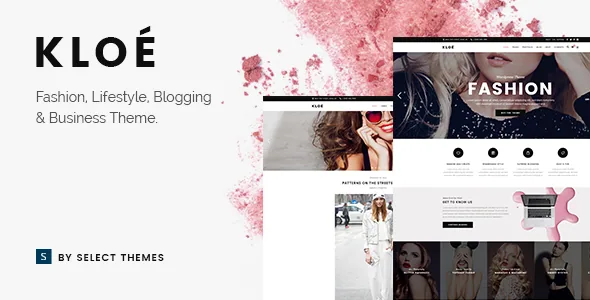
Kloe's slider is not a generic plugin setup in the vendor's account: it is described as a full screen Select Slider with parallax functionality, and it accepts both image and video slides. There is also an image movement animation applied to slides.
The distinction matters for fashion imagery. A still campaign photograph with a slow parallax and internal movement reads differently from a flat carousel, and video slides let a short runway clip sit in the same rotation as a product still. If your creative depends on large photography with room to breathe, this is the element the demo is built around.
Kloe also ships Slider Revolution in the package according to the vendor, so the theme has two slider routes rather than one. Which one carries your homepage is your call; the description presents the Select Slider as the theme's own element and Slider Revolution as a bundled tool.
Portfolio layouts: list pages versus single project pages
The portfolio is described in two layers. On the index side, the vendor lists multiple list layouts and a masonry option offered in both a regular and a Pinterest-style arrangement. On the detail side, there are multiple Portfolio Single layouts, and custom layouts for individual projects.
For a model agency or a brand presenting collections, that split maps onto a real structure. A campaign index can stay uniform so a series of shoots look like a series, while one flagship project gets its own arrangement, such as a full-width image run followed by credits. The masonry and Pinterest options change how uneven image heights are absorbed, which matters when photographs arrive at different crops.
The portfolio content types do not come from the theme files alone. The vendor's list attributes them to the Select Core plugin, which supplies the custom post types the portfolio and other content sit in. In practice that means the project and model structure depends on that companion plugin staying active, and the changelog shows it moving in step with theme releases.
What you actually build pages from: WPBakery and the shortcode set
WPBakery Page Builder is the editing layer the vendor describes, and the theme list includes a long shortcode collection that feeds it. A few entries indicate the intended feel more than the rest: an Elements Holder shortcode for grouping components, an Animation Holder for wrapping motion around content, Service Tables for structured offers, an Uncovering Background element, a Video Button and a customisable Google Map.
Set those beside the site-wide motion controls and the character becomes clear. The description offers smooth page transitions with a choice of fifteen loader styles, smooth scroll, and video background sections alongside parallax sections with a full-height option. This is a theme that expects motion in the page rather than a static grid.
The less visible but more practical entries are the layout ones: a variable grid size, multiple custom sidebars, footer layouts from one to four columns with regular or unfold behaviour, and a fullscreen menu option beside the standard navigation. Demo content import is listed as one click, which is how you see those arrangements before committing.
Commerce, language and the plugin dependencies
Kloe is not built as a shop-first theme, but commerce is present. The vendor describes customizable shop pages, a WooCommerce Dropdown Cart widget, and WooCommerce integration generally. The marketplace attributes, observed on 4 November 2026, declare compatibility with WooCommerce 10.x.x and 9.x.x, WPML and WPBakery Page Builder, with WordPress versions from 6.5.x through 7.0.x, and package files listed as PHP, CSS and JavaScript.
Two things are worth separating there. The declared ranges are vendor statements, not the result of running the theme on your server. And the most recent release note in the changelog fixes the "Add to cart" button on the single product page, which tells you the shop side is maintained but is not the theme's centre of gravity. If the store is the business, judge Kloe by its product templates as much as its lookbook pages.
On the language side, WPML is integrated and translation files are listed as ready, with version 3.0 adding a WPML config file. Contact Form 7 is named as an integration, and a child theme is listed as supported for customisation that survives updates.
Two things the demo does not hand you
The vendor's own note is explicit that the images shown in the demos are presentational only and are not licensed for use on your site; they have to be replaced or licensed separately. For a photography-led fashion theme, this is the largest practical cost after the theme itself, because the demo's appeal is largely its imagery.
Social feeds are the other thing to plan around rather than assume. The changelog records the Select Instagram Feed plugin being removed in version 3.0 because of Instagram API changes, after the Twitter feed plugin was removed in version 2.9. Feed widgets appear in the older feature list, but the current build's changelog shows them pulled, so treat any Instagram or Twitter feed on your site as something to solve with a current plugin rather than a theme feature.
Beyond that, the safest reading of Kloe is as a set of presentation layers: header behaviour per page, a slider built for large imagery, and a portfolio system with enough layout variety to separate an index from a feature project. Whether those layers match your content is something the live demo answers better than any feature list.
Questions & answers
Can I use a different header on each page in Kloe?
Yes, that is stated in the vendor's feature list: the header type can be changed from page to page. It also lists separate logo files for the normal, sticky and mobile header states and for light and dark header skins, so each header variant can carry an appropriate logo rather than one shared lockup.
Does Kloe include WPBakery Page Builder and Slider Revolution?
The vendor's feature list states that both plugins are included in the package, with stated values of $46 and $26 respectively. That is a vendor claim about what the marketplace package contains; confirm what an installed copy actually includes before you rely on either plugin.
Are the portfolio layouts part of the theme or a plugin?
The layouts are described as theme features, but the content types behind them come from the Select Core plugin, which the vendor lists as supplying custom post types. The changelog shows Select Core updated alongside theme releases, so the portfolio structure depends on that plugin remaining active and current.
Does the theme still provide Instagram and Twitter feed widgets?
Feed widgets appear in the theme's feature list, but the changelog records the Select Instagram Feed plugin being removed in version 3.0 due to Instagram API changes, after the Twitter feed plugin was removed in version 2.9. Plan to supply social feeds through a separate, currently maintained plugin.
Can I use the photographs shown in the Kloe demo?
No. The vendor states that it does not own the copyright for the demo images, that they are used for presentation only, and that they cannot be used on your site unless you license them from a stock image source yourself. The demo import gives you structure, not usable photography.