Quickfinders: a navigation block, not a content section
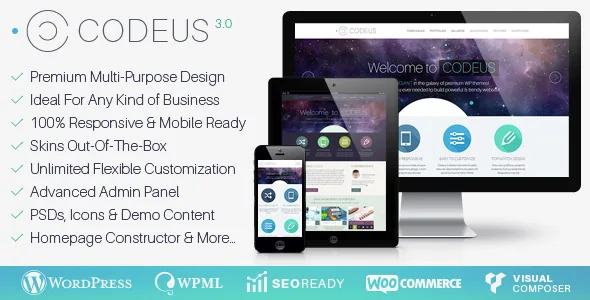
Most themes treat an icon grid as decoration. In Codeus the vendor gives Quickfinders their own section of the feature list and describes the job plainly: help visitors navigate the site and highlight the special selling points of your products or services. You build them from either images or flat icons with drop shadows, and the package lists 200+ font icons whose appearance is editable.
That single block explains the rest of the theme's shape. A consulting firm, an agency or a product-focused company usually wants a row near the top of the home page that says "these are the four things we do, and each one leads somewhere." Codeus makes that row a repeatable component rather than a hand-built grid you redo on every page.
On the styling side, the vendor treats Quickfinder backgrounds as part of the global design surface — backgrounds can be set for headers, sliders, the slideshow area, quickfinders, main content and contact panels, using colours, images or patterns. So the icon row sits inside the same colour system as everything else instead of being an island you style separately.
Page options or shortcode: the same modules in two places
The feature list repeats one pattern across four different modules: slideshows, portfolios, galleries and clients can each be added "both as page settings or shortcodes", and the vendor says slideshows can go on any page you wish by that method.
That distinction is practical. A page-setting module belongs to the page's own configuration — typically a header slideshow or a portfolio block positioned by the theme. A shortcode drops the same module inside body content anywhere you can edit text, including blog posts and portfolio items. If your header area already holds a slideshow, the shortcode route is how you get a second gallery or client grid further down the page.
The page options panel also carries a custom page header, lazy-loading page animations, and the full-width, left-sidebar or right-sidebar layout choice per page, plus a built-in shortcode generator that works in pages, portfolios and blog posts rather than only in the main editor.
The Homepage Constructor and what 'ready-to-use' means here
Codeus ships a Homepage Constructor described as drag-and-drop, with the ability to use and combine any post type with any content. In a theme built around custom post types — portfolio items, galleries, team members, testimonials, clients — that is the expected control: pull a few portfolio entries, a client logo row and a testimonial into one front page without writing templates.
Paired with the marketing line that the theme is "fully customizable, but also ready-to-use," the trade-off is clear enough. The starting demo at the vendor's demo URL gives you a finished business site; the constructor and the shortcode library are what you use once your own content no longer matches the demo's structure. The shortcode list is wide: galleries, portfolios, quickfinders, clients, slideshows, diagrams, pricing tables, teams, feedback forms, font icons, styled boxes and images, tabs, accordions, maps, videos, tables, buttons and column layouts.
The custom widget set covers a similar spread — project and contact info with iconed fields, picturebox, interactive diagrams, team, testimonials, submenu and side navigation, Flickr, Facebook, recent and popular posts. Those matter if you keep sidebars rather than building every page edge to edge.
Skins you can back up, and a font manager of your own
There are two pre-configured skins, light and dark, and the vendor lists backup and restore for skin settings. That last item is the one worth planning around. Because the theme's whole appearance runs from a settings framework named CodeXTuner, your colour, background and typography work lives in saved option sets rather than in files — take a backup before a round of redesign and you have a way back.
Typography is handled through a Font Manager with 300+ Google fonts and websafe fonts, and the vendor states you can upload your own Google font and webfont files, then set size, colour and line height per content element. If a brand font is licensed and self-hosted, that upload route is what you need; the bundled library will not include it.
The colour controls are described as extensive rather than prescriptive — customizable colours in almost any page element, with backgrounds by colour, image or pattern, and fancy header background patterns included in the package. Layouts come in wide and boxed variants, with a separately configurable background colour or pattern for the boxed version.
Galleries and portfolios: what the browsing choices actually are
Galleries come in four layouts — medium thumbnails grid, small thumbnails grid, full-width slider, and half-width slider — crossed with six styles, with business galleries using bottom sliders. Images are organised by drag-and-drop with multi-image upload, open in lightboxes with captions, and image styles are customizable for colour, background and font.
Portfolios are split three ways on the listing side: grid, slider and list overviews, filterable, with automatic pagination. On the detail side the choices are page-level: full-width, half-width or a sidebar portfolio page, and each item can be a standard page, a video or image lightbox, or a link to an external page. A project-info widget supplies the custom fields for each entry.
The pairing matters more than the raw count. A portfolio in grid form on a wide page with no sidebar suits visual work, while the list overview with a sidebar is closer to a case-study index. Both are settings rather than separate templates, so switching later does not mean rebuilding the archive.
Where WooCommerce, WPML and the update history sit
The compatibility field lists WooCommerce 5.x and 6.x, WPML, WPBakery Page Builder and Facebook, with WordPress versions from 4.9.x through 6.0.x declared as supported. The vendor describes shop integration as covering all online shop templates, with full-width and sidebar shop pages. The changelog backs up that shop interest: version 3.4.0 was a large update to all WooCommerce templates, followed by template fixes in 3.4.1.
That release history is also the caveat. The vendor's last update is dated 7 September 2021, and the latest marketplace version is 3.4.1, whose changelog entry is a WordPress 5.5 compatibility fix. Nothing in the supplied material describes behaviour on WordPress 6.1 or later, on current WooCommerce releases, or with current PHP versions — those are declarations from an older listing, not results from testing.
Two more facts shape a decision. The Gutenberg-optimized field is marked "No", which tells you the theme was not built and checked for the block editor; the stated builder is WPBakery, with both frontend and backend editors and the theme's shortcodes included. And the vendor states plainly that all images used on the demo site, except background patterns, are not included with the theme — any demo photography you like has to be licensed separately.
What you actually receive in the files
The included files are listed as layered PSD, PSD, PHP, CSS and JS, alongside documentation, icons, background patterns and demo content. The PSDs are the unusual part. If a designer needs to match the theme's header or page-title design in a print or social asset, having the layered source saves rebuilding it; for a team without a designer, they simply sit unused.
LayerSlider is described as a premium plugin bundled for building slideshows, and a Nivo slider with transition effects is included alongside it. Built-in styles for the free Contact Form 7 plugin are also listed, with the plugin itself not part of the package.
Questions & answers
Can I use Codeus if I want to work in the block editor?
WPBakery Page Builder is the stated editing environment, with frontend and backend editors, and the listing's Gutenberg-optimized field reads "No". That field records whether the theme was tuned for the block editor; it does not by itself make the block editor unusable for standard posts and pages. Most of the design structure you see in the demo — quickfinders, portfolios, galleries, slideshow headers — is produced by the theme's own page settings and shortcodes, so plan to build inside WPBakery.
Do the demo images come with the theme?
No. The vendor states that all images used on the demo site, except the background patterns, are not included, and that you should purchase them if you want to use them. Background patterns, icons and demo content are listed as part of the package.
How current is the WooCommerce and WordPress support?
The listing declares WordPress 4.9.x to 6.0.x and WooCommerce 5.x and 6.x, and the vendor's last recorded update is September 2021. Treat those as claims made at that point rather than a statement about present compatibility, and test the shop flow on a staging install with your own plugin set before committing.