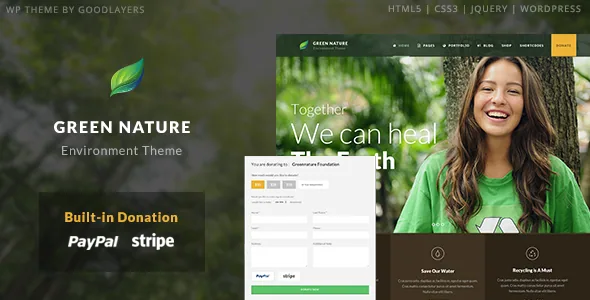
Donations and the take-action form sit inside the theme
GoodLayers introduces Green Nature as a theme for nature, environment, animal, NGO and nonprofit sites, and calls two things "necessary features": a donation system supporting PayPal and Stripe, and a take-action form of the kind, the vendor says, that appears on many popular nonprofit sites.
Both are described as theme features rather than a listed plugin integration, which is worth weighing if fundraising is the point of the site. A donate block and a petition-style action form can sit where the vendor designed them instead of being dropped into a page as a third-party widget.
The description stops short of the details that usually decide a fundraising build: whether recurring gifts are configured in the theme, how receipts and confirmations work, and where donor records go. The credit to 3Public for recurring PayPal code suggests the idea was contemplated, but a credit line is not a configuration claim. If recurring billing or donor management matters, the demo and documentation are the places to look before you plan around it.
The slider is a separate tool, and timing is set on a timeline
Green Nature includes a slider the vendor describes as its own: you arrange elements by dragging and dropping them, and a timeline control sets the transition period.
The timeline is the part that changes daily work. Transition length is set visually rather than through a number you guess at, so the pace between slides on a campaign hero is something you tune directly. Three presentations are listed — full-screen, full-width and boxed — which covers the spread between an immersive front page and a banner inside a narrower container.
Treat the slider as its own editing surface rather than part of the page builder. If more than one person maintains the site, that is another place to agree on who edits what.
Parallax bands get a skin scoped to the band
Parallax and colour sections can take a parallax background, with adjustable speed or a fixed background. The companion feature is a skin system: you create a skin in the admin panel and assign it to a parallax or colour section, and the vendor gives changing the font colour or link colour inside that band as the use case.
That scope is the useful detail. A dark photographic band under a light header needs its own text colour, and the alternative is inline styling or a global change that breaks the rest of the page. Assigning a skin per section keeps the override where the contrast problem is.
A wildlife or conservation site tends to stack image-heavy bands — a habitat shot, a project strip, a donation appeal — so this is likely to be one of the controls you reach for most after the slider.
A landing template that removes the header, the footer, or both
The feature list includes a landing page template with options to disable the header, the footer, or both.
For a nonprofit this is a campaign tool as much as a page type. A single appeal, a petition tied to the take-action form, a seasonal drive or a fundraising push can run without the site's full navigation, so the visitor gets one message and one action instead of an exit route through the menu. Removing the footer also takes away the second set of links that usually competes with a donate button.
The vendor does not describe how those pages are kept out of navigation or search indexes, so treat that as your own decision rather than a theme feature.
Blog and portfolio styles, and why the portfolio set matters here
Four blog styles are listed — Column, Medium, Full and Masonry — and six portfolio styles: Classic, Classic without space, Modern, Modern without space, Modern Masonry Style 1 and Modern Masonry Style 2.
The portfolio set is the one to look at first on a conservation or animal-welfare site. Field reports, reserve photography and species galleries are visual material with uneven image shapes, and the two masonry options and the no-space variants give you a way to present them as a wall rather than a rigid grid. The Classic and Modern pairs let you choose between framed and edge-to-edge treatments without rewriting templates.
The blog styles carry the editorial side: Medium for a running news feed with thumbnails, Full for long-form field updates, Masonry when updates arrive with very different amounts of text and image.
Layout numbers you can plan against
The vendor gives real numbers for two layout controls.
Sidebars use five widths — 16%, 25%, 33%, 41% and 50% — and both-sidebar layouts support 25% and 33%. A 16% column is thin enough for sponsor logos or a partner list; a 50% column is effectively a second content column, which is where a standing donate prompt fits without crowding the article text.
Container width is set in pixels, so the content area can be matched to a design reference instead of a preset. The mega menu is built in, and the vendor says you don't need a plugin for it. Floating navigation, boxed and full-width layouts, unlimited sidebars and post formats fill out the rest of that list.
What the package includes, and what it leaves out
The marketplace file list names PHP, CSS and JS files alongside PSD and Layered PSD files. The layered sources are useful if a designer wants to rebuild a banner from originals rather than trace a live page.
The same listing states plainly that images shown in the preview site are not part of the theme package. Photography is the backbone of an environmental site, so plan for a licence budget or your own field images. Alongside the files, Widget Ready and High Resolution are declared Yes, Documentation is marked well documented, and support is handled through GoodLayers' own support site.
The compatibility attributes list WooCommerce 10.x.x, 8.x.x, 7.x.x and 6.x.x, WordPress 6.1.x through 7.0.x, and Chrome, Firefox, Safari, Edge and IE11 as browsers. The description adds WPML. These are vendor and marketplace declarations recorded on the listing on 3 November 2026, not results from running the theme against your own plugins, and a listed integration does not mean every template uses it. If your host already runs a WordPress version outside the declared range, confirm that first.
Where the theme stops and your organisation starts
Green Nature supplies the surfaces a campaign site needs: a donation path with PayPal and Stripe, a take-action form, a slider you can pace precisely, skins for image bands, and a landing template that strips navigation from a single appeal. It also provides the listing styles to show wildlife photography and field reporting without template work.
What it does not settle is the operational side of fundraising — recurring gift configuration, receipts, donor records, and the policy behind a petition form — none of which the vendor's text describes. Those questions belong with the demo and the documentation, not the feature list.
Questions & answers
Does Green Nature handle recurring donations?
The vendor description does not specify that. The listing states a donation system with PayPal and Stripe and credits the 3Public recurring PayPal code, but it does not describe a recurring-gift setting in the theme. Test the out-of-the-box donation setup against your own payment flow before committing.
Can I build a single-appeal page without the site menu?
Yes, by the vendor's description. The landing page template includes options to disable the header, the footer, or both, which removes the usual navigation and link clutter around one message and one action.
Are the demo images included in the theme files?
No. The vendor states that images in the preview site are not part of the theme package. The file list does include PSD and Layered PSD sources, useful for rebuilding artwork, but you will need your own licensed photography.