A menu where each dish can be ordered
Most restaurant themes treat the food menu as a display page: a list of dishes with prices, styled to look like a printed card. ThemeGoods describes Grand Restaurant with a different unit of work. Under a heading about making money from the online menu, the vendor lists a direct purchase link option for each menu item, so a visitor can click the specific dish they want and go order it.
That single detail changes what you build. A dish entry stops being a row of text and becomes a small commercial object with its own destination. The vendor presents the link as a way to increase online selling, and in practice it lets a kitchen send a particular dish to a delivery service, a pre-order form or a separate checkout without routing the visitor through a general shop page first.
Two paths to an order, and which one the dish link serves
Behind the individual links sits WooCommerce, which the vendor lists as the mechanism for starting a food delivery service. The description says both online and offline payment options are supported, which covers the common split between paying by card up front and paying on collection or delivery.
The distinction worth planning around is between the two routes. A full WooCommerce catalogue suits a business that wants a cart, product variations such as size or add-ons, and a single checkout for a mixed order. A per-dish purchase link suits a shorter transaction: the customer decides on one item and is sent straight to the place where that item is bought. The vendor describes the second as an addition to the menu rather than a replacement for the shop, so you can use both, with some dishes linking out and others sitting in the store.
The description does not settle where the link points by default. Whether it opens an internal product page, an external URL or a custom destination is worth confirming before you commit to a menu structure.
Menu layouts borrowed from the printed page
The vendor describes unique food menu layouts, including a classic menu inspired by what you see on an actual restaurant card. That is a presentation choice, not a data model: the theme reproduces the familiar divisions of a printed menu rather than presenting dishes as a uniform product grid.
The theme's own count is three menu layouts, with three menu styles and further customisation options, so the food menu is treated as a component you shape rather than a single template. If your dishes carry a purchase link, those layouts are where the link lives, which means the layout you pick determines how prominent ordering is. A layout close to a printed card keeps prices and dish names calm and readable, and the purchase option has to fit into that restraint. A more commercial layout gives the link more room.
There is also a separate Food Menu Highlight colour among the vendor's colour controls, a styling hook aimed specifically at the menu rather than the general palette.
Reservations take three different routes
Rather than building its own booking engine, Grand Restaurant offers three documented options for reservations: an email form, a custom URL, or OpenTable. Choosing between them is a commitment about who owns the booking record.
An email form is the lightest of the three: the enquiry lands in your inbox and a person confirms it. It needs nothing beyond your mail setup, but it also produces no availability data and no automatic confirmation. A custom URL sends the reservation action to a service you already use, so the theme supplies the button and the third party handles the calendar. OpenTable is the named third-party route, which suits venues already listed there and anyone who wants bookings to appear in an existing profile.
If a table-booking system is central to how the restaurant operates, the choice affects page design too. A form on the page invites the visitor to stay; a redirect hands them off. Both are described as supported, so the decision is operational rather than technical.
Multiple locations, styled maps, and the brand question
The vendor states that multiple maps and locations are supported, and that the map colour scheme can be changed using styles from Snazzy Maps. Read together, those two facts point at a multi-branch restaurant rather than a single address in the footer.
Support for more than one map matters most when each branch has its own page or contact template. Visitors landing on the wrong branch's page is a common failure, so the useful question is how locations are organised: as separate pages, as sections of one contact page, or as entries you repeat across templates. The theme also lists four contact templates with different layouts for contact forms, Google Maps and styling, which gives you room to give each location a similar but distinct page.
The Snazzy Maps point is a design consideration as much as a technical one. A default Google map palette can clash with a restaurant's colours badly enough to look unfinished. Applying a Snazzy Maps style lets you bring the map into the site's palette without custom development.
Editing: a Keynote-style builder, not Elementor
The theme ships with its own content builder, which the vendor describes as having a Keynote-like interface with live preview. Two working modes are named. Live Mode shows the result of each change immediately; Classic Mode is offered for people already familiar with the builder who want to work faster. When you add content, the picker shows a screenshot of each module instead of an icon, and modules including galleries, blog loops and testimonials are placed by drag and drop. A finished page can be saved as a template and reused on new pages.
It is worth being precise about the builder's identity, because the marketplace attributes list both Elementor and Elementor Pro under compatible with. A compatibility entry is not the same commitment as a bundled builder. The vendor's own feature list treats the theme's content builder as the editing surface, so Elementor is something you can add and test rather than the route the demos are built in.
Around the builder sits the WordPress Customizer. The vendor lists over 500 Google Fonts and a long set of typography controls covering body text, headings, buttons, menu and submenu, mega menu headers, side menu and widget titles, plus background image and colour controls for header, menu, footer and page title areas. A one-click responsive preview inside the Customizer shows laptop, tablet and phone views while you change those settings.
What the starting package claims and what it cannot answer
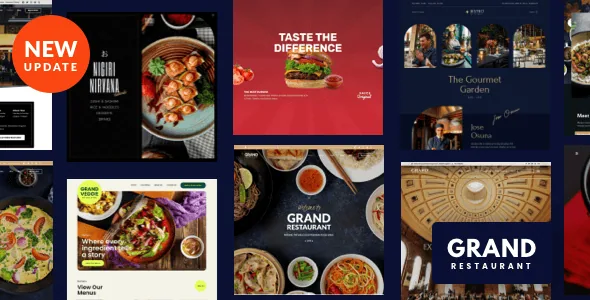
The vendor lists six predefined demos, importable in one click along with pages, posts, sliders, widgets and theme options. The overview names three styling directions among them: Modern Cuisine Restaurant, Asian Food Restaurant and Elegant Food Restaurant. For a restaurant, that spread is more useful than a large generic library, because the styling direction sets the tone a guest reads before they read a single dish.
The usual caveat for one-click imports applies: a demo proves a layout exists, not that its content set covers what you need. Whether the reservation page, contact pages and food menu pages in a given demo are complete, and whether a demo you like uses the per-dish purchase link, are questions for the live demo and a staging install.
On compatibility, the attributes recorded on 3 November 2026 list WordPress 4.9.x through 7.0.x, WooCommerce 6.x.x through 9.x.x, WPML, bbPress 2.5.x, Facebook, Elementor and Elementor Pro. Those are vendor and marketplace statements about intent, not results of testing on your host or PHP build. Gutenberg Optimized is marked No, which describes whether the theme's design was built around the block editor rather than removing the editor from your site. The files listed are PHP, CSS and JS.
Questions & answers
Does the direct purchase link replace WooCommerce?
No. The vendor describes the per-item purchase link as an option for each menu item, alongside WooCommerce support for online and offline payments. You can run a WooCommerce catalogue and also attach a link to individual dishes.
Can I use Elementor with Grand Restaurant?
Elementor and Elementor Pro appear as compatible-with entries in the recorded marketplace attributes, observed on 3 November 2026. The theme's own feature list presents its built-in content builder as the editing surface, so Elementor is something to test on a staging copy rather than an assumed part of the demo workflow.
How are reservations handled?
Grand Restaurant documents three routes: an email form, a custom URL, or OpenTable. The choice determines whether the enquiry lands in your inbox, hands off to a service you already run, or goes through OpenTable's booking system.