Causes and events are the theme's actual structure
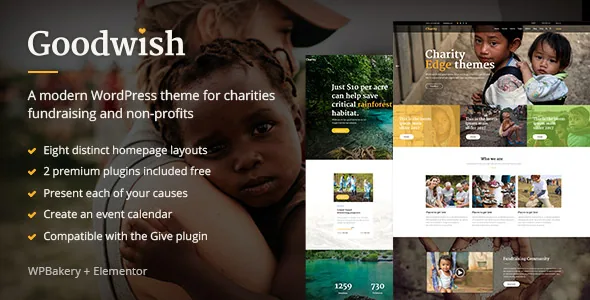
Take away the styling and Goodwish still has a shape: causes and events sit alongside ordinary posts and pages. The vendor's feature list names a Cause List shortcode and a Cause Slider shortcode, plus a separate Events custom post type rendered through Event List and Event Single Info shortcodes.
That matters more than the usual "customisable homepage" line. A fundraising appeal is not an article with a donate button bolted on; it gets replaced, extended or archived as the campaign moves. Having a repeating display format for appeals and a separate format for events means the two kinds of content do not have to share one design compromise.
Donations themselves come from the Give plugin. The description lists Give compatibility, and the changelog revisits it repeatedly — entries for 1.8.11, 2.0.6, 2.2.3, 2.4.7 and 2.5.11 — rather than mentioning it once at launch. The theme frames and presents the appeal; Give processes the payment and keeps the donor records. If you were hoping to avoid installing a donation plugin, Goodwish is the wrong starting point.
Cause List, Cause Slider, and the event detail shortcode
The two cause shortcodes are two views of the same entries. The list places appeals as a grid inside a page; the slider promotes a selection across the top of a page or inside a section. Because both read the same content, a campaign page does not need rebuilding when one appeal finishes and another starts — you edit the entries and the layouts follow.
Event Single Info is the less common piece. Most themes fix where event details appear; here it is a shortcode, so on a page built with the theme's builder you decide whether event information sits under a hero image, next to a registration block, or below a map. Event List covers the listing side.
The rest of the shortcode library supports the surrounding argument: pricing tables for sponsorship or membership tiers, call-to-action blocks, a video button, infographics for showing where money goes, numbered titles for countdown-style sections, and banner blocks. Those are builder components, but they are the ones a campaign page tends to need.
WPBakery ships in the package; Elementor arrived five releases later
The vendor describes the package as including the WPBakery Page Builder plugin and the Slider Revolution plugin, quoted at $64 and $26 respectively. Slider Revolution drives the theme's own slider, which the feature list says supports image and video slides, zoom animation on images, parallax and several transition types.
Elementor compatibility appears in the changelog at version 3.0 in June 2020, several years into the theme's life. Read that as support alongside the theme, not a rebuild of it: the shortcode library and the demo layouts belong to the Qode/Edge framework, so an Elementor page composes theme elements rather than reproducing the demos from scratch in Elementor's own widget set.
For a charity with a small team and volunteer editors, that makes picking one route a handover decision as much as a design one. Pages built in WPBakery and pages built in Elementor can coexist, but the person who inherits the site will have to learn both to edit everything on it.
The Instagram entry is the one gap in the feature list
Version 3.8, released 4 March 2025, contains the line "Removed Edge Instagram Plugin due to Instagram API changes." The plugin had been updated as recently as 3.6, so this was a maintained component withdrawn because the service underneath it changed.
The same version's feature list still names an Instagram feed widget among the theme's widgets. The two statements conflict. If a social feed belongs on your home page, check what the installed release actually provides rather than trusting the widget list, and plan for a standalone Instagram plugin as the fallback. Social Icons and the WooCommerce Dropdown Cart widget are listed separately and are not affected by that removal.
The rest of the changelog reads like maintenance for a site that has to stay online: WordPress and WooCommerce compatibility added release by release, a Disable Google Fonts option and PHP 8.2 support in 3.7, Tag Cloud and Filter By Price block support in the same version, and security improvements noted at 3.8.
Why tutorials and menus say Goodwill
The theme was first sold as Goodwill. The vendor says a copyright issue forced the rename, and version 2.0 in January 2018 carries one changelog line: "Changed theme name." Everything indexed under the old name — documentation, video tutorials, forum threads, older articles — describes this same theme.
The rename came with a migration note for existing installations: do not activate 2.0 straight away. Deactivate and delete the Edge CPT and Edge Instagram Feed plugins, switch the active theme to Goodwish, then reinstall and reactivate those plugins so the new theme registration takes effect. The Instagram Feed half of that procedure is historical, since the plugin is no longer in the current release; the registration order still explains why an inherited site might behave oddly after a manual update.
A fresh install never encounters any of this. It becomes relevant when you take over a site built before 2018, or when a tutorial's menu paths don't match what you see.
Demo imports give layouts, not photographs
The vendor offers one-click demo import, eight homepage examples and a collection of inner pages. The description is explicit that the demo images are licensed for presentation only and cannot be used on your own site without buying a stock licence.
For a charity this is a scheduling issue rather than a footnote. Campaign pages lean on photographs of people, places and work, and eight demo layouts imported with placeholder imagery will look finished long before they are. Line up photography or a stock budget before importing.
The marketplace listing, checked in November 2026, declares compatibility with Elementor, Events Calendar, WooCommerce 9.x.x, WPBakery Page Builder and WPML, and WordPress versions from 6.4.x through 7.0.x. A child theme is included in the package, which is worth activating before you touch templates or styling, because the theme's own files keep changing across releases.
Questions & answers
Does Goodwish include the Give donation plugin?
No. The vendor describes the theme as compatible with Give, and the changelog records compatibility updates for several Give versions. Give is installed separately and handles the donation processing, receipts and donor records; the theme supplies the campaign presentation around it.
Should I build pages with WPBakery or Elementor?
WPBakery is the bundled builder and the one the demo layouts and shortcode documentation were written for; Elementor compatibility was added in version 3.0 in June 2020. Choose one for page composition so that whoever edits the site later only has to learn a single interface.
Do the eight homepage examples include usable images?
The vendor states that demo images are presentational only and cannot be used on your site without purchasing a stock licence. Budget for your own photography or licensed stock for campaign and event pages before running the import.
Will an Instagram feed still work after the 3.8 update?
Version 3.8 removed the Edge Instagram Plugin because of Instagram API changes, while the feature list still names an Instagram feed widget. Verify what the installed release actually offers, and expect to use a separate Instagram plugin if the feed is important to your home page.