Listing Action Types decide what a visitor can do
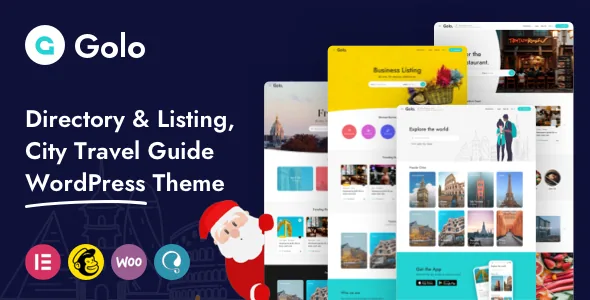
A city guide has to hold places that do not behave alike. One entry needs a booking request, another a price list, a third only an address and a phone number. Golo's vendor answers that with a setting called Listing Action Types, which assigns each listing type one of five actions.
The five are a Booking Form, a Send Message form, See Location & Contact, an Affiliate Booking Link and an Affiliate Banner. The vendor describes the booking form as collecting a preferred time slot on a chosen date plus the number of people, the contact variant as showing phone, map, email, website and social details alongside a message to the owner, and the two affiliate options as placing either a button or a banner that leads to a booking on a third-party site.
In practice that is the difference between one content model and three. A bookable rental, a museum entry that only needs directions and a tour sold through an affiliate link can share the same listing object and still show a different call to action. The description does not state whether the action is set per listing or per listing type, so establish that split before you commit a data model to it.
The fields that carry a mixed directory
Supporting information does most of the persuading once the action is chosen, and Golo's listing fields are described with unusual specificity by the vendor.
Business hours can be set either for 24-hour opening or as intervals within a weekday, with the vendor's own example of two windows in a single day: 8:00AM–12:00AM and 2:00PM–11:00PM. A venue that closes in the afternoon can therefore show an accurate schedule instead of a single daily range. Menu Management is aimed at restaurants and service businesses that want a price list of dishes or services inside the listing rather than in an attached document. A built-in custom fields system lets you create, edit and delete fields, which is what makes shared categories workable: a room-count field for hotels and a cuisine field for restaurants can sit on the same object and appear only where you add them.
Reviews are multi-criteria, and the vendor says the criteria are configurable and you can add as many as you wish. For a travel directory this affects comparison directly, since a location rating and a value rating tell a visitor more than one averaged star score.
Suppliers: packages, dashboards and claim requests
Golo is described as a two-sided system rather than a submission form attached to a blog. The vendor separates Guest and Owner roles, and the Membership Package feature lets a Partner or Supplier buy a package in order to submit listings, described as either free or paid.
The User & Partner Dashboard is where that relationship is managed: listings, bookings, packages, profile details and reviews. Vendor changelog entries point at the same area, with a package summary added to the user dashboard and package renewal and upgrade prompts in the August 2026 release. Read together, those describe a subscription flow that expects suppliers to return, renew and upgrade rather than submit once.
Claim Listing handles the situation every directory meets: a business is added by an editor or a member of the public, and the real owner later wants control of it. The vendor says the feature lets that owner take ownership of the listing and edit it. If you intend to seed a directory with imported business data, that route is the difference between a queue of manual requests and a process owners can complete themselves.
Filtering, neighbourhoods and which map provider
Location structure is nested. The vendor defines a neighbourhood as a child of a City/Town, and it appears in the filter on the search results page. Filters cover Type, Category, Amenities, Pricing and Cities, and the individual filter elements can be switched on or off in theme options. The most recent changelog entries add country selectors for submitting and editing places, country filters on search and archives, and dynamic city/town filtering with location validation — evidence that the geographic layer is still being worked on.
Map View lets visitors see listings nearby and search within an area. The detail worth pausing on is the provider: the vendor states the theme supports OpenStreetMap and Mapbox alongside Google Maps, and notes that Google's API requires credit card details. If you would rather not attach billing to a maps key, or the map is a supporting element rather than the centrepiece, those are the two routes to test. Map styling is described as adjustable. Mapbox still needs its own account and token, so the choice is about billing arrangements and styling, not about avoiding credentials altogether.
A changelog worth reading before you build
The release history is explicit about security work, which matters for a theme that handles logins, public submissions, booking forms and a wishlist endpoint. Entries in the 2026 releases list fixes for insecure direct object references in the wishlist, claim-listing and booking handlers, multiple SQL injection issues, CSRF protection on wishlist and claim forms, reflected cross-site scripting on the checkout page, and local file inclusion in Elementor widgets.
A directory that accepts user submissions is a target, so the release you install should be recent and updates should not be deferred. It also means the notes are worth reading rather than skimming, because they name the handlers involved.
One entry changes what you buy elsewhere. Version 1.7.0 records the removal of the Elementor Pro licence from the theme purchase package while Elementor Pro stays on the compatibility list, so plan on supplying your own Pro licence if a demo depends on Pro widgets. The changelog also shows Elementor hooks and multilingual fixes arriving across 2026 releases, so the Elementor layer is actively maintained.
The marketplace attributes observed on 4 November 2026 declare compatibility with WordPress 5.6.x through 7.0.x, WooCommerce 5.x through 8.x, Elementor and Elementor Pro, WPML, and Bootstrap 4.x and 5.x. Those are vendor declarations, not results from running the theme on your hosting. Gutenberg Optimized is marked No, which describes block-editor optimisation; it does not remove the block editor.
What the package and the money side include
The vendor's package content list names online documentation, demo data, plugins, the theme, a Sketch design file and a readme, and one-click demo import is described as available. The description does not say which images in the demos are licensed for use on a live site, so treat demo photography as something to replace or licence separately.
The revenue paths the vendor names are advertisement positions, AdSense, paid memberships for suppliers, and affiliate business links — the same affiliate actions that appear in the Listing Action Types. A child theme is described as ready for code changes, and the theme is listed as WooCommerce compatible for selling products alongside listings.
When the two-sided design earns its setup cost
Golo is aimed at operators who expect other people to add content. Packages, partner dashboards, claim requests and per-listing actions all assume a directory with suppliers, editors and visitors rather than a site one person updates.
The clearest match is a mixed guide where listings genuinely behave differently: bookable stays, restaurants with menus and split opening hours, and attractions that only need contact details and a pin. It also suits a directory intended to earn through memberships, ad positions or affiliate links, since all three are described in the theme itself.
If the site is a small brochure with a few hand-written pages, most of this machinery becomes configuration you maintain for no return. And if a separate Elementor Pro licence is not in the budget, check which demos rely on Pro widgets before choosing a starting layout.
Questions & answers
Do I need a Google Maps API key to use Golo?
Not according to the vendor, which states that OpenStreetMap and Mapbox are supported alongside Google Maps and that map style can be changed. Its stated reason for the alternatives is that Google's API requires credit card details. Mapbox still needs its own account and token, so the difference is the billing arrangement rather than the absence of credentials.
Is demo content included with the theme?
The vendor's package content list names online documentation, demo data, plugins, the theme, a Sketch design file and a readme, and one-click demo import is described as available. The description does not state which images in the demos are licensed for a live site, so plan to replace or licence the photography separately.
Does Gutenberg Optimized: No mean I cannot use the block editor?
No. That marketplace attribute describes how thoroughly the theme has been tuned for the block editor. Golo's page building is presented around Elementor, and the vendor's claims centre on Elementor widgets and theme options rather than block patterns, so the block editor is unlikely to be the intended layout tool — but the attribute alone does not remove it.
Can listings be submitted without a paid membership?
The vendor describes membership packages that let a Partner or Supplier buy a package to submit listings, and says submission can be free or paid. Free submission is therefore described as a package option rather than a separate mode, so confirm the exact free-tier behaviour in the documentation or on the demo.