Booking is a set of shortcodes, not one checkout page
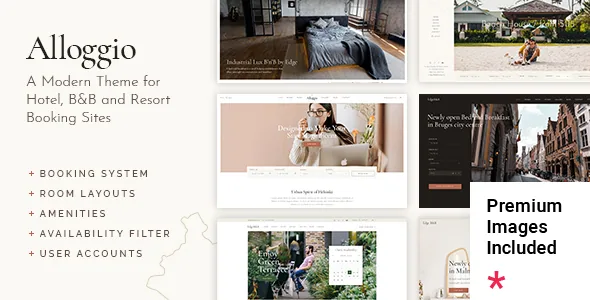
Edge-Themes describes Alloggio for hotels, B&Bs, resorts, apartments and glamping sites, and the vendor's feature list treats booking as a collection of separate shortcodes rather than a single bundled booking screen.
Each block does one job. A Room List shortcode presents the property's rooms, and Room Gallery List covers the same ground with a gallery emphasis. Room Calendar displays availability. Room Reservation Filter narrows rooms by criteria such as guest capacity, and the Reservation Form collects stay details and leads into the booking. Amenity List handles the facility text that usually sits beside a room description.
That split shapes how you plan pages. Rather than filling in one booking template, you decide which question each section answers: browsing rooms, checking a date range, filtering by party size, or capturing a reservation request. A search-and-availability page and a quieter room overview page can be built from different combinations of the same blocks. The vendor calls the underlying capability integrated room booking management; the shortcodes are how it reaches your pages.
Rate rules sit on the room record
The changelog is more specific than the feature list about pricing, and it shows where rate logic accumulates. Version 1.1 added seasonal pricing fields to the room single page. Version 1.2 added a minimum-nights setting to the same record. Version 1.5 added an option to enable half-day booking on room singles.
Read together, those entries mean a room is more than a title and a price. It can carry different rates by season, a floor on how short a stay may be, and an alternate half-day model for properties that rent in shorter blocks. If your rates shift with school holidays or high season, the seasonal fields are the first place to look; the minimum-nights setting is the control that blocks a two-night booking in a week priced for seven.
These are vendor-documented options. Two things are worth checking on a staging copy: whether seasonal rates total correctly through the reservation form, and how the half-day mode reads on a phone, since version 1.1 also records reservation date field work for touch input.
Six homepages, one-click import, Elementor underneath
The vendor supplies six predesigned homepages and one-click demo import. The decision that matters is which layout matches how you want visitors to start — a full-bleed slider, a room grid, or a booking form high on the page — because the imported demo content gives you a working starting point instead of an empty canvas.
Page building runs on Elementor, listed as compatible in the marketplace attributes. The vendor also names Qi Addons for Elementor and Qi Blocks for Gutenberg as compatible; those are addon plugins described as compatible, not bundled, so confirm what ships before relying on their widget libraries. Gutenberg Optimized is marked Yes in the attributes observed on 4 November 2026, though the demos and the vendor's emphasis are Elementor-based.
Slider Revolution is the one premium plugin the vendor explicitly includes in the theme package, and it is what the slider-led homepages depend on. That is a separate claim from the marketplace file list of PHP, CSS and JS, which describes theme files rather than every plugin a demo uses.
What the WooCommerce additions actually do
WooCommerce support here is not only about selling rooms. The vendor highlights QODE Wishlist for WooCommerce, which lets visitors create and share lists of products they are interested in. For a hotel selling extras, spa treatments or gift vouchers, a shareable list works closer to a planning aid than a cart.
The wishlist plugin appears in the changelog as a required addition in version 1.10, with QODE Quick View for WooCommerce following as required in 1.11. The theme also ships a WooCommerce Side Area Cart widget, so basket access can live in a slide-out panel rather than the header.
None of that describes payment processing or a booking-to-payment handoff. Treat the reservation flow and the WooCommerce flow as two related systems whose connection you map before launch. Changelog entries about taxes and order handling for the rooms post type suggest they do interact — version 1.11 fixed WooCommerce taxes on the Orders page and 1.11.1 fixed order functionality for the rooms post type — but how far that extends needs a test install.
Headers and hospitality widgets
Four header types are named: Standard, Minimal, Divided and Vertical. On top come optional separate logos for the mobile header, for light and dark versions, and for the sticky state, plus header top and bottom widget areas and a side area with integrated search. A vertical header keeps room search reachable down a long property description; a minimal header leaves a full-width hero image unobstructed.
The widget set follows the same subject. A Weather widget, a Working Hours List widget (with a matching shortcode), a Contact Info widget and an Instagram feed widget are supplied, so opening hours and local weather can sit near the booking entry point without hunting for separate plugins.
Footers split into top and bottom sections, each configurable at one to four columns, and a child theme is included for your own customisations.
Where the changelog shows maintenance
Recent releases concentrate on the framework and addon plugins rather than new layouts. Version 2.2, dated 18 September 2026, updated Qode Framework, Revolution Slider and Alloggio Core and mentions improved Elementor editor stability and a header transparency fix. Version 2.1.3 earlier that year touched WooCommerce styles and pagination helpers; version 2.0 recorded PHP 8.3 compatibility, Google Maps API work and security improvements.
Translation is the thread worth following if you publish in more than one language. Version 1.3 fixed extra-services translation, 1.4 fixed room reservation behaviour with WPML installed, 2.0 added a WPML config file, and 2.1.1 through 2.1.2 updated it. Those entries concern how room and reservation strings behave after translation.
The compatibility declarations observed on 4 November 2026 list WordPress 6.5.x through 7.0.x and WooCommerce 9.x.x and 10.x.x. They are marketplace and vendor claims, not results from running the theme against your PHP version or plugin stack, so test the reservation flow end to end on your own setup before guests use it.
Questions & answers
Does Alloggio replace WooCommerce for taking bookings?
The vendor describes an integrated room booking system built from its own shortcodes — room lists, calendar, reservation filter and reservation form — and separately lists WooCommerce compatibility with wishlist, quick view and side-area cart. The description does not say the reservation form charges a card through WooCommerce, so plan the payment path explicitly rather than assuming it.
Where do I set different prices for high season?
Seasonal pricing fields were added to the room single page in version 1.1, alongside a minimum-nights setting in version 1.2 and an optional half-day booking mode in version 1.5. Those are per-room settings rather than global theme options, so rates are edited on the room record itself.
Are the Qi Addons and Qi Blocks libraries included with the theme?
The vendor lists both as compatible plugins. Only Slider Revolution is explicitly described as included in the theme package, so treat the Qi libraries as separate additions to install and verify.