Locations are the setting that reshapes everything else
Most booking themes ask you to configure the site once. Auto Spa's vendor description puts the Locations module first and treats a location as the container that carries its own currency, tax rates, whether packages, services or both appear in the menu, availability rules, calendar behaviour, notifications and payment settings. Workplaces — the number of service slots available — are defined per location too.
That single decision ripples outward. A location selling only three fixed packages needs a short menu and a tight calendar; a detailing bay that sells individual services with add-ons needs a longer one. Both can live on the same install without sharing a global price list or a shared capacity cap. If you run several branches, sketch the location list before you pick a demo layout, because each one is a separate configuration job, not a filter applied to one master form.
The travel fee is calculated, not quoted
Mobile detailing is where the pricing model stops resembling a normal service booking. The vendor describes an optional customer address field with Google Places autosuggestion, and a service area you can limit to chosen countries or to a radius around your base.
The fee that follows is derived from the Google Maps API rather than entered by hand. You set a rate per distance unit or per minute, separately for the trip to the customer and the return route, and the result is added to the booking total. A customer far outside a comfortable radius is priced accordingly instead of being handled by a note on a contact page. The trade-off is dependency: this path is only as accurate as the maps data behind it, so a mobile operation should confirm the calculation on its own addresses before going live.
Three ways to present the same service list
The tailored sales menu gives you a choice of packages only, packages with their related services, or a plain list of individual services. That is a positioning decision as much as a design one — a fixed-price wash menu reads differently from an itemised detailing menu.
Behind the menu, services carry durations, per-location availability and per-location pricing. Packages bundle services and can be checked for availability against a location and a vehicle type, with add-on services and location-specific tax. Selected services can be bound to a package so they only become available once that package is chosen, which keeps optional extras from floating free in the form.
Vehicle type as a price component and a picture
Vehicle types — sedans, SUVs, vans, buses and whatever else you add — can each carry an initial fee and their own tax rate, so a larger vehicle costs more before any service is selected. That is cleaner than a size surcharge buried in a package price.
On screen you have two routes. One of 24 built-in vehicle icons, or an icon you upload, keeps the selector compact. The Vehicle Images option instead pulls real photos from the media library, which helps when customers misjudge categories. Both are vendor-described; how they look with your own images is a question for the demo.
Form shape, calendar limits and the sticky summary
The booking form runs multi-step or single-step. Multi-step separates vehicle type, package, date and time, then customer details; single-step shows everything on one page and scrolls to the next section after each choice. The optional sticky summary bar keeps the selected date, time, total duration and final price visible at the bottom of the screen while the form scrolls.
The calendar does more of the operational work than the layout. Working days, business hours and break periods define when slots exist, with holidays and custom dates excluded. Slot size, lead time, an advance booking limit, how many days ahead can be browsed and whether month switching is enabled all sit in the same place. Set the advance limit generously and you are filling Saturdays months out; set it tightly and you keep the schedule flexible.
Payments, coupons and the WooCommerce fork
Cash, Stripe and PayPal are supported natively, plus any further gateway reachable through WooCommerce. The booking plugin can run on its own or push bookings through the WooCommerce checkout, and that fork matters: it decides where orders, receipts and tax records actually live. Coupons are generated inside the plugin with fixed or percentage discounts, usage limits and activation dates, and a bulk generator creates several at once.
Around the booking flow sit email and SMS notifications, Google Calendar sync, and multiple agreement fields that can be marked optional or required for consent. None of these change how the site looks, but they determine how much of the day-to-day admin happens inside WordPress.
What the theme layer contributes
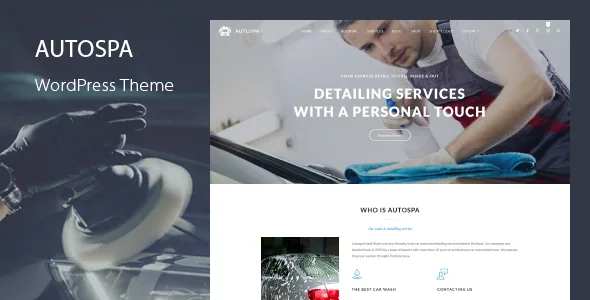
Auto Spa's site styling is managed from three panels under Appearance. Theme Options covers header, footer, blog layout, posts, pages and menus; Theme Fonts sets families from 800+ Google Fonts with separate typography per screen resolution; Theme Styles recolours any theme element including hover states.
Page layouts are built in WPBakery, which the vendor bundles with 30+ custom Auto Spa elements. The demo installer imports widgets, dummy content and theme options, and the vendor states it also seeds booking content — sample forms, packages, services and settings. The stored listing also marks Gutenberg Optimized as Yes, though the custom elements described belong to the builder. Treat imported booking data as a worked example to replace rather than a configured shop.
Compatibility and the two things worth verifying
The marketplace attributes observed on 4 November 2026 list WordPress 4.9.x through 7.1.x, WooCommerce 5.x through 10.x, WPML and WPBakery, with files in PHP, CSS and JavaScript and a responsive layout. These are vendor and listing claims, not the result of a fresh install.
Two of them carry real weight here. The travel-fee feature leans on the Google Maps API, so the mobile pricing path depends on that service and on a correctly scoped API key rather than on the theme alone. The WooCommerce choice determines where bookings are stored, so the checkout route should be exercised against the WooCommerce release your host actually runs. Neither is settled by an attribute field.
Questions & answers
Can one Auto Spa install serve several branches?
Yes, according to the vendor. The Locations module creates an unlimited number of booking forms, each with independent currency, tax, menu display, availability, calendar, notification and payment settings, plus its own workplace count.
Does the booking system require WooCommerce?
No. The vendor describes cash, Stripe and PayPal working natively, with WooCommerce optional for processing bookings through its checkout and for additional gateways.
How is the mobile travel charge worked out?
You set a rate per distance unit or per minute, separately for the outbound and return legs, and the plugin calculates the fee from Google Maps data and adds it to the booking total. The customer address field can use Google Places autosuggestion, and the service area can be limited by country or radius.