Gloreya's centre of gravity is a plugin, not the theme
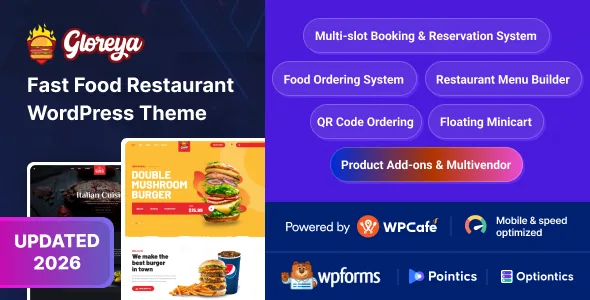
Most restaurant themes sell themselves on layouts. Gloreya's vendor description opens with a different claim: that it is a complete fast food ordering system powered by WPCafe. The theme supplies the styling, three demos and Elementor-built pages; the food items, menus, ordering and reservations come from the plugin.
That split determines what you are really evaluating. WPCafe's free version is the operating layer the vendor says the theme works with, and the note attached to the description insists it already includes the essential features to run the site. No paid tier is named as a requirement. What is not provided is a feature-by-feature map showing which ordering and reservation behaviours belong to the free plugin and which the theme only wraps in CSS.
If you want a restaurant site where the menu is a designed page, Gloreya is more machinery than you need. If you want customers to build an order and book a table inside WordPress, the theme is essentially the front end for a plugin-driven system, and the plugin is where your questions should go.
What 33+ WPCafe menu templates buy you
The vendor puts the menu library at 33+ templates inside WPCafe, and describes the variety rather than the number: location-specific menus, list style, tab style, sliders, and combinations of those treatments. In practice that lets one brand present a compact tabbed block for lunch service, a slider for featured items, and a longer list on a dedicated menu page, without redesigning theme files for each.
The caveat is ownership. Those templates ship with the plugin, so which ones you can use depends on the WPCafe release you run, not on Gloreya. Since the vendor does not say which of the 33+ are exposed in the free version, check the count against the plugin's own documentation before planning a menu structure around a specific layout.
Outside the menu, Elementor handles composition. The description says existing designs can be modified in minutes with the drag-and-drop builder, which is a general statement about Elementor rather than a guide to how much of a demo page is builder structure and how much is WPCafe output. Expect the food sections to be plugin-driven and the surrounding hero, story, hours and contact blocks to be yours to rearrange.
Order variations, tips and the reservation rules the vendor lists
Two ordering behaviours are named explicitly: food item variation options and a tip feature. Variations turn one listing into a priced choice of sizes or add-ons instead of a note in the description, which is the difference between a menu that reads well and one that takes an order correctly. A tip field changes the checkout conversation, and whether it works usefully depends on your WooCommerce payment setup as much as on the theme.
The reservation list is longer than most themes attempt: single slots, multiple reservations, pickup and delivery, holiday special schedules, and self-service cancellation from the same place a customer booked. Taken at face value, that describes a booking system with capacity by slot, a calendar that can differ on holidays, and cancellations that do not require a phone call.
None of those behaviours are demonstrated or tested in the record. They are vendor claims about what the WPCafe-driven system offers, and the free-version note is a statement about sufficiency, not a checklist. If holiday schedules or multiple concurrent reservations are central to how your restaurant runs, confirm them on a staging install with the specific plugin versions you intend to keep.
Checkout belongs to WooCommerce, and so does the risk
The vendor states the theme uses WooCommerce for selling functionality, so any gateway that supports WooCommerce can be used. That is a conventional split: WooCommerce owns cart, tax, checkout and gateway connections, while Gloreya controls how the shop and product screens look.
The marketplace attributes, observed on 5 November 2026, declare compatibility with Elementor, WooCommerce 6.x through 9.x, WPML, Bootstrap 4.x, and the main browsers, with WordPress versions listed from 5.0.x upward. Those are vendor and marketplace declarations, not the outcome of running the theme against each combination.
The practical consequence is that the parts taking money are maintained by WooCommerce and your gateway extension, and should be updated independently of the theme. The theme's own changelog shows repeated Elementor compatibility fixes and a mini-cart fix in 2.0.10, which is the area to watch when either plugin moves.
Version 2.1.0 replaced the theme framework
The most consequential entry in Gloreya's changelog is structural. Version 2.1.0, dated 22 September 2026, removes the Unyson Framework and adds Codestar Framework support, with the vendor stating that Unyson compatibility is discontinued. If your site was set up on an earlier release, theme options saved under the old framework do not simply carry across.
The vendor addresses this head-on: back up the site before updating, and restore the backup or contact support if problems appear. That is the right way to read the release — as a migration step rather than a patch.
The same version adds WPForms compatibility, a theme admin menu, a fix for a deprecated translation-loading warning, one-click demo import, and two named plugin additions: Pointics for loyalty points and rewards, and Optiontics for WooCommerce product options. A plugin being named in a changelog does not mean it is installed, configured or bundled in every copy; it means the theme's plugin list now mentions it.
What the inventory adds, and what the record leaves open
The declared inventory is modest and consistent across the attributes and the description: three predefined demos, three header layouts, widget-ready sidebars, RTL support, WPML compatibility, parallax effects, a styled blog page, multipage design and a Customizer. Files are listed as PHP, CSS and JavaScript. Gutenberg Optimized is marked Yes, which is the vendor's grading rather than a restriction on how you edit.
Two questions a buyer would want answered are not settled here. The first is behaviour under a large WPCafe menu with live order volume; no performance information is published. The second is the gap between the marketplace's listed release and whatever build you work from, since runtime behaviour depends on your PHP version, caching and the WooCommerce and WPCafe releases running alongside it.
Questions & answers
Do I need the paid version of WPCafe for Gloreya?
The vendor says the theme works with the free version of WPCafe and that it already contains the essential features to run the site. The description does not name any function that requires a paid tier, but it also does not map each ordering and reservation feature to free or paid, so check the specific behaviours you need against the free plugin's own feature list.
Can customers cancel their own table reservation?
According to the vendor, yes: the description says a customer can cancel a reservation from the same place the booking was placed. The same list covers single slots, multiple reservations, pickup and delivery, and holiday special schedules. These are vendor claims about WPCafe-driven behaviour, not results of an independent test.
Will theme options survive the 2.1.0 update?
2.1.0 removed the Unyson Framework in favour of Codestar Framework, and the vendor states Unyson compatibility is discontinued. Options saved under the old framework may not persist through the switch. The vendor recommends backing up the site first and restoring it or contacting support if problems appear.
Does Gloreya process payments itself?
No. The vendor describes the theme as using WooCommerce for selling functionality, so payment processing comes from WooCommerce and whichever gateway extension you install. Gloreya supplies the look of the shop and product pages; WooCommerce owns the cart, checkout and gateway connection.