Pages begin from a preset, not a blank canvas
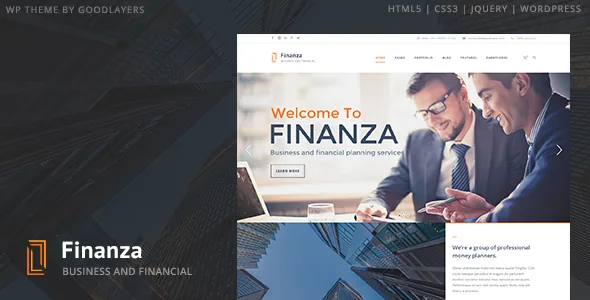
GoodLayers positions Finanza for financial advisors, accountants, law firms, wealth advisors and investment or general corporate sites, built with a drag-and-drop page builder. The detail that shapes daily editing more than the builder itself is how a page starts.
A Page Builder Setting Shortcut Button applies a saved configuration in one click, and the vendor names the configurations: Homepage, Homepage 2, About, Careers, Q&A, Awards & Honors, Contact 1 and Contact 2. That list is a set of page templates, not the whole demo site. You choose the preset that matches the page you are making, get a starting arrangement, and edit from there.
This suits a practice that publishes the same page shapes repeatedly. A second office location, a new practice-area page or a careers listing can open from a known configuration instead of an empty canvas. It also means those shapes are the vendor's decisions first and yours second, so look at the demo pages you intend to copy before you commit to the workflow.
The GoodLayers Importer is a separate tool: the vendor describes it as turning your site into the demo in a few steps, with a step-by-step video supplied. Importing the demo and applying a single page preset are different actions — the first sets up content across the site.
Section skins exist for one job: text over a background
Parallax and colour sections let you put a background behind a block of content, with the vendor offering parallax speed control or a fixed background instead. Backgrounds and text rarely arrive with matching contrast, and that is the problem the skin setting answers.
You build a custom skin in the admin panel and assign it to a parallax or colour section, using it to set that section's font and link colours. A dark photographic band can then carry light text and light links without changing typography anywhere else on the site.
That is a narrower control than a global colour picker, and it matches how a financial site tends to read: a hero band with a city or meeting image, sections of plain content, then a coloured band for a call to action. Each band gets styling for what sits behind it. The vendor separately claims unlimited colour options, saying almost every colour element can be changed — a claim about the settings panel that you confirm element by element.
Width is fixed for sidebars, open in pixels for the container
The theme's two width controls behave differently, and the difference matters if you publish tables, fund figures or document lists.
Sidebar width is not free-form. The vendor gives five options — 16%, 25%, 33%, 41% and 50% — with 25% and 33% available when both sidebar areas are in use. A short contact block can sit in 16%; a document list or numbered table needs 41% or more of the page. You pick from that list rather than dragging a slider.
The site container, by contrast, accepts any width in pixels, and it combines with boxed or full-width layout options and floating navigation. Decide the sidebar fraction before you design sections, because a 50% sidebar beside a wide table crowds the page in a way that is easier to avoid at planning time than to fix after the content is in.
The slider is edited like the rest of the page, with transition timing exposed
Finanza includes a slider with full-screen, full-width and boxed presentations. Its elements are managed by drag and drop, the same interaction as the page builder, and the vendor mentions a timeline control for transition period.
That timeline is the detail to weigh if motion matters to your brand. Financial messaging tends toward restraint, and a long transition with slow crossfades reads differently from a fast slide. Transition timing being a setting rather than a fixed effect is worth knowing before you add a separate slider plugin.
The vendor also notes social links in the header and a landing page template that can disable the header, the footer or both — useful for a campaign page where you want a visitor to do exactly one thing.
WooCommerce, mega menu and WPML as described, not demonstrated
Three integrations round out the picture, all described by the vendor rather than shown here.
WooCommerce support is framed as a design claim: the vendor says several WooCommerce elements are restyled into a minimal, modern look. That is about appearance, not checkout behaviour, payment methods or product types. The marketplace lists compatibility with WooCommerce 6.x.x and 10.x.x as of 4 November 2026 — a declaration to check against your own shop setup.
A mega menu is built in, which saves a plugin dependency for a practice with many service pages. WPML compatibility is also stated, which matters if the site needs a second language. Beyond that, the theme registers content for testimonials and personnel and offers four blog styles (column, medium, full, masonry) and four portfolio styles — ordinary site content if you publish advisor bios or client quotes.
What the listing declares, and what the package leaves out
The marketplace attributes, observed on 4 November 2026, list WordPress 6.1.x through 7.0.x, with browsers including IE11 alongside Firefox, Safari, Chrome and Edge. Files included are PHP, CSS and JS plus a PSD. Widget-ready, high-resolution and well-documented flags are present.
These are declarations, not results from running Finanza against your WordPress version, PHP configuration or plugin set. The browser list reaching back to IE11 and the version range starting at 6.1.x read as accumulated support statements, so check them against your own stack rather than treating the list as current testing.
One package fact affects planning more than any attribute: the vendor states that images used in the preview site are not included with the theme. Budget for licensing photography or using your own. The PSD is the other practical inclusion — layered design files ship with the theme, which matters if someone will adapt graphics rather than only configure settings.
Questions & answers
Does the one-click page setting produce a finished page?
No. The vendor describes it as applying a page builder setting such as Homepage, About or Contact 1, so you begin from a configured arrangement and then edit the content and sections yourself. The separate GoodLayers Importer is the tool described for importing the full demo site.
Can I set any sidebar width I want?
No. The vendor lists five fixed options — 16%, 25%, 33%, 41% and 50% — with 25% and 33% when both sidebar areas are used. The site container width, by contrast, accepts any pixel value.
Do I get the demo photographs with the theme?
The vendor states that images in the preview site are not included in the theme package, so plan to license images or use your own. PHP, CSS and JS files plus a PSD are what the marketplace lists as included.