The food menu is a data structure, not a page of text
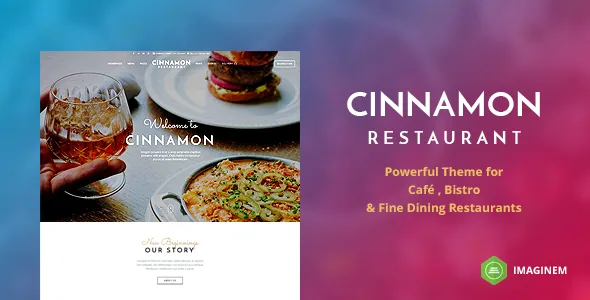
Most restaurant themes hand you a good-looking template and leave the menu as whatever you type into it. By the vendor's description, Cinnamon takes the opposite approach. Food items are a dedicated post type, and the theme supports variable item size for a dish — the vendor's example is Large, Medium and Small, each with its own price. That is the arrangement a menu needs when the same dish is sold in two or three portions, and it is a different problem from writing "Small $8 / Large $12" into a paragraph.
Labels are handled the same way. Version 1.6 of the changelog records custom Food labels added through theme options, with the new labels then selectable in food post settings. If your menu needs to mark vegetarian, spicy or chef's-special dishes, that becomes a per-item choice from a defined list rather than an image or a styled span.
The practical consequence is that a price change happens in the item record, and the same item can be displayed in more than one menu layout without rewriting it. The vendor also says multiple food menu layouts are available, so the data is meant to be reused across presentations rather than baked into one design.
Currency and colour settings live in theme options
Currency for food items is changed through theme options rather than edited item by item. Version 1.3 of the changelog added the option to switch the currency symbol to the left or right of the price, which is the difference between writing "12 €" and "€12" — a small setting with real consequences for European menus.
Theme options also hold colour changes and a choice of 400+ Google web fonts, per the vendor description. That means colour and typography are global decisions made once, while the menu items, labels and prices stay content. For a restaurant that updates a seasonal menu every few months, that split is the point: staff edit dishes, and design stays where it was set.
From menu row to order button: the WooCommerce path
The vendor describes two related ordering behaviours. You can build a delivery food page that handles online payment and cash on delivery through WooCommerce, and you can add purchase links to food menu items so an order button appears when the menu is displayed.
The second one is what separates a browsable menu from a menu that sells. If a dish has a purchase link attached, the menu layout can render an order control next to it, which is convenient for a takeaway-focused site where customers scan the menu and order from it directly. Casual-dining sites that want the menu to stay purely informational can simply not attach links.
Treat this as the vendor's description of intended behaviour rather than a tested checkout. Payment gateways, tax settings, delivery zones and cash-on-delivery instructions all come from WooCommerce and your own configuration, not from the theme. It is worth walking through a real order on a staging copy before you rely on the delivery page for revenue.
Four ways to take a reservation, and what each commits you to
The vendor keeps the booking button visible and gives you a choice of where it leads. It can open a modal slide window with a form, or link to a dedicated reservation page. Behind the form, the description names OpenTable integration or an email form.
These are not equivalent. The modal keeps the visitor on the page they were browsing, which suits a one-page restaurant site where the menu and the booking action sit together. The dedicated page gives the reservation its own URL, useful when you link to it from Google listings, social bios or a QR code on the table card. OpenTable hands the booking mechanics to a third party and requires an account there; the built-in form needs an email address that someone actually monitors. The theme fixes the shape of the button and the form, not the operational side.
Food and Events as separate content, plus the widgets that show them
Cinnamon ships its Food post type and an Events post type, both delivered as bundled plugins rather than hard-coded into the theme files — the vendor also packages the shortcode generator and the theme widgets as plugins. That arrangement keeps menu and event entries outside page content, so adding next week's live music does not mean editing the home page.
Display is handled by dedicated widgets and builder blocks. The widget list includes an Events Lister alongside an address block, social icons, gallery, recent and popular posts, Instagram and video. The page builder inventory adds Food Menu, Staff, Testimonials, blog grids, a photocard, Google Maps, slideshows with or without lightbox, tabs, accordions, counters and progress bars.
If you plan an events calendar or a long-running gig list, note the vendor describes an Events post type and an events lister widget, not a recurring-date or ticketing system. Confirm the date handling you need in a test install before committing a season of listings to it.
Localisation, forms and the compatibility the listing declares
The vendor states the theme is internationalised for single-language localisation and WPML ready for multilingual translation, with .po and .mo files included. That covers two different jobs: translating a one-language site's interface strings, and running a genuinely bilingual menu and site through WPML. A restaurant with an English and a second-language menu needs the second.
The marketplace listing, observed on 4 November 2026, declares compatibility with Gravity Forms, WooCommerce 6.x.x and WPML, a WordPress range from 4.9.x up to 6.3.x, and browsers including Chrome, Firefox, Safari, Edge and Internet Explorer 9 through 11. The IE entries reflect when the list was written rather than current relevance.
Gutenberg Optimized is marked No. That describes how the theme was designed — around its own page builder and shortcode system — and does not by itself mean the block editor is unusable on your site. If your editing workflow depends on blocks, settle that question before building pages, because it changes how you write content.
The maintenance record, and why it matters more than usual
The vendor's last recorded update is 13 June 2023, and the marketplace lists the latest version as 3.9.2. The changelog carried in the description stops earlier, at version 1.6 — a reminder that the release record shown alongside a listing may be partial, not proof that later changes went undocumented.
What the changelog does show is a theme whose updates were largely WooCommerce template refreshes, WPML fixes, slider and builder plugin bundles, and small additions like the currency symbol position and the custom food labels. Version 1.0.1 added a one-click demo importer.
For a buyer in 2026, the gap between a 2023 vendor update and current WordPress and WooCommerce releases is the practical risk. The listed WordPress ceiling of 6.3.x and WooCommerce 6.x.x sit several major versions behind what a new site will typically run. That is a reason to test the theme against your actual stack — particularly the cart, checkout and single-product templates, which is where the changelog shows the most template overrides — rather than to assume it will work because it installs.
What comes in the package, and how the demo is built
The marketplace files list includes PHP, CSS and JavaScript files together with Layered PSD and PSD files, so the design assets are part of the download if you need to adapt graphics. The vendor describes a PDF help guide with step-by-step screenshots, an XML demo data file, bundled JPlayer for audio, and the Isotope script for filtering layouts.
Demo import is a one-click process added in version 1.0.1. It gives you the structure of the vendor's demo — layouts, menu items, events, widget placements — with your own photography and copy to follow. Budget time for replacing the food images with your own, since menu-heavy restaurant sites live or die on how the dishes look.
None of this constitutes a test of the theme on your hosting. It describes what the vendor and marketplace say ships, which is the right basis for planning content and design work, not a guarantee about performance or security on your install.
Questions & answers
Can I sell takeaway orders from the food menu without building a separate shop?
The vendor describes adding purchase links to food menu items so an order button appears when the menu is displayed, with delivery orders handled through WooCommerce including online and cash-on-delivery payment. That means menu rows can double as purchase entry points. The checkout itself is WooCommerce's, so you configure payment methods, delivery and taxes there, and you should run a real order through it on a staging site before launch.
Do I need OpenTable to use the reservation feature?
No. The vendor lists OpenTable integration as one option alongside an email form, and the reservation button can either open a modal form or link to a dedicated reservation page. The email route requires only an address someone monitors; OpenTable requires an account with that service.
Can I show a small and a large portion of the same dish at different prices?
Yes, per the vendor description. The theme supports variable item size for food items, with Large, Medium and Small given as the example, each carrying its own price. Custom food labels added in version 1.6 let you also mark items from a list you define in theme options.
Is the theme compatible with current WordPress and WooCommerce versions?
The listing observed on 4 November 2026 declares WordPress 4.9.x through 6.3.x and WooCommerce 6.x.x, with the vendor's last update recorded in June 2023. Those declarations may not cover what you are running now. Test the menu, cart, checkout and product templates on your own setup before committing content to the theme.