Dishes, events and photos are stored once and reused
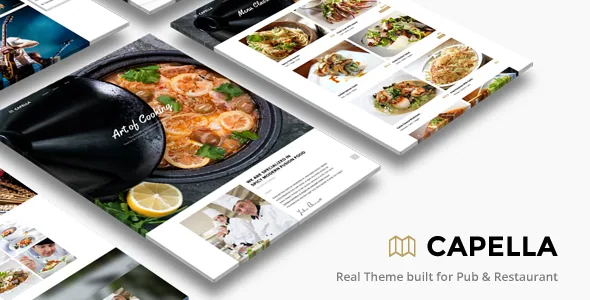
The most consequential line in Capella's feature list is easy to skim past: custom post type support for Galleries, Menus, Events, Testimonials and Team Member. Everything else in the theme orbits those five objects.
That matters because a restaurant site is mostly repetition. A dish changes price, a wine leaves the list, a new tasting menu starts on Friday, a band plays on the 14th. If a menu is a page you typed once, each of those changes means re-editing that page and any other place the same dish appears. If a dish is an entry in a Menus post type, you edit the entry. The vendor does not detail the fields attached to each type or whether a dish can be cross-listed, so treat the depth of that structure as something to check against the live demo rather than an assumption.
The same logic applies to Events and Team Member. A venue with a churning calendar and a staff page that changes seasonally benefits from entries with dates and photos instead of a layout you rebuild every month.
Three menu presentations over one dish library
Capella lists 3 food-menu style templates. Read that as three ways to present menu content, not three separate menus that each need their own copy of the dishes.
In practice this gives you room to match presentation to context. A lunch menu, a dinner list and a drinks card can share entries while differing in layout, or the same set of dishes can appear as a compact list on the home page and a longer-form presentation on the menu page. The vendor does not specify whether the styles are interchangeable per menu or fixed per display, so if switching presentations without retyping is the thing you care about, verify it in the demo before committing.
Restaurants often underestimate how much this saves. Menu text is high-churn content and it is the content most likely to be edited by someone who is not a designer.
Events with a filterable listing
Events come with a filterable option, according to the vendor. For a venue running recurring programming — quiz nights, live music, weekend brunch — a filterable list lets a visitor narrow the schedule instead of scrolling a chronological block.
The description does not itemise what the filters are built on. If your events need slicing by category, date, room or performer, ask that question of the demo specifically. A filterable listing is only useful when the filter axis matches how your guests actually search, and the theme's own dimensions are what you would be working within.
Pair that with the Events post type and you get a schedule that is data rather than a page. The trade-off is that a themed event framework is narrower than a dedicated events plugin; if your calendar is the main commercial product, compare what the theme provides against the plugin you would otherwise run.
Photo galleries drive the look, so evaluate them first
Twenty gallery templates, unlimited portfolio and gallery pages, a full-screen slideshow and a Ken Burns slideshow for photo galleries, plus an admin that supports uploading multiple images at once. For a restaurant, whose website is largely appetite, this is arguably the part of Capella doing the most work.
Ken Burns is the slow pan-and-zoom treatment applied to stills; it makes a hero image feel filmed rather than static, and it also means your photography is being pushed around at full width. Images that look sharp in a grid can soften under that movement, which is a reason to judge the galleries with your own photos rather than the demo's.
The multi-image upload in the gallery admin is the unglamorous counterpart. A photo-led site gets updated constantly — new dishes, a refit, a seasonal terrace — so getting twenty photos into a gallery in one upload instead of twenty separate ones changes whether anyone bothers.
Parallax backgrounds and a custom header background image sit alongside this. The vendor's changelog shows parallax fixes for HTTPS and for touch devices going back years, which is worth knowing as history rather than as a claim about the current release.
The builder composes pages; the post types hold content
Pages are assembled with a drag-and-drop content builder whose modules include food menu, gallery, blog and event. Shortcodes handle finer-grained elements: text styles such as dropcap, and column shortcodes for 2, 3, 4 and 5 columns, generated through a bundled shortcode generator plugin.
The important distinction is that the builder places content, while the post types store it. You build a menu page by dropping a food-menu module into a layout, and the dishes themselves live as entries. That split is what keeps a page build from becoming a content edit chore.
The marketplace listing marks Capella as not Gutenberg optimized, observed on 4 November 2026. That is a statement about the vendor's optimisation target, not evidence that the block editor refuses to load — but it does tell you the intended editing surface is the theme's own builder and shortcode system rather than block patterns.
Layout switches that go beyond the usual theme options
Most of Capella's presentation controls are familiar: colour pickers for elements, custom typography for font size, style and colour without touching code, installable Google Web Fonts from a library the vendor counts at 300+, and flexible column widths. Sticky main navigation and an off-canvas mobile menu cover the standard navigation patterns.
Two entries are more particular. The first is a backend switch that deactivates responsive behaviour in one click. That is a deliberate escape hatch for a site that needs a fixed desktop layout — an in-venue display screen, for instance — rather than a mobile-first default. It is not a reason to skip responsive design for a customer-facing restaurant site.
The second is unlimited sidebars, with the vendor describing the ability to create a sidebar and select it per page. On a site where the menu page, events page and blog want different supporting content, per-page widgets beat one global sidebar. Widget readiness is confirmed in the listing attributes.
Reservations and contact forms are theme features, not a booking engine
Capella lists reservation and contact form support, and a contact page with validation and fullscreen Google Map support. Both are form-and-map conveniences inside the theme. Neither is described as a table-management or availability system, so if you need real-time covers, deposits or waiting lists, plan on a dedicated booking service layered on top.
A changelog entry from January 2015 records a fix for a possible security issue with the theme's contact and reservation form. That is a thirteen-year-old note about an old release, not a statement about the version you would run today — but it is a fair reminder that theme-bundled form handlers are code you inherit, and that keeping the theme current matters more than usual when forms collect guest data.
On multi-language sites, the vendor lists WPML support alongside translation-ready .mo/.po files, so a bilingual menu and events calendar is within the intended scope. The listing does not say which parts of the menu and event content WPML covers, only that the plugin is supported.
What the marketplace listing declares
Observed on 4 November 2026, the compatibility attributes name WooCommerce 6.x.x through 9.x.x, WPML, and Facebook integration, with browsers IE11, Firefox, Safari, Opera, Chrome and Edge. The software version attribute runs from WordPress 4.9.x through 7.0.x, and the marketplace records version 2.5.6 as the latest.
WooCommerce appearing in that list is worth reading carefully. Capella is a restaurant theme, not a shop theme, and the vendor's description does not describe store functionality — the attribute says the two are declared compatible, not that a working restaurant shop with product templates ships with the theme.
Revolution Slider is listed in the vendor's feature description as an included plugin. That is the seller's bundle claim; what a given package actually contains is a separate question.
All of these are declarations attached to the product. They are not the result of testing on your server, with your plugins, on your PHP version and caching setup. Files listed in the ThemeForest bundle are PHP, CSS and JS.
Whether Capella fits your restaurant's content shape
Capella makes most sense when your site's content behaves like a database: a menu that changes, a calendar of events, a growing photo library, a team page, and customer quotes. The custom post types and the 3 menu styles, 20 gallery templates and filterable events all assume that shape, and they are what you would be paying for.
If your site is genuinely a handful of static pages — home, about, contact, a PDF menu — the structure is more machinery than the job needs, and a simpler theme plus your own photography would do the work. The deciding question is not the feature count; it is whether the person updating the site will be editing entries or rebuilding pages.
Questions & answers
Can I run a shop on Capella?
The listing's compatibility attribute names WooCommerce 6.x.x through 9.x.x, so the theme is declared compatible with the plugin. The vendor's feature description, however, talks about food menus, events and galleries rather than products, cart or checkout, and no product templates or shop layouts are described. Treat WooCommerce as an available integration to test, not as a shop the theme provides out of the box.
Does Capella work with the block editor?
The listing marks Gutenberg Optimized as No, observed on 4 November 2026. That is the vendor's optimisation declaration and does not by itself disable the block editor. The intended editing route is the theme's own drag-and-drop content builder plus shortcodes and the shortcode generator, so plan your page editing around that.
Is the responsive layout mandatory?
No. The vendor lists a backend switch that deactivates responsive features in one click. That is useful for a fixed-width display such as an in-venue screen, but a customer-facing restaurant site will normally want responsive behaviour left on for phones.