A cause is an entry, not a page you rebuild
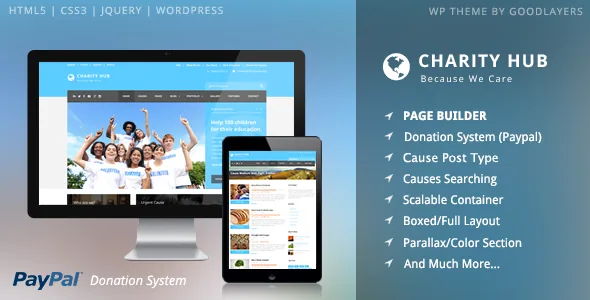
The structural decision in Charity Hub is a custom post type called "cause" with its own donation status. The vendor presents it as the way campaign management stays manageable, and that framing is the useful part: an appeal is an entry you edit, so a new total or a retired campaign is a record change rather than a redesign.
That entry then appears in three named styles — column, medium thumbnail and full thumbnail — and the theme also includes a causes search. In practice you decide how a campaign looks where it is listed, while its copy and donation details stay in one place.
Whether that matters depends on your publishing rhythm. An organisation running two flagship appeals for years can express them as ordinary pages without losing much. One that opens and closes appeals through the year gets the benefit, because the tenth campaign costs about as much effort as the first.
How the vendor says a gift becomes a progress bar
PayPal is the donation route described in most detail. The vendor says the system collects the amount sent to PayPal and converts it into a percentage bar for each cause, and that payment evidence goes automatically to the sender's email once a payment succeeds. Read together, those two sentences describe a completed gift updating the campaign's progress and leaving the donor with a confirmation in their inbox.
Stripe is listed as a second donation system, and recurring donations are credited in the feature list to a contributor called 3Public. Both are named capabilities without the same level of explanation, so treat PayPal as the documented flow and the other two as features to confirm against the documentation before you build around them.
What the description leaves open is where funds settle outside the gateway account, how currency and fees are treated, and how an offline gift would be recorded. If the donation layer is central to your project, those answers belong in your planning before launch rather than after.
Section skins solve the contrast problem a photo band creates
Charity sites tend to run dark field photography next to light appeal copy, and the GoodLayers builder addresses that with parallax or colour sections that can carry their own skin. The vendor explains the reasoning directly: a parallax section may need different font and link colours from the rest of the page, so you create a custom skin in the admin panel and assign it to that section.
Other section controls listed include a parallax background with a speed you set, an option to fix the background instead of moving it, and YouTube video as a section background. A landing page template can also hide the header, the footer, or both — the setting behind a stripped page for a single urgent appeal or a campaign-specific form.
The distinction worth noting is local versus global colour. There is an unlimited colour option that the vendor says reaches almost every colour element, which handles the site's palette. Skins handle the exception where one band needs different treatment, without disabling the global setting everywhere else.
Two ways to start a page, with different scope
The Page Builder Setting Shortcut Button applies a preset layout in one click to specific pages named in the description: Homepage, "What we do", "Our Story", "Be a volunteer", FAQ, Contact 1, Contact 2 and Service. It is a starting arrangement for that page, not a whole-site install.
Separately, the GoodLayers Importer is described as turning the site into the demo in a few steps, with a step-by-step video. Choose the importer when you want the full structure mirrored; choose the shortcut when the FAQ or volunteer page is the only one you want to begin from something sensible.
The vendor states plainly that images from the preview site are not included in the theme package. Either route gives you structure, sections and menus — your campaign photography is a separate task.
Sidebar widths and a container measured in pixels
Most of the layout settings in the description are the kind an editor touches once and then forgets, which is why the specific values are more informative than the feature names. Sidebar width is a choice from 16%, 25%, 33%, 41% and 50%, with 25% and 33% available when the page carries both sidebars.
The container width is set in pixels to any value, so a site does not have to accept a fixed maximum. Boxed and full-width layouts are both offered, navigation can float, and the mega menu is built into the theme rather than supplied by a plugin.
Smaller items in the same list fill out the publishing side: four blog styles (column, medium, full, masonry), four portfolio styles, unlimited sidebars assignable per page or post, testimonials, personnel entries, shortcodes and a shortcode generator. If your charity publishes field updates and volunteer profiles, the blog and personnel pieces are the ones you will use; the portfolio styles are easier to leave alone.
Compatibility and package details as declared
The marketplace attributes recorded on 3 November 2026 declare support for WordPress 6.1.x through 7.0.x, WooCommerce 6.x.x, 7.x.x, 8.x.x and 10.x.x, and WPML, along with a responsive layout, widget-ready status and files listed as layered PSD, PHP, CSS and JavaScript. The vendor's listing shows an update date of 13 October 2026.
Those are listing declarations, not the result of installing the theme here. The WordPress range covers a long span of major releases, so if your site is on an older or newer branch than you expect, confirm the combination on a staging install rather than assuming the whole band behaves the same way.
One gap matters for charities specifically. Nothing in this evidence covers tax receipt rules, gift-aid reporting or multi-currency handling, so do not assume the theme supplies them. The vendor describes the theme as well documented and directs support to its own site; that tells you where questions about the donation flow go, not how the flow will behave on your host.
Questions & answers
Does the same campaign have to look identical everywhere it appears?
No. The vendor lists three cause styles — column, medium thumbnail and full thumbnail — and a causes search system, so the entry stays one record while the presentation varies by placement. The exact controls for choosing a style per placement are not detailed in the description, so check the documentation if you need different treatments on the homepage and the causes archive.
Is the demo import a finished charity website?
Not on its own. The vendor states that preview images are not included in the theme package, so the import gives you pages, sections and menus. Photography, campaign copy and your own donation details come from your organisation.
Can I hide the header and footer on a campaign page?
Yes, according to the vendor: the landing page template has options to disable the header, the footer, or both. That is useful for a single urgent appeal or a form you link to directly from an email or social post.