Rate rules come before design choices
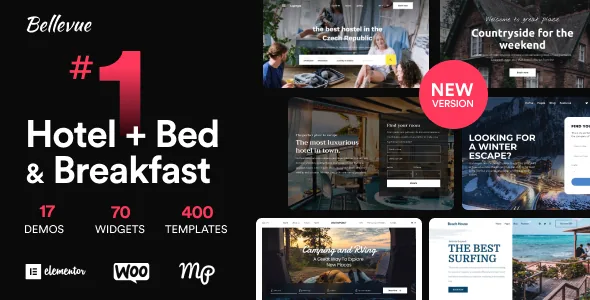
Bellevue's description spends its opening on the reservation system, not the look, and that is how the theme is best read. Themovation states the package includes the full premium version of a hotel booking plugin along with a named set of add-ons: WooCommerce Payments, Payment Requests, Mailchimp integration, a Notifier for emails triggered by arrival and departure dates, Checkout Fields, PDF Invoices, Multi-Currency and Reviews.
The booking features that matter most for a small property are the pricing ones. The vendor lists flexible seasonal pricing, rates set per person and per length of stay, discounts and coupons, taxes and fees, bookable extras or free services, and customisable minimum and maximum stay requirements. A two-night minimum on a peak weekend is the kind of rule that keeps a calendar from fragmenting into single-night gaps, and it exists here as a setting rather than something you enforce by hand.
Payment timing is also a setting. You choose whether guests pay online or after arrival, and whether confirmation is instant or manual. Manual confirmation means each reservation waits on a staff decision — fine for a B&B that screens bookings, less so for a hostel that wants the room filled overnight.
The admin calendar and manual bookings
Behind the guest-facing form sits a centralised admin bookings calendar, a sales dashboard and real-time availability calendars, with support for multiple properties. The vendor also describes recording reservations manually and editing original bookings.
Manual entry deserves attention because phone enquiries, walk-ins and returning guests rarely come through the website form. If a system only accepts online reservations, those bookings end up in a spreadsheet that no availability calendar can see — which is how double bookings start. Editing an existing booking matters for the same reason: an extension of stay or a room move has to update the calendar rather than sit in an email thread.
Branded admin and client email notifications are listed separately from the Notifier add-on, so plan the guest-messaging path as two layers: the booking confirmation and the date-driven reminders that arrive before check-in and after check-out.
iCal channel sync: an intent, not a guarantee
The vendor states the bundled plugin syncs availability and bookings with Airbnb, Booking.com, TripAdvisor, HomeAway or any other service that supports iCal. That sentence covers a lot of ground, and an iCal feed is a calendar format, not a full integration: what it carries depends on the platform publishing it.
Rates, restrictions and guest details sit outside what a blocked-date feed usually conveys. Before you rely on sync to prevent double bookings, confirm with each channel you actually list on what their feed publishes and how often it refreshes. A property with same-day turnover has far less tolerance for refresh lag than one that holds a room for a night between stays.
The practical reading is that the vendor's statement tells you the capability is intended; it does not tell you the timing works for your operation. Sync is precisely the kind of feature to run against a staging copy with a real booking, in both directions, before the site goes live.
Assembling pages with the Elementor Visual Library
Design happens in Elementor, and the workflow the vendor highlights is the Visual Library. You open it from inside an Elementor page, click import, and browse a popup of previews covering whole pages and individual page sections, then insert what you want.
That differs from the more common pattern of importing one full demo and editing downward. Sections become interchangeable material: you can lift a room grid or a booking block from one style and drop it into a page built in another style. The vendor also lists 300 design blocks, 70 Elementor widgets and 10 global templates, which is the inventory the Library draws on.
The file list adds layered PSD, Sass, SCSS and LESS files, plus the vendor's mention of Figma files and Photoshop files, for anyone who wants to work from the source design assets rather than edit styles in the browser.
Styles sorted by property type — and some that were not ready
The style roster is organised by the kind of property you run. The vendor lists thirteen niche vacation-rental designs, among them Modern Chalet, Bright Beach House, Trendy Tiny Home, Scenic Countryside, Cozy Lake Cabin and a one-page scrolling layout, alongside three hotel designs: Classic Hotel, Modern Hotel and Funky Hostel, with an Elegant Hotel design mentioned in the same "what's new" section.
The vendor's own counts move around — the page refers to a collection of sixteen themes, then to thirteen live demos, and separately says the theme is "14 WordPress Themes coupled into 1". Several listed styles carry a "coming soon" label, including Outdoor/Camping, Modern Lake Cabin and Trendy City Guest House.
That inconsistency is not fatal, but it decides how you approach the build: if a specific style is the reason you are buying, check that it is present in the version you receive before you plan around it rather than assuming the roster equals what ships.
Keeping your own booking engine
The vendor states that Bellevue is specifically engineered to work with other hotel booking plugins and third-party services, so the bundled stack is an inclusion rather than a dependency. That matters for a property already running a reservation system its staff know.
The marketplace attributes, observed on 3 November 2026, list Elementor and Elementor Pro, WooCommerce 5.x through 7.x, WPML, The Events Calendar and its Pro version, Gravity Forms, Contact Form 7, Easy Digital Downloads, Jetpack and Bootstrap 5.x. These are vendor compatibility statements about technologies the theme is said to work with; they do not confirm that every room grid or booking screen behaves identically under a different reservation engine, and they do not mean the named plugins come with the theme. A booking plugin you supply carries its own licence and configuration.
What the split gives you is separation of concerns: Bellevue's room displays, availability calendars and enquiry forms can remain the visible layer while another system holds the reservations. Test that handoff on a staging copy, because the calendar and search components are built to talk to the bundled plugin first.
What to verify before committing
The bundled stack is the reason to choose Bellevue when you have no reservation software yet: one vendor supplies the theme, the booking engine and the money-and-messaging add-ons, and a one-click import from the Bellevue dashboard sets up the booking pages, rooms and calendars together.
If you already run a system your team trusts, judge the theme on what remains — the Elementor templates, the Visual Library and the accommodation displays — and accept that you are testing an integration the vendor has not documented in detail.
Either way, three things are worth settling first: run one real booking through your chosen payment path, test the iCal feed against the specific channels you use, and confirm the style you want is actually in the package rather than flagged as forthcoming.
Questions & answers
Does Bellevue include the booking plugin, or do I buy it separately?
The vendor states the package includes the full premium version of the hotel booking plugin plus a named set of booking add-ons covering payments, payment requests, Mailchimp, notifier emails, checkout fields, PDF invoices, multi-currency and reviews. The dollar values quoted in the description are the vendor's own figures, not a price breakdown of the bundle.
Can I use a different booking plugin with this theme?
The vendor says Bellevue is engineered to work with other hotel booking plugins and third-party services, so the Elementor templates and room displays can sit in front of a reservation engine you supply and license yourself. How cleanly the theme's calendars and search behave with another engine is not documented, so test that pairing on a staging copy.
How many design styles ship with the theme?
The description lists thirteen niche vacation-rental designs and three hotel designs, but several listed styles are marked "coming soon" and the vendor's counts vary between thirteen, fourteen and sixteen across the page. Check which styles are present in the version you receive before planning a build around one.