Proofing and booking sit inside the theme, not beside it
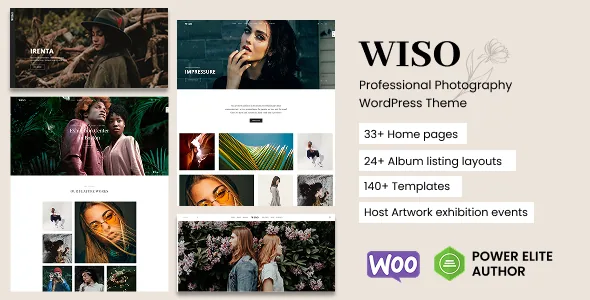
Fox-Themes describes Wiso around a shoot cycle rather than a grid: the client reviews a gallery, books the next session, then buys prints. The first two steps are named as theme features instead of plugin add-ons. The layout list covers albums, portfolios, galleries, events, full-screen presentations and client proofing, and separately names a password-protected album for client review. Appointment booking lets visitors schedule consultations, portrait sessions or studio bookings from the site, with automatic Google Calendar sync.
That is delivery and intake on your own domain: a link goes out instead of a file-transfer service, and a prospect picks a slot instead of trading emails. The description says nothing about how the proofing album handles selections, comments or access expiry, so those questions belong in a test install before you promise a client a review process.
Two scheduling systems doing different jobs
Appointment booking and the event calendar are kept apart in the vendor's copy. Built-in booking covers one-to-one slots: a consultation, a portrait sitting, studio time. Modern Events Calendar compatibility covers published dates such as workshops, exhibitions and open shoots, with Google Calendar sync, interactive maps and recurring events.
The split matches how many photography businesses work: private bookings through the theme, public dates through the calendar plugin. One consequence is that the calendar side depends on a named plugin rather than the theme's booking code, so a workshop programme needs that plugin installed and configured. Without it, the booking form carries intake alone. The compatibility field also lists Events Calendar Pro in the same scheduling corner, and the description never says which calendar a given demo relies on — check the demo you plan to reuse.
Layout types that map to different visitor situations
Once proofing and selling are part of the site, the layout types stop being cosmetic. The vendor frames them as formats for particular work: a minimal grid for editorial sets, a full-screen gallery for weddings, an album layout for client delivery. Those are three different visitor situations, and the password-protected album is the one that changes workflow most, because it turns a page of images into a handoff step rather than a portfolio entry.
The store carries packages and vouchers, not just prints
WooCommerce is the selling layer, and the vendor is specific about what it should hold: fine art prints, digital downloads, photography packages and gift vouchers. The compatibility field lists WooCommerce 5.x through 9.x, a range spanning several plugin majors.
The unusual items there are packages and vouchers, because they are sales that outlive a single print order. Whether a package becomes a variable product, a booking or a voucher code is a WooCommerce decision the theme description doesn't settle. If the store is central to your plan, build one of each product type early and see how it reads on the shop and checkout templates before committing the catalogue.
WPBakery builds pages; The Grid handles the walls of images
Page composition runs through WPBakery Page Builder, described as the tool for rearranging sections, adding galleries, embedding forms and building pricing pages. The Grid covers what WPBakery handles least naturally: masonry grids, filterable portfolio layouts and dynamic galleries without CSS. Contact Form 7 and Google Maps complete the bundled set, with the forms pre-styled for enquiry types such as wedding booking requests and commercial briefs.
The vendor calls these plugins bundled and pre-configured, and the changelog entry for 1.8.5 updates The Grid to 2.8.2 and WPBakery to 9.0.1. Those are statements about the vendor's package and release notes, not a description of any particular archive. The compatibility field also lists Bootstrap 4.x, worth noting if the rest of your tooling has moved on. The marketplace metadata marks the theme Gutenberg optimised, but the page workflow the vendor describes is the WPBakery one.
Lazy loading, and the images you don't get
The only weight-related claim in the description is that Wiso supports lazy loading on an HTML5 and CSS3 build, so images load as a visitor scrolls instead of all at once. That is a mechanism, not a performance result; how it behaves with your file sizes and host is something you measure after import.
The vendor also states outright that demo images are for demonstration only and are not included with the theme. An imported demo therefore arrives full of photography you cannot publish. Budget for a licensed set of your own, or plan the import around blocks you will fill later.
Other listed options lean toward branding and staging: unlimited colour schemes, Google Fonts and custom font support, an Instagram feed widget, a coming-soon page, a custom 404, a page preloader, and theme settings import/export for moving configuration between installs.
What the release history shows
The changelog reads like maintenance rather than reinvention. Version 1.8.1 fixed WooCommerce and plugin compatibility, 1.8.2 added HTML templates and setup guidance, 1.8.3 addressed WordPress 7.0 compatibility, and 1.8.4 added a licence activation system with purchase-code verification while removing an older tracker and updater.
The marketplace fields declare support from WordPress 6.0.x through 7.0.x and record a 1.8.5 release. Those declarations describe supported ranges; they are not evidence that the theme has been run against your WordPress, builder and WooCommerce versions. With a bundled builder and a commerce plugin in the stack, a staging install on your actual versions is the only reliable answer.
Questions & answers
Does Wiso include its own booking system, or does it need a plugin?
The vendor describes built-in appointment booking for consultations, portrait sessions and studio bookings, with automatic Google Calendar sync. Workshop and exhibition scheduling is listed separately as Modern Events Calendar compatibility, so the two scheduling jobs don't run on the same mechanism.
Can clients review and select images inside the site?
Client proofing is listed as a dedicated layout type, and the vendor names a password-protected album for client review. The description does not explain how selections, comments or album access expiry work, so confirm those on a test install before handing a client the link.
Are the demo photographs included?
No. The vendor states the demo images are for demonstration only and cannot be used on your site. Plan to replace them with your own work or separately licensed photography.
Which page builder does the theme use?
Composition is built around WPBakery Page Builder, with The Grid for masonry and filterable gallery layouts. The marketplace metadata also marks the theme Gutenberg optimised, but the workflow the vendor describes is the WPBakery one, so expect page building to happen in that builder.