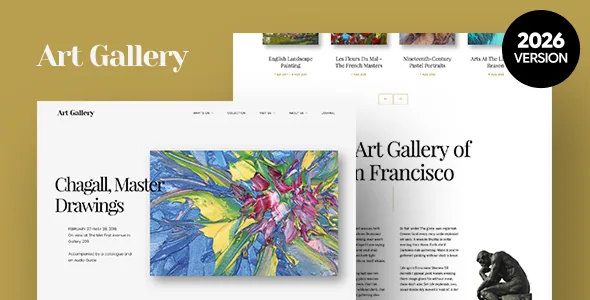
What a gallery site needs that a portfolio theme doesn't supply
Most themes for visual work give you a project grid and a lightbox. Arte's marketplace description assumes a different job: a venue with a rolling programme. It names custom functionalities for the theme as a collection grid, an events schedule, a timeline and a journal, and pitches the theme at museum galleries, exhibitions and expositions rather than individual artists alone.
That distinction shapes what you can publish. A collection grid groups works that belong together, the schedule carries dates and times for what is on, and a timeline presents a history or sequence of activity. Whether those are separate post types or configured layouts is not spelled out in the description, so the live demo is the place to see how entries are entered and displayed.
The vendor also describes the visual register the theme is built for — large sliders and images, carousels for art exhibits, and generous footers — and says it suits painting, sculpture, photography, drawing, costumes, furniture, decorative art, print and performance art.
Three bundled plugins and how they divide the work
According to the vendor, Arte ships with Visual Composer, Slider Revolution and an Events Schedule plugin, each with a stated saving that the theme author presents as a bundle benefit. Those are marketplace bundle claims, not a statement about what any particular copy of the theme contains.
Taken together they sketch the workflow. Layout is assembled in the page builder, which the vendor lists under both Visual Composer and WPBakery Page Builder in its compatibility attributes. Slider Revolution covers the hero sliders and exhibit carousels. Events Schedule feeds the timetable side of the site, which is the piece a gallery would otherwise solve with a separate events plugin and its own templates.
If your programme lives in an existing calendar system or a ticketing platform, the useful question is how the schedule gets populated — manually in WordPress, or through an import. The description does not say, so confirm it before committing a season's worth of listings.
Xtender: the vendor's own layer over WPBakery
Arte's own additions live in a plugin called Xtender, which the vendor describes as its tool for improving the client's WordPress experience. It supplies custom Visual Composer elements, an extended Individual Page Settings options panel, a sidebars generator, shortcodes for icons and buttons, custom widgets and custom options for footers.
The practical consequence is that per-page control and site-wide structure come from two different places. Page settings handle the local decisions on a given page, while footer options and generated sidebars define the frame that repeats. When a change seems not to apply, knowing which panel owns it saves time.
The listing also records Widget Ready as Yes, so generated sidebars and custom widgets have somewhere to live in the usual Appearance → Widgets workflow. That is the opposite of minimalist themes that strip widget areas out; if parts of your site — opening hours, a donor list, a mailing signup — belong in a sidebar or footer, this is a theme that expects them there.
Editing happens in the builder, and the listing says so
The vendor attributes record Gutenberg Optimized as No, observed on 4 November 2026, while listing WPBakery and Visual Composer as compatible. Read that as a note about where the vendor put their layout tooling, not a verdict on the block editor. What it does mean for planning is that the demo pages themselves are unlikely to be block compositions, so a team committed to building in the Site Editor should weigh that before choosing Arte.
The files field lists PHP, CSS, SCSS and JavaScript. SCSS matters if you intend to restyle rather than only pick options: stylesheets are authored in a preprocessor format, so fork the source and compile rather than patching compiled CSS.
The broader environment claims are broad. The vendor lists WordPress 4.9.x through 6.9.x, Bootstrap 4.x, five browsers including Edge, high-resolution output and four-plus columns. Those are stored compatibility claims rather than results of running the theme on a current install.
Selling prints and running a bilingual programme
Two compatible plugins extend what the site does beyond display. WooCommerce appears in the vendor's compatibility list for versions 6.x through 9.x, and WPML appears as well.
WooCommerce compatibility supports the common gallery arrangement of a shop for catalogues, editions or prints alongside the exhibition content — but the listing is a compatibility claim, not a set of Arte-designed shop templates, so treat the storefront's appearance as something to check against the demo.
WPML compatibility matters for institutions that publish in more than one language, where an exhibition title, wall text and opening hours all need translated equivalents. As with the shop, compatibility is declared, not demonstrated; the vendor updated the listing on 29 October 2026 and the marketplace last published version 1.2.33, but change history is not part of this evidence.
Where Arte fits, and one thing to verify
Arte suits an organisation with a programme rather than a single body of work: exhibitions that open and close, events with dates, a collection that gets grouped and regrouped, and possibly a history worth putting on a timeline. It also suits a team that is comfortable assembling pages in WPBakery and wants the vendor's art-specific elements on top.
It is a weaker fit if you build in the block editor and want your design to follow from it, or if you expect the supported plugins on this list to arrive configured and connected out of the box. The website is described as well documented, and the vendor keeps a live demo, which is where the collection grid, schedule and timeline are best judged with your own content in mind.
Questions & answers
Does Arte include an events calendar for exhibitions and openings?
The vendor lists an Events Schedule plugin as bundled, described as displaying schedules and timetables, and names events schedule among the theme's custom functionalities. How entries are created and whether they sync with external calendars is not covered in the vendor description.
Can I use the block editor with Arte?
The compatibility attributes mark Gutenberg Optimized as No, and the vendor's layout tooling is WPBakery/Visual Composer. That attribute describes where the vendor built their page tooling rather than proving the block editor is unavailable, so test your intended workflow on a staging install.
Can Arte run a shop for prints and catalogues?
The vendor lists WooCommerce 6.x through 9.x as compatible, which supports selling alongside the exhibition content. The description does not detail theme-specific shop templates, so check how product pages look in the demo.