An album can present itself five different ways
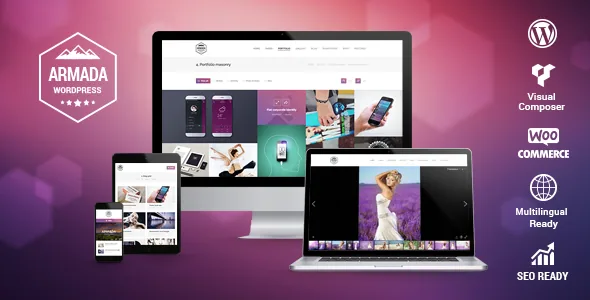
The album settings are where Armada separates itself from themes that decide your gallery behaviour once, globally. Photo Albums are a dedicated post type here, and the vendor lists five appearance options for an individual album: lightbox, photo scroller, simple slider, metro, or list.
Those are not cosmetic variants. A wedding set works as a scroller that moves horizontally through the sequence. A mixed commercial archive is easier to scan in the metro arrangement. A list keeps captions and ordering readable. The lightbox hands the whole thing to a popup, which the vendor describes as a responsive Magnific popup. Because the choice sits on the album rather than in one site-wide setting, a portfolio can hold different kinds of set side by side and let each behave the way its content wants.
The surrounding listing pages get their own controls: masonry, grid or list views, a justified grid reserved for portfolios, albums and galleries, adjustable column count and minimum column width, plus infinite scroll or lazy loading. Those decide how much of a large archive a visitor meets before scrolling. Everything in this section comes from the vendor's marketplace description; it has not been tested here.
Headers that change the shape of the frame
Armada names five header and menu interpositions rather than leaving you to discover them:
Top header with logo left and menu right. Top header with logo left and the menu left underneath it. Top header with a centred menu below the logo. Header on the left with content on the right. Header on the right with content on the left.
The vertical arrangements are the consequential ones for photography. A side header occupies permanent horizontal space, so a justified grid or full-bleed slideshow sits in a narrower column and the images read taller. The three horizontal variations move navigation into a strip and give the full width back to the photographs.
Width is a separate switch: boxed or full-width, a content width and optionally a header width, and the vendor says the responsiveness switching points for desktop, tablet and mobile are configurable. When a justified grid starts to reflow, that last setting lets you decide where the column count drops instead of accepting the theme's breakpoints. The listing marks the theme responsive, high resolution and four-or-more columns.
Four slideshows, four different engines
The slideshow list is not one script with four skins. Per the vendor: Slider Revolution, a Photo Scroller described as built exclusively for Armada, a Porthole Slider based on Royal Slider, and a custom 3D Slideshow that also works as a gallery.
The Photo Scroller is aimed plainly at photographers, a horizontal browsing motion rather than a timed crossfade. The 3D Slideshow is the option when you want depth between images. Slider Revolution covers the general-purpose case. The package is described as bundling Slider Revolution, the JavaScript version of Royal Slider, Visual Composer and Go pricing tables, which the vendor values at $75.
Fancy headers add a second axis: four tile styles, regular, overlapping, semitransparent and transparent, each in three layouts. They are selected per page, post or project, so a portfolio project can open under a different header treatment from the blog.
Before/After, and what the 29 elements are for
The Before/After element is the clearest sign the theme was written with retouchers in mind. A visitor drags between two versions of the same frame to compare a retouched image with the original; the vendor calls it the essential tool to showcase retouch work. On a photography site that is a portfolio piece, not page furniture.
Of the 29 custom Visual Composer elements the vendor counts, the photographic ones are Photos Justified Grid, Photos Masonry and Grid, Photos Scroller, Albums Scroller, Portfolio Scroller and Royal Slider. The rest handle ordinary page content: fancy titles, separators and quotes, call to action, teaser, banner, contact form, blog mini, team, testimonials, logos, benefits, gaps, media, buttons and fancy lists.
The vendor also says the stock builder elements are customised, giving rows that produce parallax stripes as the example, and lists striped content backgrounds, video backgrounds, rollovers and a floating menu among the design features. Editing happens in WPBakery Page Builder, declared compatible at 5.7.x. Gutenberg Optimized is marked No, which means the vendor built no block-editor patterns; the attribute alone says nothing about whether the block editor runs.
Microsite: a page that drops the surrounding chrome
Most of Armada's page templates route content by category: albums in a justified grid, albums in masonry, blog as list, blog as masonry, gallery in a justified grid, gallery in masonry, three portfolio arrangements, team and testimonials. Since each lets you choose which categories it draws from, one site can host several separate portfolios or blogs.
Microsite is the outlier. It arrives with its own toggles: a custom menu, switches for the top bar, header, floating menu and bottom bar, a custom logo, logo link and favicon, a page-loading animation toggle, wide or boxed width, and a custom CSS field. The regular header, slideshow and sidebar settings remain available on top of those.
The vendor suggests it for landing pages, one-page sites, blank pages and a site-within-a-site. In practice it is a way to build a self-contained presentation, for a single exhibition or a client campaign, without those pages inheriting the site's navigation and bars. It is a template inside the same WordPress install, not a separate deployment.
Skins, post types and the menu that carries an archive
Sixteen ready-made skins in different colour schemes, four layouts each, are what the vendor counts as 64 designs. Read that as a starting set; the theme options panel and per-page header settings are where a skin becomes a particular site.
Seven dedicated post types hold repeating content: portfolio, testimonials, team, logos, benefits, photo albums and slideshows. The blog supports eight post formats, each styled separately: standard, aside, image, video, quote, link, gallery and status. Widget areas are unlimited, with individual sidebars and footers assignable per page, post or project.
The mega menu is described with icon-font icons, subtitles, multiple rows or columns and styling options. Subtitles and columns are what let a photographer with a deep archive put categories in the menu without flattening everything into one long list.
WooCommerce, translation and a stopping changelog
The vendor says Armada applies its own styles to WooCommerce output automatically, tuned for digital and physical goods, and the listing declares compatibility with WooCommerce 3.8.x. Other declared pairings are Events Calendar, Events Calendar Pro, Gravity Forms, WPML and WPBakery Page Builder 5.7.x. Translation is claimed as complete, with WPML support.
The changelog shows what upkeep looked like: version 1.5.4 in December 2019 recorded a WordPress 5.3 and PHP 7.3 compatibility update, and version 1.5.8 in October 2020 fixed a potential security threat in the bundled WPBakery Page Builder. Patches for WordPress versions and fixes inside bundled plugins mean those plugin versions are part of what you maintain, not a one-off install detail.
The declared baseline is WordPress 5.5.x and the last recorded vendor update is dated 11 December 2020. Put a current WordPress and PHP combination against it on a staging copy before committing a client project; nothing in the available material shows how Armada behaves on later releases.
One practical note from the vendor: the preview photographs are not included and are sold separately through Shutterstock. Your own images replace them, which a photography site needs anyway.
Questions & answers
Can I run Armada on a WordPress version newer than 5.5.x?
The listing declares WordPress 5.5.x and the most recent recorded vendor update is dated December 2020. That is the only version claim attached to the product, so whether a newer WordPress works with it depends on your setup. Test on staging before you build on it.
Do the demo photographs come with the theme?
No. The vendor states the preview images are not included and can be purchased from Shutterstock. You supply your own photography.
What is in the plugin bundle the vendor describes?
The vendor describes the package as including Slider Revolution, the JavaScript version of Royal Slider, Go pricing tables and Visual Composer, valued at $75. The listing separately declares compatibility with WPBakery Page Builder 5.7.x. Bundled plugin versions need their own upkeep; theme version 1.5.8 fixed a security issue in the bundled page builder.
Is the Before/After element only useful on a photography site?
It works anywhere you have two versions of an image to compare, but it was designed for retouch work, which the vendor calls its essential purpose. On a portfolio it shows a client the difference your editing makes.