A header that hides on the way down
WebOn's most useful setting for a landing page is easy to miss in the feature list: among the header behaviour options (sticky, fixed) the vendor names a third, sticky only on scroll up. A header that reappears when someone scrolls back up keeps the pitch uninterrupted on the way down while leaving navigation within reach. Landing pages rarely need a permanent bar eating into the hero; this option gives you the choice.
The vendor also separates logo files by context — normal, sticky and mobile — and provides light and dark versions for different header skins. If your hero is dark and the content below is light, that separation prevents a logo from vanishing against one of the backgrounds.
Beyond that, the theme lists three header types (Standard, Divided, Minimal), a fullscreen menu, a customisable mega menu, an optional header top widget area, a side area with its own opener widget, and footer layouts of one to four columns. Most of these are conventional; the scroll-up behaviour and the per-context logo set are the two that change how the top of a one-page site behaves.
The shortcode library duplicates what Elementor would otherwise do
Elementor is the declared builder, yet the vendor's feature list spends most of its length on shortcodes — and several are components a landing page needs rather than decoration. The Vertical Split Slider builds the two-panel split screen without assembling it by hand. Text Marquee and Image Marquee produce the scrolling strips commonly used for client logos or a slogan loop. Countdown, Counter, Progress Bar and Pricing Table cover launch timers, traction figures, capability bars and plan comparisons.
The supporting set runs from Video Button, Parallax Images, Info Section, Highlight and Call to Action through Icon List Item, Team List, Clients List, Testimonials List (with an accordion variant) and a Custom Font shortcode. Blog List, Portfolio List and Product List pull in queried content, so a section can draw from posts, projects or shop items instead of hard-coded cards.
In practice this means two routes to the same page. You can compose in Elementor and drop shortcode blocks into the canvas, or use the theme's own elements wherever one already matches the layout you want. The shortcode path is quicker for repeating structures such as testimonials and pricing rows; the Elementor path gives finer control over spacing and nesting. Note that the vendor's feature list names Elementor, while the marketplace also records WPBakery Page Builder as compatible; how the shortcodes render inside WPBakery is not described, so try the combination you intend to use.
Eleven homepage layouts, and the ways they differ
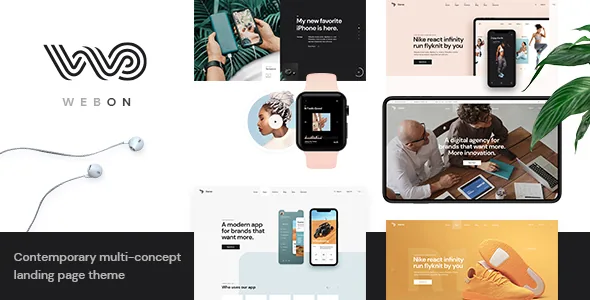
The headline count is 11 homepage layouts, with the vendor naming app landing, split screen and SaaS among them, plus a set of predesigned inner pages. The count matters less than the spread: an app landing page wants a prominent download action and feature blocks, while a split screen puts the pitch beside a large image or form. Those are different compositions, not colour variants.
Marketplace tags extend the intended range to agency, business, fitness, food delivery, webinar and coming soon. Treat them as signals of what the demos are dressed for rather than restrictions on what you can publish.
Whichever layout you start from, expect to replace copy, imagery and calls to action. The layouts supply structure and section rhythm; the content decisions are yours.
Portfolio layouts if the landing page shows work
For an agency or product page that doubles as a showcase, WebOn's portfolio side is more developed than a landing theme usually bothers with. The vendor lists four list layouts — Gallery, Masonry, Slider and Justified Gallery — and several single-project layouts, including multiple masonry, gallery, images and slider variants. A separate Portfolio Category List shortcode makes a filtered grid possible.
Blog entries support six formats: Standard, Gallery, Link, Quote, Video and Audio. If the landing page links out to a news or updates section, the chosen format decides how each entry renders without a template per type.
None of this is required. A single scrolling pitch with a contact form may never touch the portfolio templates. When you do need to show past projects, having four ready grid styles saves shaping a generic post loop into something presentable.
Demo images are not part of the purchase
One vendor statement is worth reading before you plan the visual work: the images in the demos are used for presentation only and cannot be used on your site unless you license them from a stock image library yourself.
What you get with the theme is the layout, typography, colour handling and structure. The photography that carries the demo is not included in that. Since landing pages lean on large hero images, budget for stock licences or your own shoots, and plan for how a replacement with a different crop or tone will shift the composition.
Version 1.6 and the declared platform range
The marketplace attributes, observed in November 2026, declare compatibility with Elementor, WPBakery Page Builder, WPML and WooCommerce 9.x.x and 10.x.x, across WordPress 6.5.x through 7.0.x. Gutenberg Optimized is marked Yes. These are vendor and marketplace declarations, not the result of running the theme on a server.
The changelog's latest entry, version 1.6 dated March 2026, updates Revolution Slider to 6.7.51 and the bundled WebOn Core plugin to 1.4, revises the WPML config file, and improves font helper functions, pagination and WooCommerce styles. Version 1.5 from May 2025 was the larger release: it added a WPML config file and readme, and improved PHP 8.3 compatibility, Elementor compatibility, Google Maps API compatibility, theme security, parallax backgrounds and back-to-top scrolling, along with a fix for translation loading. Version 1.4 in August 2024 added WordPress 6.6.1 and WooCommerce 9.2.2 compatibility and fixed duplicate pagination in the Vertical Split Slider under Firefox.
Revolution Slider is listed as included with the theme by the vendor. The attributes also name PHP, CSS and JavaScript among the files in the package, with no design source files recorded, so visual restyling happens in CSS and the theme's options rather than a layered design file.
Questions & answers
Can the WebOn header stay hidden until a visitor scrolls up?
Yes — the vendor lists sticky only on scroll up alongside plain sticky and fixed as a header behaviour option. It is a per-site setting rather than a per-page trick.
Do I need Elementor to build a page with WebOn?
The vendor names Elementor as the page builder and lists WPBakery Page Builder as compatible too, and most of the theme's own components are shortcodes. The evidence does not describe a demo that requires one specific builder, so which path you use is a working preference rather than a hard dependency.
Are the demo photographs usable on my site?
No. The vendor states the demo images are for presentation only and must be licensed separately from a stock image library before you publish them.
Does WebOn support selling products?
WooCommerce compatibility is declared for versions 9.x.x and 10.x.x, and the theme includes Product List and Product Categories List shortcodes. That covers presenting products on a landing page; the vendor does not describe the theme as a storefront system for a large catalogue.