The same element library, in two builders
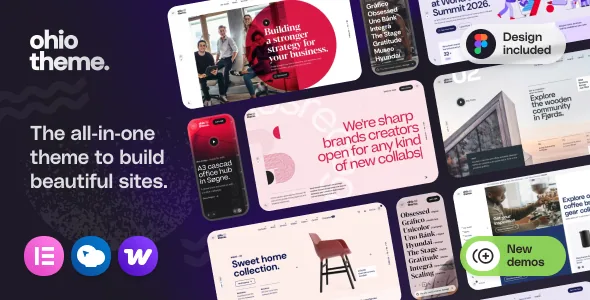
Ohio's most useful trait is duplication rather than novelty. The vendor's description lists the same custom element groups twice: once as "WPBakery Page Builder custom shortcodes" and again as "Elementor custom widgets." Heading, button, carousel, Google Maps, message, social networks, Mailchimp subscribe, accordion, horizontal accordion, blog posts, portfolio projects, fullscreen vertical slider, compare, tabs, banner, contact form, pricing table, process, team member, team group, testimonial, call to action, countdown, clients logo, image gallery, Instagram feed, dynamic text, video, counter, service table, icon box, pricing list and progress bar all appear in both columns.
That matters because the choice between Elementor and WPBakery stops being about which modules exist and becomes a question about your team. Ohio does not force a decision at build time either: the marketplace compatibility list names Elementor, Elementor Pro and WPBakery Page Builder separately, and the vendor presents the pairing as "two popular builders." Pages you build in one are not automatically available to edit in the other, so the practical caution is to settle on one editor per site and keep portfolio project layouts consistent with it. The vendor's own portfolio copy names WPBakery for custom project layouts, while the Elementor widget list includes a portfolio projects widget of its own.
One difference between the two paths is documented in the release notes. Recent Ohio versions add Projects blocks to a library called Ohio Blocks, and several fixes in version 3.7.8 target WPBakery editor behaviour specifically — hidden toolbars in accordion elements and front-end editor controls. Those entries show where active maintenance is landing; they are not a statement that the Elementor path receives less attention.
ACF Pro sits underneath both editors
The vendor says theme options are "powered by ACF Pro engine," which is a separate statement from page building. In practice this is the layer that holds the theme's own settings — the options you configure once and that apply site-wide, rather than the content you compose on a page. Ohio's description repeats its five menu types in this same context (hamburger, fullscreen overlay, classic menu with various positions, sidebar menu and sidebar panel menu), which suggests menus, typography and similar global choices live in theme settings rather than in the builder canvas.
The distinction is worth understanding before you commit to a workflow. If a design decision can be made in theme settings, changing it later applies everywhere without touching individual pages. If it was made with builder elements, it lives in that page's content. The vendor does not publish a granular map of which settings exist, so treat ACF Pro as the place to look first for global options and confirm the specific ones on the demo.
Portfolio: a custom post type with its own templates
Ohio is filed under creative/portfolio on the marketplace, and the portfolio side has more depth than a gallery shortcode. The vendor describes a custom post type for projects and collections, with "minimal portfolio grid and project page layouts," hover effects for grid items, and a large set of portfolio-specific settings. Version 3.7.8 added URL anchors for portfolio category filters — useful when you want to link someone straight to a filtered view — and earlier notes in the changelog fix project-detail fields and an empty Project Details section on one project layout.
Each project also supports structured details. The changelog references project Task, Strategy, Design and Client fields, which implies project pages carry labelled metadata rather than only body content. For a studio site, that structure is the reason to use the theme's portfolio post type instead of a generic posts archive: the detail fields and category filters come with the layout rather than being assembled by hand.
The blog side is narrower by comparison but still has distinct post types: gallery, image, video, audio and quote. Pagination is offered in three documented forms — classic links, AJAX lazy load and a load-more button — and the choice applies to archives rather than to individual entries.
Shop behaviour is named, not just claimed
Ohio's WooCommerce feature list reads like a sequence of interactions rather than a list of page templates. The vendor names sticky product display, AJAX live search, AJAX product quickview, an AJAX save-to-collection feature, AJAX add to cart and a product lightbox gallery preview, along with four product hover effects (image scaling, colour overlay, greyscale and image parallax) and three pre-made category layouts (offset, boxed and overlay grids).
These are vendor claims about what the theme provides, not measured performance figures. The useful takeaway is which problems the shop layer already addresses: a shopper can search, preview, save and add without leaving the catalog view, and category browsing can use a layout that is not a plain grid. If your store depends on a different interaction — a configurator, tiered wholesale pricing, a subscription flow — that work would come from WooCommerce extensions rather than from Ohio.
The marketplace compatibility list puts WooCommerce at 6.x.x through 10.x.x, as recorded when the listing was observed on 3 November 2026. Compatibility statements of this kind describe the vendor's declared support range; they are not a record of hands-on testing in this shop's environment.
Starting material, and what it excludes
Ohio leans on prepared demos. The vendor's one-click importer is a bundled plugin, and Figma source files for the demos are listed as a core feature — you can mock up a site in Figma before building it. A child theme is described as ready to use for source-code changes. The marketplace file list names PHP, CSS, SCSS and JS files, so the Sass sources arrive with the package if you plan to override styles rather than rely on the options panel.
One exclusion is stated plainly and catches people out: the images and fonts used on the demo site are demonstration assets and are not included with the purchase. You will replace demo imagery with your own licensed assets. The hundreds of bundled icon fonts — Font Awesome, Ionicons and Linea Icons — are a separate matter from the demo photographs.
Typography options are stated as 900+ free Google Fonts and 12K+ Adobe Typekit webfonts, with PO translation support alongside WPML and Loco Translate compatibility. Those are vendor listings; verifying that a specific Typekit kit works with your account and plan is worth doing before you design around it.
What you need before installing
The vendor states the hosting requirement directly: Ohio needs a WordPress installation from WordPress.org on your own server, or a WordPress.com site on the Business plan. Free, Personal and Premium WordPress.com plans do not permit installing custom themes and plugins. That single sentence decides whether the theme is even an option for a given project, so check the plan before reading further into features.
The marketplace listing records responsive layout, high-resolution assets, widget-ready sidebars, browser support for Firefox, Safari, Opera, Chrome and Edge, and a declared WordPress software range from 6.0.x upward. The listing observed on 3 November 2026 records the marketplace version as 3.8.1; the vendor's updates page reports fixes and additions through version 3.7.8 above it. The demo is publicly viewable, which is the most reliable way to check whether the minimal creative style and the menu treatments suit the project you have in mind.
Questions & answers
Can I mix WPBakery and Elementor on the same Ohio site?
Nothing in the vendor's material describes a converter between the two, and the element sets are published as separate shortcodes and widgets. Building different pages in different builders is technically possible, but you would maintain two editing systems and two sets of conventions. Pick one editor for page content and use it consistently.
Does Ohio include the images shown in its demos?
No. The vendor states that demo images and fonts are used for demonstration only and are not included with the purchase. You supply and license your own media.
Is Ohio's portfolio a separate post type from blog posts?
Yes. The vendor describes a custom post type for projects and collections with its own grid and project layouts, hover effects and category filters, kept apart from the blog post formats (gallery, image, video, audio and quote).