Two header systems, and the choice between them
Tourm's description separates site chrome into two parallel routes, each with its own control panel. A default header is configured through Tourm Options and Appearance > Widgets, where header widget areas hold its content. A second, page-builder header is built as a template under Tourm Builder > Header Builder. Footers follow the same pattern: default footer settings and footer widget areas on one side, a Footer Builder template on the other.
That matters for handover. A default header lives in the theme panel and in widget areas, so a site manager can change a phone number or a booking CTA without opening a builder. A builder header template is edited as a designed object instead. If more than one person maintains the site, deciding which system you standardise on shapes the documentation you write for them.
Widget Ready is marked Yes on the marketplace listing, which fits the default route. The vendor does not describe the two systems as interchangeable per page, so treat the choice as a site-wide decision rather than a per-template toggle.
Travel-specific addons, and a colour field worth finding first
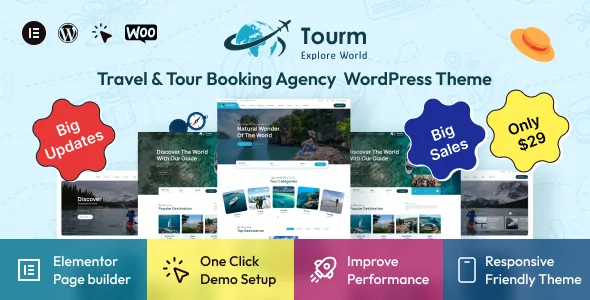
The theme is built for Elementor, and the vendor's headline block claims 57+ Elementor custom addons alongside pointers to custom widgets. A separate feature item elsewhere in the same listing claims 250+ sections. Both are self-reported inventory numbers measuring different things — reusable widgets versus prebuilt section arrangements — and the listing does not reconcile them, so neither is a verified count of what you will find in the panel.
The practical question is whether the addons are travel-specific. The vendor describes them as designed for this theme and responsive. Given the tour-focused demos, the useful ones should be the blocks you would otherwise rebuild by hand: trip cards, destination grids, itinerary blocks and enquiry forms. Open the live demo and check that the addons look like those rather than generic headings and buttons.
Colour control is documented with a location rather than a flourish: Dashboard > Tourm Options > General > Theme Primary Color, which the vendor says affects the header, navigation menu, buttons, links and backgrounds. If you plan to carry a brand palette across a large site, that one field is the lever to test first.
Trip pages and galleries are treated as their own layouts
The release notes suggest the trip surfaces get more design attention than a typical theme's generic blog templates. Version 2.2.0 records six new layout styles for the trip single page gallery and an enhanced trip archive layout. Version 2.1.0 lists optimisation of the trip single page and trip gallery page for compatibility with updated plugins, plus a new slider option to enable or disable drag behaviour.
Read that literally: the theme carries a dedicated trip content type with a gallery on the single template and a designed archive. For a tour operator, the archive is where visitors compare departures and the single page is where they commit, so having both addressed is more useful than a prettier homepage.
What the listing does not describe is how those six gallery styles differ, or whether the trip archive filters by destination, duration or price. Check the demo's trip listing page for filtering before assuming it exists.
Homepages accumulate by concept name, not by template number
The vendor adds homepage designs steadily and names each one by the kind of travel business it serves. The changelog lists Home Hiking and Home Hiking v2 in version 1.1, Home Cruise Tour in January 2025, Home Booking Agency and Home Travel Agency at version 2.0.0, Home Museum Tour later in the same version, and Home Winter Holiday Travel and Home Traveller in version 2.4.0.
That naming pattern is a useful planning signal. Rather than one flexible homepage you reshape for each client, the theme offers distinct starting points aimed at hiking operators, cruise sellers, booking agencies, museums and holiday travel. If your business fits one of those descriptions, you can start closer to finished; if it does not, you are adapting someone else's concept.
The listing never states a total homepage count, so build your shortlist from the demo switcher rather than from a number in the description.
The shop layer arrived late, and the listing is honest about that
WooCommerce appears in the compatibility attribute across versions 5.x through 9.x, and the changelog shows the integration being built up over time. Version 2.3.0 in August 2025 records the introduction of a comprehensive WooCommerce integration, and version 2.4.0 repeats that line while adding that WooCommerce template files were updated for better compatibility.
For a travel business this is best read as a storefront, not a reservation engine. The listing describes adding products for online purchase and delivery, with a customer dashboard showing order history after checkout. That covers selling deposits, gift vouchers, guidebooks or fixed-date packages as catalogue items. It does not describe date selection, per-person pricing, availability calendars or supplier inventory — so if your site needs real-time availability, budget for an additional booking plugin and confirm with the vendor how it would sit alongside the theme's WooCommerce templates.
Declared compatibility, and one line that has aged
The marketing copy in the description still says "Latest: WordPress 6.2.x / Elementor 3.13.X". The marketplace's own software version attribute is wider, spanning WordPress 5.0.x through 6.7.x. The headline line is stale — it was written against an older release — and the attribute is the field to check when you compare your WordPress install against the declared range.
Those are vendor and marketplace declarations, observed on the listing on 5 November 2026, not results of a test run. If you run a version above the attribute's top entry, ask the vendor rather than assuming support.
Other declarations worth knowing: compatibility is listed for WPML, Contact Form 7 and Bootstrap 5.x, the framework is Underscores, and Gutenberg Optimized is marked No. That last attribute describes the prepared editing path — the theme is built around Elementor — rather than a statement that the block editor is unavailable for ordinary posts. If block-based authoring is central to your workflow, this theme is not aimed at you.
ThemeForest Files Included lists PHP, HTML, CSS, Less, Sass, SCSS and JS files, and a child theme is listed among what you get. If you intend to restyle rather than click, the child theme plus the Sass sources is the route that survives a theme update.
Questions & answers
Can I mix a builder header on one page with the default header on another?
The vendor presents the two systems as parallel routes with separate settings, not as a per-page switch, so plan on choosing one approach for the site. If per-page header variation is essential, confirm it with the vendor before you build around it.
Does Tourm handle booking dates and availability?
The listing describes WooCommerce for selling products, with a customer dashboard after checkout, and does not describe date selection, per-person pricing or availability calendars. Tour operators needing live availability should plan on an additional plugin.
Which WordPress versions does Tourm declare?
The software version attribute spans WordPress 5.0.x through 6.7.x as observed on 5 November 2026, and the description's "WordPress 6.2.x / Elementor 3.13.X" line is older still. Ask the vendor about newer releases rather than assuming support.