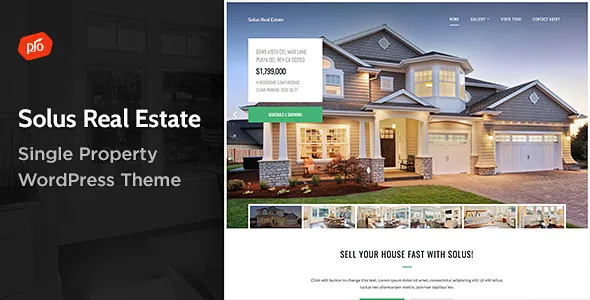
One property, not an inventory of listings
The subtitle is unusually literal: Single Property Theme. Solus is not aimed at building a portal where visitors filter hundreds of listings. It is aimed at presenting one home, villa or rental as its own site, where the page itself is the sales argument.
That framing changes what you need from a theme. There is no search to design, no results grid to populate, no per-listing template to standardise. Instead the work goes into a landing page that carries the photography, the location, the floor details and a way to get in touch. ProgressionStudios' description uses the phrase "show off your work," which lines up with this: the demo is a presentation piece, and the marketplace offers one demo address rather than a menu of demos to pick from.
If you are building a multi-agent brokerage site, this scope will feel narrow. If you have a single development, a holiday let, a farm for sale or one architecturally interesting house, it matches the job almost exactly.
The rest of the vendor's feature list describes how that one page gets built and tuned. The claims below come from the marketplace description, not from an install test.
The Boosted Elements bundle as the interaction layer
The headline inclusion is an add-on rather than a theme option: "Boosted Elements Add-on included – Easily create sliders, maps, popups & more with this premium plugin." That single line covers most of the interactive pieces a property page uses.
A slider carries the image sequence of the house, which is typically the first thing a buyer looks at. A map places the property in its surroundings — neighbourhood, transport, amenities. A popup handles the interruptions that would otherwise eat the layout: an enquiry form, a floor-plan overlay, a booking note. On a one-page presentation, keeping those pieces inside a plugin the theme ships with reduces the number of separate moving parts you have to keep track of.
The changelog shows this plugin is maintained alongside the theme rather than frozen at release; entries in 2022 and 2024 record Boosted Elements updates. Treat the plugin's exact element inventory as something to confirm on the current build, since the vendor summary describes it with a category list ("sliders, maps, popups & more") rather than an itemised set.
Sliders and demo content as the assembly path
Alongside the Boosted Elements add-on, the feature list names a built-in slider element: "Premium Slider – Add slideshows to any page using the built-in slider element." The distinction is worth keeping in mind when you plan pages — a slideshow element can sit inside any page you compose, not only on the home template.
Demo content is described as included, with a demo importer that the vendor says gets a site "up and running within minutes." The importer has been in the product since version 2.0 in April 2018, so it is a long-settled part of the package rather than a recent addition.
Importing is mainly a way to see how the property page is composed before you replace the content with your own. It is not a content strategy. For a single-property site, everything you actually publish — images, room descriptions, contact details — is yours to supply.
Site-wide tuning through the Customizer
The vendor's customisation claims sit in the front-end theme customizer: unlimited colours and font adjusting. Read that as global settings — you change the site's palette and typeface once instead of styling each section by hand. For a theme built around one property, that is the right level of control, because the design should stay consistent across the page.
Three layout controls are listed separately and are more structural. Sticky Header fixes the navigation to the top of the browser so it remains visible while someone scrolls through long property copy. Mega Menus provide built-in drop-down support for grouped navigation. The Footer section lets you set the column count anywhere from one to four and add a logo, icons and navigation.
Those three are the difference between a page that feels assembled and a page that feels designed. A single-property site with one main menu and a contact strip in the footer can use a simple one-column footer; a site with several areas of content — gallery, floor plans, neighbourhood, contact — benefits from the four-column arrangement and a menu that groups them. A sticky header makes the contact route reachable at any scroll depth, which is the one thing a property page must never hide.
The feature list also names a Contact Form for building and displaying multiple forms, which covers the enquiry route without reaching for a separate form plugin.
Elementor is a stated dependency, and the changelog shows it
The marketplace attributes list Elementor as compatible with the theme, and the changelog makes the relationship concrete rather than incidental. Version 2.9 in December 2024 was released to support Elementor 3.26+, version 2.8 in June 2024 covered Elementor 3.22+ and also fixed hidden Elementor templates, and version 2.6 in March 2022 fixed a deprecated function in Elementor 3.6+.
That pattern tells you the theme receives maintenance when Elementor changes, which matters more than a compatibility checkbox if you intend to build with that builder.
One piece of the naming needs care. The vendor feature list promises a "Drag & Drop Page Builder," and the changelog records that a drag-and-drop page builder was added in version 2.1 in September 2018 — the same release that added a new design, a new theme options panel, mega menu support and new Google Map support. The description does not say whether that builder is Elementor, the theme's own builder, or a label applied to the combined editing experience. If your workflow depends on a specific editing surface, verify which one you get in the current build before you plan around it.
Ten years of entries in one changelog
The update trail runs from version 1.1 in April 2015 to version 3.1 in August 2026, and the later entries are mostly compatibility work: WordPress 7+ support in 3.1, WordPress 6.9+ in 3.0, Elementor releases in 2.9 and 2.8, PHP 8 support back in 2.5 in 2021.
The marketplace record observed on 4 November 2026 lists declared WordPress versions from 7.0.x down to 5.0.x. Those are the seller's stated ranges, not a record of how Solus behaves against your plugin set, PHP version or hosting configuration. Declared compatibility and a tested install are different things, and only one of them is visible from the listing.
The practical read: the theme is actively maintained for a product that has been on sale for over a decade, and the maintenance is concentrated on keeping pace with WordPress and Elementor rather than adding new front-end features. If you need a theme whose recent releases expand the design toolkit, this is not that record.
What comes with the purchase
The marketplace file list names PHP, CSS and JS files. The vendor's framework attribute is Underscores, the starter theme Automattic maintains, which usually means a conventional WordPress template structure rather than a bespoke framework to learn.
The vendor feature list adds two things beyond the runtime files. Photoshop files are included for the logo and design, which is useful if you want to adapt the visual identity before you build rather than after. Documentation is described as detailed, and the marketplace marks the item as well documented and widget ready.
Two practical notes on scope. The theme's compatibility attributes still list IE9, IE10 and IE11 among supported browsers alongside Firefox, Safari, Opera, Chrome and Edge — a list that reflects a long-lived product and has little bearing on what you should build for today. And the demo photographs are the demo's, so a property site will need its own photography and floor plans before the layout looks like anything.
Questions & answers
Can Solus run a site with several properties for sale?
The product is framed as a single-property theme, with one demo and a feature list built around presenting one piece of work. Nothing in the evidence describes a listings index, filtering or a per-listing template, so treat a multi-property catalogue as outside the vendor's stated scope.
Do I need Elementor to build pages with Solus?
The marketplace lists Elementor as compatible, and the changelog records releases made specifically for Elementor 3.22+ and 3.26+. What the description does not clarify is whether the advertised drag-and-drop page builder and Elementor are the same editing surface, so confirm that detail for the current build before committing a workflow.
Are the demo images and Photoshop files the same thing?
No. The vendor lists Photoshop files for the logo and design, which are editable brand assets. The photography shown in the preview belongs to the demo and is not supplied as part of the theme, so a real property site needs its own images.


