The mobile layouts are two design layers that stay in sync
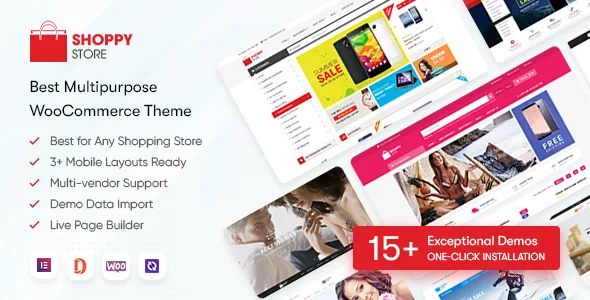
The vendor describes ShoppyStore as shipping both responsive layouts and "3+ Mobile-Specific Website Designs," and treats the difference as the theme's main argument. The part worth understanding is how little separates them in practice: you enable the mobile layouts in the theme options, and if you turn them off the theme uses its responsive layouts as the default. There is no per-device template assignment described.
So the mobile design is a mode you switch on for the whole site, not a separate build. If you keep it on, every phone visitor meets the layout the vendor designed for small screens; if you leave it off, they get the responsive version of the desktop design. The vendor does not explain how a visitor is detected and routed to either presentation, which is the one thing to confirm with the author before you make the mobile layer central to a launch.
This is why the two layers matter together. A mobile design that drifts away from the desktop build needs its own upkeep — separate artwork, separate navigation decisions, separate testing — and the options panel is where that upkeep is scheduled. Decide early whether you are maintaining one design or two.
The option set is about global decisions, not product pages
The theme options bundle is where site-wide choices live: logo, colours, mobile layouts, blog, shop, typography and a pop-up setting. The list tells you the intended division of labour. Global rules sit in the options panel; page content is assembled in Elementor.
Colour and type are the parts most shops will touch first. The vendor offers unlimited colour styles with 16 presets as a starting point, and typography controls with over 500 Google Fonts, with font family and size settings for titles, slogans and body text.
Homepage variety comes from a library of 15+ layouts, with multiple header and footer styles that the vendor says can be switched between homepages. Read that as components you can mix across pages — a header from one design and a footer from another — not as content that travels with them. Changing a homepage means rebuilding or re-importing that page.
What the AJAX layer changes for a shopper
ShoppyStore's feature list is mostly about what happens between pages rather than on them:
- AJAX live search returns results as the shopper types, which matters on catalogues too long to browse. - Quick view opens a product lightbox from a listing, so a shopper can check details without loading a product page. - AJAX cart, compare and wishlist keep those actions out of a full page reload, and compare and wishlist support is listed as a feature in its own right. - Image cloud-zoom responds to hover on desktop and, the vendor says, works on iPad and other tablets; a pop-up gallery displays the full image set as a slider. - Featured video thumbnails let a listing show a clip rather than a still. - Colour and image swatches present variations the vendor says WooCommerce does not handle natively — that capability comes from a bundled swatches plugin rather than the theme alone.
The vendor also lists four product page types, related product and up-sell sliders, and social sharing buttons. Those product-page features are claimed rather than demonstrated, so the useful test is your own variation structure: colour swatches, multi-image products and a couple of long titles.
Bundled plugins, and the conditions attached to each
Two inclusions come with limits the vendor states plainly, and they change how you plan upgrades.
JetSmartFilters Pro is included as a package only, with no licence, and the vendor says plugin updates arrive through theme updates. Practically, your filter plugin version follows the theme's release cadence rather than a separate subscription — workable if you are happy updating the theme as a unit, awkward if you need a filter fix that the plugin vendor has shipped but the theme has not yet bundled.
WPBakery Page Builder is included for customers who still run the older WPBakery build. The changelog places a boundary on that support: WPBakery-based theme updates were supported only until 5 December 2020, with the theme moving to Elementor afterwards. An inherited WPBakery site therefore sits behind that date, and its editing route is not the current one.
Revolution Slider, MailChimp for WordPress, Contact Form 7 readiness and a child theme are also listed. The vendor's package description names the theme package, PSD sources and documentation.
Multi-vendor, forum and language support as stated
If you plan to host third-party sellers, the vendor names four plugins it says the theme is compatible with: Dokan Multivendor, WC Vendors, MultiVendorX and WCFM MarketPlace. That is a compatibility statement, not a demonstration that vendor dashboards, commissions or payouts behave identically under all four, so test the workflows you will actually depend on.
bbPress 2.5.x appears in the marketplace compatibility list, which gives you a forum beside the shop — useful for pre-sales questions and product communities. WPML is listed too, and the vendor says every line of content can be translated, with RTL layout support for right-to-left markets.
The same marketplace record, observed on 4 November 2026, lists Elementor, Elementor Pro, WooCommerce 6.x.x and Bootstrap 4.x under Compatible With. It is a snapshot of declared compatibility, not a test result, and it will age faster than the vendor's own changelog.
Where the recent releases actually go
The changelog reads as maintenance rather than redesign. The newest entry recorded, version 3.7.23 dated 11 September 2025, updates WooCommerce to 10.1.2, WordPress to 6.8.2 and Revolution Slider to 6.7.37, and fixes a wishlist update bug plus brand display with WooCommerce 9.6 and later. Earlier entries repeat the pattern — WooCommerce and WordPress version bumps, slider and Elementor Pro updates, with fixes attached, including an Elementor update error and PHP 8.2 issues in version 3.7.17.
That tells you what kind of upkeep you are buying into: the theme's releases are aimed at staying current with WooCommerce, which is the compatibility that decides whether a shop keeps working. It also tells you the design side is settled. You are choosing an existing set of homepages and mobile layouts, not waiting for a redesign release.
Questions & answers
Can I use the mobile designs on phones only, while desktop visitors get the responsive layout?
That is the intent as described, but the vendor does not document how visitors are routed between the two presentations. The options panel switches the mobile layouts on or off for the site, with responsive layouts as the fallback when they are off. If device-level control is central to your plan, ask the author how detection works.
What happens to JetSmartFilters Pro updates if I rely on it?
The vendor includes the plugin as a package without a licence and says its updates ship inside theme updates. Your filter version therefore tracks the theme release schedule rather than the plugin's own releases.
Is WPBakery still a supported way to build with ShoppyStore?
The vendor includes WPBakery only for customers using the older WPBakery-built version and records in the changelog that WPBakery-based theme updates were supported until 5 December 2020. New builds go through Elementor.