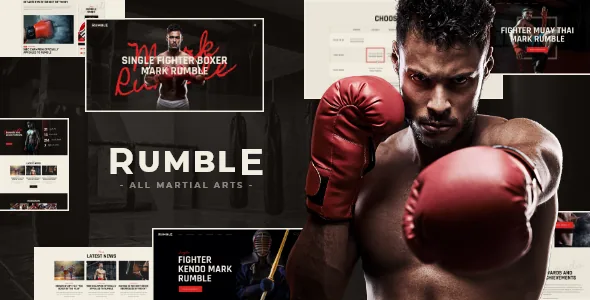
Eight starting points, one per corner of the fight business
Plenty of niche themes ship several homepage demos that differ in colour and photo choice. Rumble's vendor describes something closer to separate briefs: eight homepage options named for the audiences behind them — Boxing News, MMA News, a Boxing/MMA Gym, a Single MMA and Boxing Fighter, a bet company site, a sport store, a Karate & Katana section, and a Muai-Thai section.
That list matters because a fight gym and a fight news portal want different furniture on the front page. A gym needs a timetable, class descriptions and a way to book a trial. A news site needs a lead story, a feed of recent posts and something to show results or rankings. A fighter profile page needs a portrait, a record and social links. Buying one theme that addresses all three is the point.
The vendor's changelog shows the set was built up discipline by discipline rather than designed once: Karate and Muai-thai homepages arrived in an early release, crossfit and MMA homepages followed in September 2021, and a Wrestling homepage was added in January 2022. Treat the eight as current listing contents rather than a fixed historical plan.
What each concept is actually for
Reading the names against the theme's declared plugin compatibility gives a clearer picture of what you would be assembling.
For news and results, the vendor lists multiple blog styles, 20-plus post animations, a feed you can restrict to chosen post types or categories, post views, likes and sharing buttons, and a related posts section. On a boxing news build those are the mechanics that keep the homepage full without hand-editing it every fight night.
For a gym or promotion, the relevant names in the compatibility list are The Events Calendar, Timetable and Event Schedule, and Booked. The Events Calendar handles event listings; a timetable plugin is the more natural fit for recurring weekly classes. Booked, an appointments plugin, appears in the vendor's plugin list, though the changelog records it being removed from the package in version 1.4.0 — so confirm the current position before you plan around it.
For a store selling gloves, wraps or jerseys, WooCommerce appears in both the vendor's plugin list and the marketplace compatibility attribute, which names WooCommerce 5.x through 9.x as observed on 4 November 2026. For a fighter or coach profile, the vendor's custom post types and custom shortcodes are the tools you would use to lay out a record and a biography.
None of this is a promise that a given homepage works with a given plugin. It describes the pairings the vendor advertises.
Settings that inherit, and where you override them
The theme's own short description singles out a system of inheritance and override options: individual parameters can be set for different sections of a site and for supported plugins. The feature list repeats it under the theme framework as "Setting Inheritance and Override System", alongside 750+ customizer options and a custom theme options panel.
In practice this is the feature that matters once a site has more than one purpose. If your store section and your news section should carry different typography, or one plugin's output should be styled apart from the rest of the site, an inheritance chain lets you set a global default and change it only where needed. Without one, you end up either accepting one look everywhere or writing CSS exceptions by hand.
The 750-option figure says little on its own. What is worth knowing before you buy is how the override logic behaves with the plugins you intend to run — the vendor describes it as working with supported plugins, not with everything you might install.
A plugin list is a snapshot, not a contract
The description's plugin section names Slider Revolution, Elementor, Essential Grid, MailChimp for WP, Instagram Feed, WooCommerce, The Events Calendar, Booked, Search & Filter, Timetable and Event Schedule, WP GDPR Compliance and ThemeREX Addons.
The changelog is the more honest document. Smash Balloon Instagram Feed was removed in version 1.1.2 in March 2021, and an earlier release note in the same period mentions an Instagram feed change. Booked was removed in November 2023. Elegro Crypto Payment and the Cookie Information plugin were dropped in 2024. Each removal reflects something outside the theme — an API change, a plugin's own maintenance — but the effect for a buyer is the same: an integration named in a feature list may no longer be the supported path.
Check the item's current description and recent changelog entries for whichever plugin your build depends on. The list is a useful map of what the theme was styled around; it is not a guarantee of bundled code.
Editing the frame, not just the page
Elementor appears in the compatibility attribute and the vendor describes builder support for page content. The more useful detail is that header and footer layouts are also described as customizable in Elementor. That means the persistent frame around your content — logo placement, navigation row, footer columns — is editable in the same canvas as the pages, rather than in a separate theme panel with its own field set.
Sliders are covered by two names: Slider Revolution is listed among included and compatible plugins, and Swiper supplies swipe gestures. On a phone, a gesture-driven slider is the difference between a gallery that moves properly under a thumb and one that fights the page scroll.
The marketplace attribute marks Gutenberg Optimized as No. Read that as a statement about the editing path the vendor supports — the theme's page elements live in Elementor — not as evidence that you cannot write posts in the block editor.
The declared environment, and the imagery you supply
As observed on 4 November 2026, the marketplace compatibility attribute lists Elementor, Events Calendar, WooCommerce 5.x through 9.x and WPML, with browsers recorded as Firefox, Safari, Opera, Chrome and Edge. The software version attribute spans WordPress 4.9.x through 7.0.x, and the changelog records compatibility work through WordPress 7.0.2 in mid-2026. Files included are recorded as PHP, CSS and JS.
Documentation is marked Unrated, which tells you nothing either way — budget for reading the vendor's own docs rather than relying on that field.
The description states that images used in the live preview are copyrighted to their respective owners and are not included in the template. Demo photography, including any fighter portraits and gym shots, is yours to license and supply. Plan the content shoot before you plan the build, because the design leans on it.
Questions & answers
Can I run a shop and a gym timetable on the same Rumble site?
That is the scenario the theme is described around — the vendor names a sport store and a gym homepage separately, and lists WooCommerce alongside The Events Calendar and Timetable and Event Schedule. The inheritance and override system is the piece meant to keep those sections styled apart. Whether the specific plugins cooperate on one install is something to confirm with the vendor or test on your own environment.
Does the theme require the plugins in its compatibility list?
The vendor presents them as compatible additions, not as a required set. Elementor is the editing path Rumble is built around, and the header and footer layouts are described as editable there. The events, booking, grid and filtering plugins support particular homepage concepts; a single-discipline site would not need all of them.
Is the fighter homepage a profile template or a blog layout?
The vendor's list names "Single MMA and Boxing Fighter" as one of the eight homepage options, without describing its fields. Treat it as a layout you would populate, and check the demo before assuming it stores records or fight history as structured data.


