A business theme that stores its catalog in WordPress posts
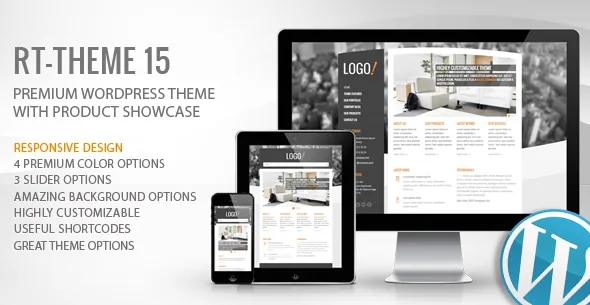
RT-Theme 15 treats products as their own content type. The vendor's marketplace description calls this the Product Showcase: custom product posts with a tabbed single-product page, related products, unlimited photos attached to one product and support for custom sidebars. Portfolio items work the same way, as custom posts that can be image- or video-based, with thumbnails pulled automatically from Vimeo and YouTube links.
That means a small catalog or services site can be maintained from the normal WordPress editor and media library rather than a shop plugin. The vendor also positions the product and portfolio tools for tour itineraries, car rental, real estate and hotel room presentations — the same post structure wearing a different label.
One timing fact belongs up front: the marketplace lists version 3.0.1 and a vendor update dated 13 November 2020, with WordPress 4.9.x to 5.5.x in the compatibility attributes. Treat the theme as software of that era and check how it behaves on a current install before committing a client project to it.
Placing selected products with one shortcode
A Product Slider shortcode added in version 1.6 lets you choose individual products and output them on the home page, an inner page or inside a post. Left as a slider, it cycles the chosen items; turn the slider off and the same shortcode renders them as a plain grid in 2, 3, 4 or 5 columns.
The column count is the useful part of that switch. Five columns suits a wide homepage strip of small product cards; two columns reads more like a feature list. Because it is a shortcode, the same selection can be reused in several places without rebuilding the list.
Shortcodes are also how the theme's other elements — accordions, buttons, sliders — reach the editor, added through WYSIWYG quick-styling buttons. This is a pre-block way of composing pages, and it shapes how you plan edits: the layout lives in text tags inside the content, not in blocks you drag.
Sidebars you build per placement
The RT-Framework panel includes a Sidebar Creator, described as letting you create sidebars "for any place or mixed places you want." In practice you register additional widget areas and then assign each page or product to the one that fits — a product with its own sidebar, as the showcase section states, or a page that needs something different from the blog.
Seven other widgets ship with the theme: Twitter, Flickr, two versions of Recent Posts, a Recent Posts Gallery, Popular Posts, Contact Info and Testimonials. These are the pieces you drop into the areas you create, so the sidebar system and the widget set are designed to be used together rather than separately.
On the home page the same idea appears as a widgetized page that supports unlimited boxes with shortcodes and featured images. The vendor frames it as "many layout possibilities" — an open arrangement of boxes rather than a fixed set of homepage sections.
Three home sliders, four skins and the color controls
Home-page sliders come in three engines: Flex Slider, Nivo Slider and Cycle Slider. Slides are added as custom slider posts, with a custom height and adjustable transition time and effect, so changing a slide does not mean editing a page template.
For re-branding, the vendor offers four premium skins — dark, red, blue and green — with styling controls for heading, body and menu font colors, and a Remove Curves option for a completely smooth treatment that applies across all four skins. Typography runs through Google fonts and Cufon fonts with font-size control.
Backgrounds have their own option: instead of a single image you can supply several and let the theme randomize which one appears. It is a small setting with a visible effect on a photography- or texture-led business site, and it belongs to the same styling panel as the skin choice.
Where the pieces live after version 3
The version 3 changelog records a structural change: all custom posts, widgets and shortcodes moved into an RT-Theme 15 Extensions plugin, installed and activated from Appearance → Install Plugin. If the product, portfolio or slider options are missing, that plugin is the first thing to check — the framework panel can look complete while the content types are absent.
The same release also changed how the home page works. You now create a page, select "Home Page" from the Template list under Page Attributes, and set it as the static homepage under Settings → Reading. The older setup — a separate front page assembled through theme options — no longer applies in the same way.
For page-builder composition, version 2.5.6 introduced two page templates, "Builder Template" and "Builder Page With Slider," both of which strip the page title, breadcrumb menu and search box from a page. They exist so a builder can own the whole canvas. Elementor appears in the compatibility attributes, but the vendor does not describe it as the theme's own composition tool; the page templates simply get the theme's chrome out of the way. These are marketplace claims rather than results of testing the themes together on a current install.
Translations and the bundled language files
Two separate translation routes are on offer. WPML is listed as compatible for running a multilingual site, and a .po file is included for translating the theme's own strings into one other language.
Alongside those, the vendor lists ready-made translation files for Dutch, Turkish, German and Polish, credited to named contributors. Those are pre-existing translations of the theme's strings, not translations of your content. If your site is English-only, none of this affects the build; if it is not, the difference between WPML-managed content and a translated .po file is worth planning before you write copy.
Questions & answers
Are the products in RT-Theme 15 WooCommerce products?
No. The vendor describes custom product posts with a tabbed single-product page, unlimited photos and related products. WooCommerce does not appear in the theme's compatibility attributes, so treat the catalog as a presentation layer that is not wired to a checkout.
Why are the product and portfolio options missing after activation?
Version 3 moved all custom posts, widgets and shortcodes into the RT-Theme 15 Extensions plugin. Activate it from Appearance → Install Plugin and the content types and shortcode set should return.
Can the home page be assembled in a page builder?
The theme ships "Home Page" template for the static front page and, since version 2.5.6, "Builder Template" and "Builder Page With Slider" templates that remove the page title, breadcrumb and search box. Elementor is listed as compatible in the marketplace attributes; the vendor does not present it as the theme's own builder.
Does the theme require shortcodes instead of blocks?
The vendor's editing workflow is shortcode-based, added through quick-styling buttons in the classic editor, and the marketplace does not list the theme as Gutenberg optimized. That describes how the theme's elements are inserted, not a proven block-editor failure.