Seven content modules, and a switch to turn each one off
The vendor's description of BlueCollar spends most of its length on something more mundane than a hero layout: built-in post types. Seven are named — Blog, FAQ, Galleries, People, Portfolio, Services and Testimonials — and each is presented as a way to manage a particular kind of content rather than a page template you fill in once.
That is the structural decision the theme asks you to make. A renovation company's site is mostly repeating objects: a list of services, a set of finished projects, the crew, a handful of common questions, proof from past clients. Storing them as entries rather than as paragraph blocks on a page means adding a project later is a new item, not a redesign.
The vendor also lists the option to disable post types you do not need, describing the goal as keeping the admin free of clutter. Choose that set deliberately, because it shapes the menus you and your client will look at every day.
Services carries the site; Portfolio is the module with extra fields
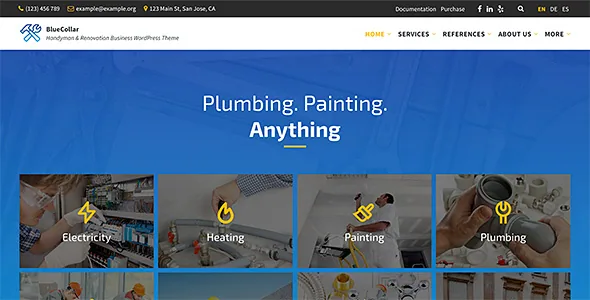
Of the seven, the vendor calls Services "the bread and butter of this theme" — a simple way to present what the business offers. For a handyman or contractor, that is the page a visitor arrives looking for, so treat its entries as the spine of the site and everything else as support.
Portfolio carries a detail the other modules do not get in the description: each project can have several custom fields plus a gallery. That gives a finished job a place for the specifics a client wants to see — scope, location, materials, whatever fields you define — alongside images of the work. Galleries exist as a separate module for showing work without tying it to a named project, which is useful for progress shots and small repairs that do not deserve a case-study page.
The remaining modules do narrower jobs. FAQ holds answers to the questions you keep retyping in emails. People introduces the team with portraits and short bios. Testimonials collects client praise. Blog carries tips and company news.
The demo import hands you a composition, not the photography
Demo content is included so you can recreate the live preview site quickly, and two caveats sit in the same vendor sentence.
First, demo images are not included, for copyright reasons. On a trade site where before-and-after shots and project photos do most of the selling, that is a budget line and a scheduling task rather than a footnote — you need your own images ready before the site looks like anything. Build the content structure first and slot photography in as it arrives, or the import will leave you with an empty shell.
Second, imported demo pages can be edited using the WordPress block editor only. The import gives you a starting composition, but adjustments to those pages happen in Gutenberg, not in a separate drag-and-drop builder.
Blocks by default; Elementor and WPBakery supported alongside
The vendor's position is that no third-party page builder is needed because the theme works with the native WordPress editor. The marketplace marks it Gutenberg optimized, Elementor and WPBakery Page Builder are listed as supported, and the vendor's own FAQ states that a bundled version of WPBakery is included.
Read those together as one workflow with options rather than three competing ones. Blocks are the default surface; the two builders are there if your team already works in them or inherits layouts built that way. Whether a given demo section survives being moved between those surfaces is not something the description addresses.
Branding runs at two depths: pick the main colours in the admin for a quick scheme, or edit the dedicated CSS (SCSS) file when you want to change every colour. A child theme is included for code-level overrides, and the vendor describes the code as commented with front-end markup overridable through that child theme.
What the listing declares, and what it leaves to your own testing
Observed on 4 November 2026, the listing marks BlueCollar responsive, widget ready and high resolution, with a four-plus column layout attribute and browser support for Firefox, Safari, Opera, Chrome and Edge. The software version field spans WordPress 6.9.x through 7.1.x, and the latest marketplace changelog entry cites improved compatibility with WordPress 7.1 alongside an updated LSVR Framework.
Those are declarations attached to the product at a point in time, not records of testing against your WordPress, PHP or plugin stack. The vendor separately states PHP 8 compatibility, translation files for the theme and its bundled LSVR plugins, and automatic RTL switching when the site language is right-to-left.
Maintenance is worth noting only as a pattern: the vendor says the theme has received more than 80 updates since its first release, which speaks to upkeep rather than to how any single feature behaves on your install.
Questions & answers
Do I need Elementor or WPBakery to build pages with BlueCollar?
No. The vendor states that pages are built with the WordPress block editor and that no third-party builder is required, while listing Elementor and WPBakery Page Builder as supported options, with a bundled WPBakery version mentioned in the vendor FAQ. Imported demo pages are specifically described as editable in the block editor only.
Will the demo import recreate the preview site exactly?
Not exactly. The vendor says demo content lets you recreate the live preview in a few minutes, but demo images are excluded for copyright reasons, so the photography in the preview has to be replaced with your own. Layout and content structure import; the imagery does not.
Can I remove content types I will not use?
Yes. The vendor describes the post types as modular and says you can disable the ones you do not need to keep the admin uncluttered. The modules named in the description are Blog, FAQ, Galleries, People, Portfolio, Services and Testimonials.