Offsets and featured flags are the front page's real controls
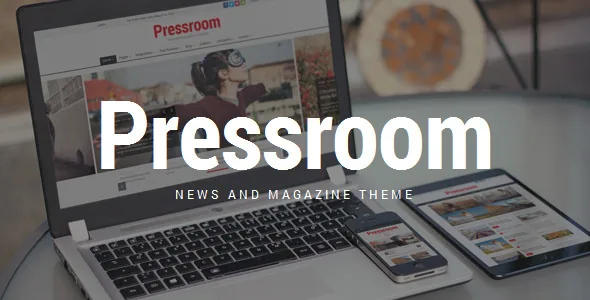
Most magazine themes sell you layouts. Pressroom, as the QuanticaLabs listing describes it, gives you rules for what appears where inside those layouts, and that is the part worth understanding before looking at anything visual.
Two settings carry it. The offset parameter can be attached to any page-builder component, so one section can skip the first N posts while another starts further down the archive. Featured posts work differently: you mark a post as featured and the vendor says it stays featured regardless of the sorting settings inside a component. Read together, the offset handles the flow of new stories and the featured flag pins the exceptions you want held in place.
On a news site that is the daily work. The top slot keeps the story you chose this morning while the section beneath it advances on its own as reporters publish. You are not rebuilding a page every time a headline changes.
Sticky columns for a layout that runs thin
The vendor describes smart sticky columns that float a column so it stays visible while a reader scrolls a long page, instead of leaving the empty space that usually appears beside a short article. In magazine layouts that is typically the rail holding a newsletter prompt, a most-read list or a single house ad.
It is a modest feature, but it decides how a template copes with thin content. A three-column arrangement with a sticky rail keeps its shape even when the main column runs short, so you can commit to a dense grid without every article needing to fill it. Because the columns are page-builder components, the behaviour is set per layout rather than globally, and two templates can treat their rails differently.
The high-contrast skin changes behaviour, not just colours
Three skins are listed: default light, dark, and a high-contrast option the vendor describes as intended for visually impaired readers. The last one is the interesting one, because the description does not stop at colour. The high-contrast skin is said to keep carousel navigation buttons and controls visible at all times and to add controls for changing paragraph font size.
Those two details turn a palette into a reading mode. Visitors who need larger body copy can enlarge it from the page, and carousel arrows stay reachable instead of appearing on hover.
Separately, responsive mode can be switched off in the Theme Options Panel, so a fixed desktop layout stays fixed if that is what an embed or a kiosk-style screen requires.
Six home page styles, seven blog layouts, nine post presentations
The home page starting points are grouped by how they lead: a wide slider for featured content, a small slider, and block-based featured content. Which you pick depends on whether the front page opens with one dominant story or turns over many items at once.
Blog indexing comes in seven described layouts covering one, two and three columns, sidebars on either side, a small-slider variant and a search page template. Some of that overlap is deliberate: sidebar position is often a per-page decision rather than a reason to choose a different theme.
Post formats are where the editorial ambition shows. Beyond large and small featured images, gallery, YouTube, Vimeo and SoundCloud audio, the list includes two distinct review layouts and a quote style. These are visual treatments for a single entry rather than separate content types, so a review reads differently from a news item inside the same archive.
Site-wide settings sit in one panel
Global settings live in a Theme Options Panel under the Appearance menu. The vendor's list covers logo, footer, sticky menu, website layout, the responsive and RTL toggles, the contact form, colour scheme, header style and Google Fonts, with 800+ fonts offered.
Header style is a menu of 15 predefined options rather than a builder task, which matters if you want to change the masthead without touching templates. Wide and boxed layouts sit here too, and boxed mode accepts a pattern or background image, with or without an overlay layer.
A one-click importer installs demo pages, posts, sliders and widgets from the same panel. Treat that import as scaffolding to replace: it is the quickest way to see how the components combine, not a finished site.
What the listing declares, and what it leaves open
The marketplace attributes recorded on 4 November 2026 list WPBakery Page Builder and WPML as compatible plugins, WooCommerce 5.x through 10.x, a WordPress range spanning 4.9.x to 7.1.x, and a browser list that still names Internet Explorer 9 through 11. The package is listed as containing PHP, HTML, CSS and JS files, and the theme is described as widget ready and Gutenberg optimized. The vendor also says the theme ships 25+ custom Pressroom components on top of a broader element set of 60+.
Those are vendor declarations, not independent test results, and a compatibility list is a snapshot rather than a warranty. The WordPress span covers many major releases; if your install sits at either end of it, check behaviour on a staging copy first.
One practical point is worth flagging before you commit to a workflow. The described components are page-builder components, while the metadata says the theme is Gutenberg optimized. How a block-built article renders inside the magazine post formats is not settled by the vendor material, so that is something to judge from the demo rather than assume.
Questions & answers
Do I have to use WPBakery to publish articles?
The described components and layouts are page-builder components, and WPBakery is bundled with the theme. The listing also marks Pressroom as Gutenberg optimized. That combination suggests block content is supported, but the vendor material does not explain how block-authored posts look inside the magazine post formats, so treat it as a demo question rather than a settled one.
How do featured posts and offsets interact?
They solve different problems. The offset skips a set number of posts in a component so sections can start at different points in the archive. The featured flag marks a post to stay featured regardless of that component's sorting. Use offsets to let sections advance automatically and the featured flag to pin the exceptions.
Is the high-contrast skin just a colour swap?
No. According to the vendor, it keeps carousel navigation buttons and controls visible at all times and adds controls for changing paragraph font size. That makes it a reading mode as much as a palette.