Global, preset, page: the three-tier override chain
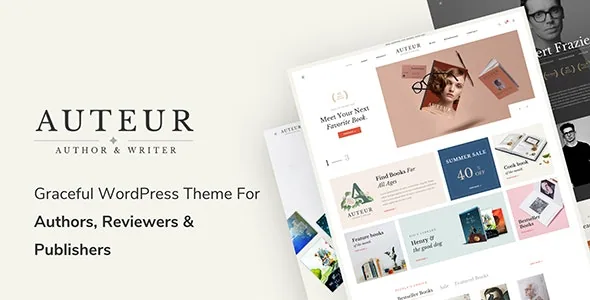
Most themes give you one settings screen and a Customizer. Auteur's description spends its longest passage on something more structural: three levels of options that stack. Theme Options hold the sitewide setup. A Preset is a saved bundle of options applied to specific pages or posts, and the vendor states it overrides Theme Options on everything it is attached to. Page Settings sit inside a single page or post, affect only that item, and override both.
For a publisher the practical shape is obvious enough: shared brand settings up top, a Preset for a series or a seasonal catalogue, and Page Settings for the one landing page that needs its own header. Take the order literally when you plan the site, because the value of the feature depends on you deciding what belongs at each tier rather than reaching for the innermost control every time. Whether the cascade behaves exactly as documented is something you would confirm on an imported demo.
Content Blocks turn the header and footer into layouts you build
The header is not a fixed theme part here. The vendor says a layout built in WPBakery can be saved as a Content Block and reused, and names that mechanism for page titles, top bars, top drawers and footers. Alongside it, the description lists 8+ header layouts, a separately set mobile header, an optional Top Bar built in the page builder, and the ability to enable or disable the footer in a Preset or in Theme Options.
The consequence for a book site is that a title detail page can carry its own page-title band built as a reusable block, while archive and shop pages take a header layout from the set. The cost is bookkeeping: every reusable block and every Preset is another named object someone has to track. That becomes a real problem once the catalogue grows, and the vendor's copy does not address it.
Typography controls, and what they leave to you
Auteur treats type as a first-class setting rather than part of a skin. Font family, size, weight and style are all editable from theme settings; the vendor lists more than 800 Google Fonts, a font manager for organizing them, and support for uploading custom font files.
That is a wide panel, not a typographic system. A review or author site lives on body text at reading size, and the theme supplies the controls for measure, line height and heading scale without making those choices. The colour side works the same way: an accent colour that changes sitewide, per-area colours for the top bar, header and footer, and what the vendor calls unlimited colour presets applied per area in one click.
For a site that sells books as well as publishes about them, the per-area colours are where coherence usually breaks first. A preset built for the shop is easier to keep consistent than a series of per-page corrections.
Blog and search templates that are configured separately
The blog section is described as 7+ layouts with distinct setups for the blog listing, the search listing and single posts, plus options for showing or hiding information, animation, pagination type and posts per page. The separate search listing is the detail that matters on a site about books: a reader searching an author name or a title lands on a template you designed rather than a default fallback.
The mega menu takes an icon per menu item and allows colour and design changes, which is a workable place to hang a catalogue of genres, series or authors rather than flattening them into one list. The vendor also lists 9+ custom widgets usable in sidebars, footers and the page builder, and a sticky sidebar option for sidebars that follow long article scrolls.
Where WooCommerce stops and your work starts
The vendor describes styled WooCommerce pages and elements and full design integration, and the marketplace files the item under a WooCommerce ecommerce category. The compatibility field declares WooCommerce 5.x through 10.x as supported ranges, as listed in November 2026. Those are vendor declarations about ranges, not evidence that the theme has been exercised against a particular shop configuration, and the declared WordPress range (5.7.x to 7.1.x) should be read the same way.
What the theme does not bring is commerce itself. Products, shipping, tax, payment gateways and catalogue structure remain WooCommerce work. If the store is the main purpose, design the product architecture first and treat Auteur's styling as the layer applied afterwards.
Package, builder and a compatibility field worth reading carefully
The files-included field lists PHP, CSS and JS, and the vendor says a child theme ships with the package for code changes that should survive updates. WPBakery Page Builder and Slider Revolution are named as bundled premium plugins, with 4 pre-homepage demos and one-click demo import; Contact Form 7 is described as supported rather than bundled. The description also mentions 40+ premade element templates for WPBakery and parallax or video row backgrounds.
One field needs care. The compatible-with list names Elementor alongside WPBakery, Bootstrap 4.x, and Gutenberg Optimized marked Yes. Elementor's presence is a compatibility declaration, not a statement that it is bundled or that the demos are built with it — the builder documented throughout the vendor's description is WPBakery, and page-building instructions in the theme's own material are written for it. Treat the whole list as declared ranges and install on a staging copy of your own versions before committing a launch date.
Two planning notes before you import
Name your settings tiers before the site fills up. Global brand in Theme Options, series or seasonal variations as Presets, true one-offs in Page Settings. Skip that and a catalogue of dozens of title pages drifts into mismatched headers and colours that are harder to trace than a single global set.
The other note is imagery. Demo screenshots show design; the marketplace description does not state that demo photographs are licensed for your use. Book covers are licensed assets in their own right, so budget for cover art and author photography rather than assuming the import supplies publishable images.
Questions & answers
Can different pages on an Auteur site use different designs?
According to the vendor, yes. A Preset overrides Theme Options on the pages and posts it is applied to, and Page Settings override both on an individual page or post. The description presents this as the way to give a page a distinct look without maintaining a separate theme.
Is Auteur built on WPBakery or Elementor?
The documented builder is WPBakery Page Builder, which the vendor says is bundled with Slider Revolution. Elementor appears only in the compatible-with field, which declares compatibility rather than describing how the theme's demos are composed.
Does Auteur work without a store?
Yes. The vendor pitches the theme at authors, bloggers, reviewers, publishers and book distributors, with styled WooCommerce pages available for those who sell. The settings layers, Content Blocks and blog layout options do not depend on WooCommerce.