A startup theme that is really a set of 24 named front pages
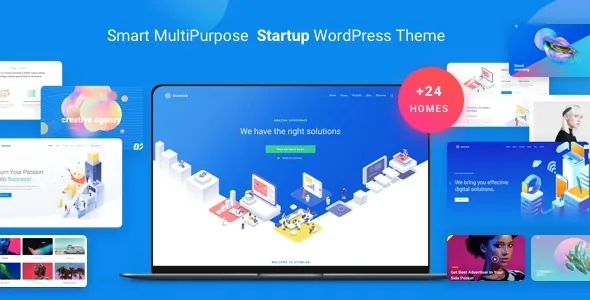
ThemeMove's description of Atomlab keeps returning to one number, and it does not keep it consistent. The overall feature list says "18+ Homepages", while the design section says "Greate 24+ homepages" and the Creative Homepages list names 24 entries, from One-page and Startup through Support Center, Finance, Conference, Medical Clinic and Blog Homepage.
The named list is the more useful figure because it tells you what kind of pages exist. Atomlab is not narrowly a pitch page for a startup: the same package covers an agency site, an app presentation, a freelancer portfolio, an SEO landing page, a support centre and two shop fronts. No single demo resembles all of them.
A "+" in both counts signals room for additions rather than a fixed inventory. If a specific homepage name is the reason you are considering Atomlab, treat the name as the vendor's label for a layout and confirm that layout on the live demo before you commit a project to it.
Three front pages described by how they work, not how they look
Most homepage names arrive with a category label only. Three get a paragraph each, and they are worth reading closely because the mechanism decides whether the layout suits your content.
Home Portfolio 02 is a portfolio-first front page with a full-screen vertical slideshow, category tabs and a masonry portfolio archive beneath. A front page that opens with a vertical slideshow asks visitors to scroll through projects before they read anything else, which works when the work is the argument: a studio, a design practice, a consultancy with case studies.
Home Blog Magazine is the news and events front page, with a lazy-load effect on the feed and Instagram content arranged next to posts. The stated aim is readability across several blog categories, so it presumes an active content operation. If you do not maintain an Instagram feed, that portion of the layout will need replacing.
Home Creative Studio fits a full-width slider with a video background, and the video opens in a popup when a preview button is clicked. The vendor points it at brands advertising a new project, product or brand film. It is the most asset-dependent of the three: without footage and a poster image, the layout has little to show.
Headers are the second counted dimension
Where FinancePlus, from the same vendor, argues from colour presets, Atomlab argues from header variants. The feature list names 17 preset header styles, and the description explains what gets combined inside them: brand logo, header menu, navigation buttons, a search bar, a header widget and a cart icon.
That combination set is the practical part. A header carrying a cart icon and a search bar behaves differently from a minimal one with a logo and menu, and it changes what you can leave off the page body. Shop sites can put the cart in the frame; content-heavy sites can put search and a widget there.
The surrounding navigation elements are listed separately: 4+ mega menu configurations, 7 footer variants, a flyout sidebar and sticky header behaviour. Together they decide how much of the site frame you configure instead of building from scratch.
What 49+ shortcodes give an editor inside WPBakery
Atomlab builds pages in WPBakery Page Builder, and the vendor says it added more than 49 exclusive shortcodes to the builder's shortcode list in backend editing mode. The premade elements are named individually: buttons, counters, Google Maps, pricing table, progress bar, icon boxes, rows and columns, popup video, countdown, gallery, cards, typed text, Instagram, Twitter, timeline, tables, team members, tabs, testimonials and social network.
The breadth matters more than a landing page usually needs. A conference page wants a countdown and a pricing table, a support page wants tabs and tables, an agency page wants team members and testimonials, a product page wants icon boxes and cards. You assemble the page from these rather than commissioning each block.
The marketplace listing marks Gutenberg Optimized as Yes, yet the vendor's own account of page building refers to WPBakery throughout and the demo structures are built in it. The two statements cover different situations: blocks for a page you compose yourself, WPBakery for the prebuilt layouts and the shortcode set.
Selective Reloading, and the rest of the motion layer
One feature is unusual enough to misread. The vendor describes a Selective Reloading Feature in which a part of a page is chosen to reload after the page has fully loaded, so the page keeps looking active rather than settling after the first impression.
That is a vendor description of behaviour, not a setting you can assume is present on every page or demo. If the effect is part of why you want the theme — for rotating content, say — check the specific page type you have in mind in the demo rather than assuming it applies site-wide.
The rest of the motion layer is conventional but named. Slider Revolution is bundled and described as the tool for retina sliders built from ready-made or blank templates, with full-screen HD backgrounds and parallax scrolling. Popup video appears both as a shortcode and as the mechanism on the creative studio homepage, and parallax is listed as its own effect.
Portfolio, blog and shop layouts are enumerated in unusual detail
The layout inventories are where the description gets concrete enough to match against a content plan.
Portfolios come as a 4-column grid with and without gutters; masonry in 3, 4, 5 and 6 columns with no-gutter variants; and metro in 3, 5, 6 and 8 columns, again with no-gutter options. Caption styles and five single-portfolio layouts are listed: left details, image slider, full-screen portfolio, video and flat.
Blogs offer large image, small image and grid masonry archives, plus 9+ pre-made blog layouts and 10+ single-post options. The single-post formats are named by media type: gallery, YouTube, Vimeo, audio, link and quote, alongside layouts with a left sidebar and with no sidebar.
The shop side runs on WooCommerce with full-width and sidebar variations: no sidebar, left sidebar, right sidebar, full width, a simple full-width grid and a single shop page. For a startup selling a small product line, that is enough structure to launch without designing a store from nothing.
Where the declared environment contradicts itself
As observed on the marketplace listing on 5 November 2026, declared compatibility spans WordPress 4.9.x through 7.0.x and names WooCommerce 5.x through 10.x, WPBakery Page Builder, WPML, Contact Form 7 and Bootstrap 4.x. Layout is marked responsive, columns 4+, widget ready and high resolution, and the files included are PHP, CSS and JS. Those are vendor and marketplace declarations, not results from running the theme on your stack.
Two internal inconsistencies are worth knowing about. The compatibility attribute says Bootstrap 4.x while the feature list says "Bootstrap 3.X Based", and the homepage count differs as described above. Neither is fatal, but both argue for checking a specific demo instead of trusting a summary line.
The vendor states that the bundled WPBakery Page Builder and Slider Revolution copies can be used without a licence, that registration prompts can be ignored, and that plugin updates arrive either with the next theme release or by buying a licence from the plugin's author. That is the vendor's account of its own plugin arrangement.
Questions & answers
Does Atomlab give me 18 or 24 homepages?
The vendor's feature list says 18+, while the design section and the named Creative Homepages list both point to 24. Work from the named list and check that the homepage you want appears in the demo you plan to import.
Do I need WPBakery to edit Atomlab pages?
The prebuilt layouts and the 49+ shortcodes are built for WPBakery Page Builder, which the vendor bundles. The marketplace listing also marks Gutenberg Optimized as Yes, so the block editor is available for pages you compose yourself, but that is separate from the demo structures.
Which homepage should I look at if my work is the main selling point?
Home Portfolio 02 is the layout the vendor describes for that: a full-screen vertical slideshow, category tabs and a masonry portfolio archive. Home Creative Studio takes a different route, with a video-background slider and a popup preview button.