The portfolio grid is the product
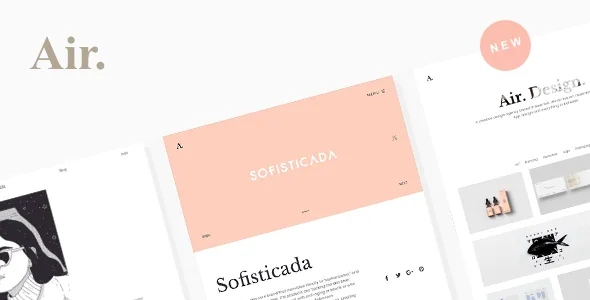
Air's feature list spends more words on one component than any other: the portfolio list. It runs as a standard grid or a masonry grid, and each instance pulls its items from single posts, from portfolio items, from WooCommerce products or from the media library. That last pair is the practical part. A photographer's project list and a small shop's product list can share the same display module, and a page can show a curated media-library set without creating a post for each image.
Between the source and the published page sit several independent choices: one to twelve columns, item spacing, an item filter you can switch on or off, and pagination as a load-more button or infinite scroll. Text under the thumbnail, text on mouseover and no text at all are three separate settings, and the text itself has its own font, colour, spacing and alignment controls.
The masonry variant gets its own drag-and-drop arrangement editor, which is a different tool from a column-number field, so the two grid types ask for different work. The vendor presents the list as suitable for portfolio, agency, photography, freelance and blogging setups; the grid is the piece that decides which of those the site actually behaves like.
BM Content Builder is the editing surface
Pages are not assembled in the block editor. The vendor's own plugin, BM Content Builder, runs in the front end in live mode and replaces the earlier BM PageBuilder as of version 2.0.0 in the changelog. The description calls it a what-you-see-is-what-you-get tool for portfolio pages, and the grid module described above is one of its modules.
The 2026 releases are worth noting for anyone building long project pages. Version 2.4.0 added history revisions and undo/redo to the builder, which changes how forgiving a long composition session is: a mis-dragged gallery block is recoverable inside the editor rather than through a page-level backup. Version 2.4.1 then updated the builder to 3.17.1.
Because content is stored in that builder's own structure, the editing experience is inseparable from the theme. The marketplace file list records PHP, HTML, CSS and JS files, and a child theme is listed among the vendor's inclusions — useful if a developer needs to extend templates, but not a way to move existing pages into another editor.
Project pages built from mixed modules
The vendor describes unlimited single-project layouts by mixing elements: gallery, single image, heading, paragraph, slider, social icons and video. The recurring arrangements named in the description are a text column beside a gallery column, with the gallery on the left or right and either filled or boxed; a full-width layout; a fullscreen slider; a carousel; and a heading with a masked image behind the text.
A gallery lightbox is listed separately from those layouts, and the vendor adds that images opened in the lightbox can be navigated across different modules — worth knowing if a project page uses several galleries and you want one continuous browsing sequence rather than one per section.
Demo layouts are described as built from pre-made templates and imported with one click. Read that as a starting point: importing gives you a page that exists, and from there the composition rules above are what you edit.
Headers and logos as a site-wide decision
The count is large: 19 header layouts (top, side, overlay, logo right and others) plus 3 mobile header layouts. The details that matter more than the count are the per-state choices — floating or fixed, custom height and colour, and a logo system that supports an image or plain-text mark, a dark/light pair for pages with different backgrounds, and a separate logo for mobile.
The dark/light logo pairing is the one to plan for. If your project pages open with full-bleed dark imagery and your index pages are white, you can keep one wordmark legible in both places without swapping header layouts. A mobile-specific logo matters if the desktop wordmark is wide enough to crowd a phone bar.
Mobile controls go past the header: the vendor lists mobile spacing for most elements, mobile font and icon sizes, and options to define font sizes per device, including support for viewport-width units. Those settings multiply quickly, so pick which elements get per-device treatment before you start.
Typography and the on-page motion layer
The vendor's font management is described as covering 900+ Google fonts, 1700+ Adobe fonts and your own uploaded files, with font size, line height and letter spacing defined per selection and a separate mobile size. The demo's web fonts are said to be included in the package.
Motion is where the theme's character sits. The list includes text marquees, floating text inside group modules, scroll-triggered animation, parallax, a custom mouse cursor with an optional follower, a background colour transition tied to scrolling, and fullscreen background video with text masked through mix-blend-mode. Menu items get three mouseover effects, and a page loader with a slide transition can be switched on.
These options are individually small and collectively defining. Used sparingly they distinguish a portfolio from a template; switched on all at once they compete with the work on screen. The type controls matter here too — marquee and floating text are only as good as the size and spacing you give them.
Declared compatibility and the Gutenberg question
As observed on 4 November 2026, the marketplace attributes record WooCommerce 7.x through 10.x and WordPress 6.0.x through 7.0.x, with WPML named in the compatibility field. The vendor's own feature list goes wider on multilingual tooling, naming WPML, Polylang and Loco Translate, a POT file and front-end translations for German, French, Spanish, Persian, Dutch, Japanese and Chinese, plus RTL CSS.
The newer evidence sits in the changelog rather than the attributes: the latest entry, version 2.4.2, records compatibility with WooCommerce 11.0, and earlier entries track WooCommerce releases closely — 10.5 in 2.4.0, 10.1 and 10.0 in the 2.3.5 line. If you are building a shop section, that changelog is the better signal than a stored attribute, but neither is a test on your host, PHP version or plugin set, so confirm on staging.
There is also a wording gap worth naming. The vendor feature list says "Gutenberg editor ready," while the marketplace attribute records Gutenberg Optimized as No. The attribute is a stored declaration, not proof that the block editor is unusable, but the theme's page-building path is clearly BM Content Builder. If block-based editing is a requirement for you or a client's team, treat the builder as the intended workflow rather than assume a block-first one.
What the choice actually comes down to
Air fits a portfolio site whose owner will work inside the theme's own front-end editor: choose the grid source, set columns and pagination, compose each project page from modules, and adjust type and motion from theme options. The grid's ability to mix portfolio items, posts, products and media-library images in differently configured lists is the most useful single fact about it, and the builder's 2026 revision history makes long editing sessions less risky than they were two years ago.
What the evidence does not answer is how the builder handles a large existing site, or what a handover to a non-technical editor feels like day to day. Both are worth checking against the vendor's live demo before you commit to the workflow — not as a final step, but as the question that decides whether this theme, rather than a block-based one, is the right base.
Questions & answers
Can I show shop products and portfolio projects in the same grid style?
According to the vendor's feature list, a portfolio list can be sourced from single posts, portfolio items, WooCommerce products or the media library. Each instance is configured separately, so column count, filtering and pagination can differ between the two lists.
Does Air work with the block editor?
The vendor feature list says "Gutenberg editor ready," but the marketplace attribute records Gutenberg Optimized as No. The theme's page composition happens in BM Content Builder, so plan on that being the editing workflow rather than a block-first one.