A food-menu layer that ships as a separate plugin
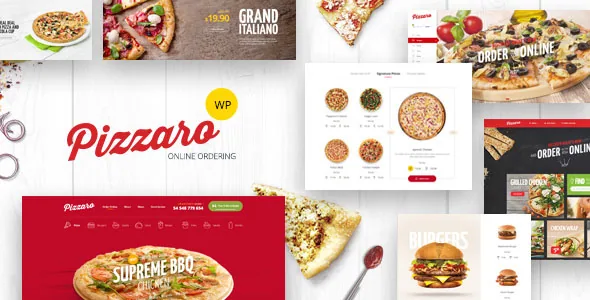
MadrasThemes describes Pizzaro as a WooCommerce theme for pizza, sushi and fast-food delivery businesses. The part that separates it from a generic shop skin is Pizzaro Extensions, a plugin the vendor says is bundled with the theme. Its listed features are Megamenu Dropdown, Menu Card, Products Carousel, Products Cards, Product Deals and Features List.
Read that list as food-publishing vocabulary rather than layout filler. A Menu Card and a Features List are blocks for a homepage or a category landing page where the menu itself is the content, not a grid of add-to-cart tiles. Product Deals and the carousel pull selected items forward — a lunch special, a family bundle — without a page per promotion. The Megamenu Dropdown handles the other restaurant problem: a category tree deep enough to need columns in the header.
Because these arrive through a companion plugin, the plugin is also the thing to keep in step with the theme. The vendor's release notes record an update making the Extensions Elementor widgets use the current Elementor API, which is the sort of change that turns a mismatched plugin version into visible breakage.
The dummy import arrives without food photography
The vendor is unusually direct here, and it matters more on a restaurant theme than on most. Importing the dummy data gives you a site similar to the live demo without preview images, and the description states that preview images are not included in the package.
For a restaurant, photography is the pitch. Every hero shot of a pizza, every close-up of a burger, every interior photograph shown on the demo belongs to someone else. A Pizzaro install therefore starts as a correctly structured site with the wrong pictures in every slot. Book a shoot or licensed stock before you promise a launch date.
The compensation is that layouts and section order come across intact, so you replace images rather than rebuilding pages. Plan the shot list around the modules you intend to use — plated dishes for the Menu Card, combos for Product Deals — and the swap goes faster. The release notes also show a fix for demo import failing to bring in images, so an older copy is worth updating before you import.
Toppings and sizes belong to a YITH plugin, not the theme
The description lists integration with WooCommerce core and several popular extensions, and one of them is YITH WooCommerce Product Add-Ons. That is the route to the choices a pizza or burger order actually needs: extra toppings, size upgrades, sides, a drink attached to the item.
WooCommerce does not do that natively and the theme does not claim to. The add-on behaviour, its pricing rules and its settings live in the YITH plugin, so treat it as a third-party dependency with its own update cycle. The release notes show compatibility work for that plugin at major versions, including a fatal error fix for the 2.x line — relevant if you are running something other than the current release.
The same reserved vocabulary applies to the rest of that list. Elementor, Slider Revolution, The Events Calendar and WP Store Locator are named as integrations, which is a compatibility statement rather than proof that a demo depends on any one of them. A store locator is a plausible fit for a multi-branch takeaway; nothing in the description says every Pizzaro build needs one.
Shop layouts that let a partial menu look finished
The vendor gives more control over product listings than many storefront themes. Products can display in 2, 3, 4, 5 or 6 columns, there are three single product page layouts, and the demo list names shop variants with a sidebar, full-width variants, dark variants, and no-image listings including one with a parallax list.
The no-image listings are the practical ones for a restaurant mid-build. A kitchen with a long menu and partial photography can run a text-led list that does not show holes where pictures should be. Column count is really a decision about how much of the menu a customer sees before scrolling — three columns for dishes with description text, six for drinks and sides.
Beyond the shop, the theme covers the order path with Shop, Cart, Checkout, My Account and a Track your Order page, and adds About Us, Contact, Terms and Conditions plus two FAQ page versions. Blog layouts run classic or grid with a left sidebar, right sidebar or full width, which suits a site publishing recipes or news alongside the menu. These demo pages are starting points to replace, not templates that keep themselves in sync when you edit one.
Headers, footers and colour as presets you can carry across sites
Appearance is preset-oriented: 4 pre-defined header styles and 5 footer styles, each with an option to customise further, plus an unlimited colour scheme with a generator for custom colours. Customisation settings can be imported and exported, which is useful when a second branch site should match the first without rebuilding the styling.
Smaller options round out the day-to-day editing: Google Fonts, FontAwesome icons, social media links, placeholder images for blog listings and a field for pasting custom CSS. The theme is built on the Underscores framework with SASS files included, and the vendor frames the codebase as lean and extensible, with additions meant to go through a child theme or custom plugins. That is a statement about developer comfort rather than something a visitor will notice.
Where the stated versions and the changelog disagree
As observed on the marketplace in November 2026, the compatibility fields list Elementor, WooCommerce 10.x.x and 9.x.x, and WordPress 7.0.x, with Chrome, Firefox, Safari, Opera and Edge named as browsers. Gutenberg Optimized is recorded as No, which describes whether block-editor layouts are styled as a priority — it does not mean the block editor is unusable. Elementor is the editing surface the vendor points at.
One inconsistency is worth knowing before you plan upgrades. The latest marketplace release notes mention compatibility with WordPress 7.1.x and WooCommerce 11.1.x, while the structured compatibility fields still record WordPress 7.0.x and WooCommerce 10.x and 9.x. Neither figure is a test result on your server, so confirm the version you are installing against what your host runs.
The files list names PHP, CSS and JS. Which build you actually receive is a package question rather than something to read off a feature list.
Questions & answers
Does Pizzaro include the food photos shown on its demo?
No. The vendor states that importing the dummy data gives you a site similar to the demo without preview images, and that preview images are not included in the package. You supply your own photography.
Can customers pick toppings and sizes on a Pizzaro product?
The theme lists YITH WooCommerce Product Add-Ons as an integration, so add-on choices come from that plugin rather than from the theme itself. Its pricing rules and settings are managed there.
Do I need Elementor to build pages with Pizzaro?
Elementor is listed among the compatible page builders, and the vendor's changelog references Elementor widgets in the Pizzaro Extensions plugin. Gutenberg Optimized is recorded as No, which concerns block styling priorities rather than whether the block editor works.