Each project gets built, not templated
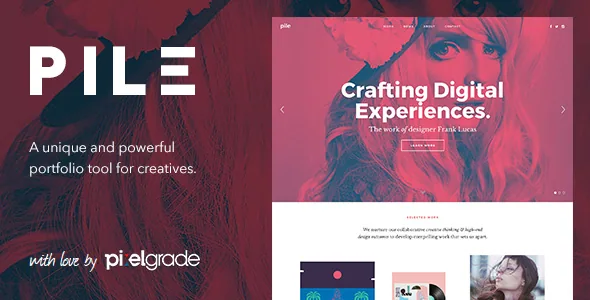
Pixelgrade's description centres on one mechanism: a "unique Project Builder" with a drag-and-drop interface for assembling portfolio pieces. It is worth reading precisely, because it describes the shape of a single project page rather than the site as a whole. PILE is not sold as a general-purpose page builder; it is sold as a way to compose each piece of work on its own terms.
The vendor pairs that with a design argument rather than a feature list. The description calls the theme "simple, but sophisticated, slick, but meaningful, minimalist, but coherent and structured," ending on the claim that the design is "always at a service of a story." That is a position about emphasis: layouts exist to carry a narrative, not to hold content evenly in neutral containers.
For a portfolio, the consequence is practical. A twelve-image photo series and a three-spread illustration set rarely want the same pacing, and a builder that works at project level lets you answer that per body of work.
Planning shifts from one front page to a project pattern
When composition happens per project, your early decisions move. Instead of designing a homepage and slotting items into it, you set a pattern for how a project page works and then apply it consistently. The house style still matters, but a single project can open full-bleed, hold a tight run of detail shots, and close on a credit line without those choices leaking into the next one.
The evidence does not describe the builder's controls in detail, so judge the actual interface from the demo rather than inferring it from the feature list. What the description does establish is that assembly is drag-and-drop rather than code, which matters when the person maintaining the site is also the person making the work.
A second consequence is easy to overlook: whoever builds the first two or three projects defines the pattern everyone else inherits. Settle early how many images a project should carry, whether captions sit beside images or below them, and how much introductory text the layout can take before it starts to look crowded.
What a dense grid demands of your files
The marketplace attributes list a responsive layout, a column option of four or more, and High Resolution set to Yes. Read together, they describe gallery-heavy pages where tiles sit close together and full-size images are expected to hold up on high-density screens.
That combination puts the pressure on your own assets. Four columns on a wide display leaves very little room per tile, so inconsistent crops and mismatched colour treatment read as visual noise rather than variety. High-resolution support also means large source files, which is an argument for preparing optimised derivatives rather than uploading camera originals.
The name sets an expectation as well. PILE's framing is cumulative, work stacked and layered, which suits a body of work with enough volume to fill a dense grid. A six-image portfolio will look sparse inside that structure no matter what the builder allows.
The version and plugin declarations, read carefully
The marketplace attributes, observed on 4 November 2026, list tested software versions as WordPress 5.9.x, 5.8.x and 5.7.x, and compatible-with entries for WooCommerce 6.x.x, 5.7.x and 3.6.x. Those are declarations of a tested range, not a prediction of how the theme behaves on the WordPress version you run today. The top of the WordPress range is 5.9, and the vendor record shows an update in March 2021.
Version details across the listing and the vendor text do not line up neatly: the marketplace records 2.5.1 as the latest version, while the description's changelog section cites 2.5.0 as current, released 2 June 2020. Treat 2.5.x as the release line and read the actual changelog before depending on a specific fix.
The WooCommerce entries deserve the same restraint. A declared range means the vendor tested against those releases; it does not mean a shop built on PILE picks up current WooCommerce templates. If you plan to sell prints or products alongside the portfolio, test the shop templates on your own stack first.
The file list, the block editor and the browser list
Gutenberg Optimized is marked No. Read that as the vendor declining to make a block-first claim: no promise of block patterns, block styles, or layouts designed around the block editor. It is not evidence that the block editor is switched off or unusable on your site.
The marketplace file list names PHP, CSS and JavaScript. PILE is a classic theme package in that sense, and its own Project Builder is where the composition work happens. If your team has standardised on block-based building, expect to assemble projects through PILE's interface rather than through patterns shipped with the theme.
Other attributes fill in the picture: Widget Ready is Yes, documentation is described as well documented, and the browser list runs from IE11 through Firefox, Safari, Opera, Chrome and Edge. That browser list dates the theme more than it describes it, and is worth treating as context for the version declarations above.
Preview images are not yours
The vendor's credits section states plainly that images seen in the live preview are for demonstration only and are not included with a purchase, then names the photographers and studios behind them. Credit is not the same as a licence for your site.
For this theme the point is decisive rather than administrative. PILE's argument depends on the strength of the work shown inside it, so weaker or inconsistent imagery removes the reason to use it. Before committing, gather the body of work you actually intend to publish and check whether it has the volume and consistency the four-column grid assumes. If it does, the Project Builder is the part worth spending time on in the demo.
Questions & answers
Does PILE require the block editor to be turned off?
No. Gutenberg Optimized is marked No on the listing, which means the vendor makes no block-first optimisation claim. It says nothing about whether the block editor is available on your site.
Can I run a shop alongside the portfolio with PILE?
The listing declares compatibility with WooCommerce 6.x.x, 5.7.x and 3.6.x. Those are tested-range declarations, so verify the shop templates against your current WooCommerce and WordPress versions before relying on them.
Are the photographs from the PILE preview included?
No. The vendor states that preview images are for demonstration purposes only and are not part of the purchase; they are credited to the individual photographers and studios who made them.