Your scheduler first, then the layout
Physio's most consequential feature is not on the canvas. The vendor bundles a premium appointment booking plugin at no extra cost and describes the purpose plainly: patients schedule an appointment through your website.
The changelog identifies the engine. Across recent releases the updates include "Booked plugin to v2.5.2", alongside separate mentions of "the appointment plugin" in fixes and improvements. That makes Booked the likely booking system inside the package, maintained through theme updates rather than as a separate purchase. If your clinic already runs a booking service with its own patient records, that bundled calendar may end up unused — and the rest of the theme decides the purchase instead.
Everything else in Physio assumes that booking is part of the site's job. Page building, the widgets and the Customizer all sit around a clinic's day-to-day business rather than a generic brochure.
The widgets that carry practice information
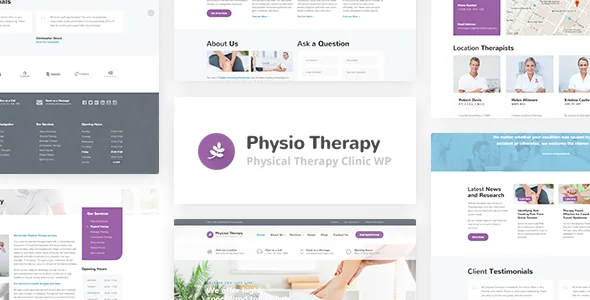
The vendor lists 25+ custom widgets and names the ones that matter for a clinic: Testimonials, Google Map, Team Members, Treatments, Call to Action, Opening Hours and Price Lists. Those are the recurring blocks of a physiotherapy site — what you treat, who treats it, when you are open, what sessions cost, and where the practice is.
Because they are widgets rather than fixed page sections, they can be dropped into widget-ready areas the theme provides, and the listing marks Widget Ready as Yes. The distinction matters for maintenance: changing your opening hours or adding a therapist is closer to editing one stored block than rebuilding a page section by hand.
The naming also sets expectations for what is not described. There is no stated treatment archive, therapist post type or structured price table in the vendor's feature list — the widgets are presentation blocks. If you need treatments to behave as a filterable catalogue, that is a page you arrange in Elementor, not something the theme promises automatically.
Responsive spacing is now a Customizer setting
Live Theme Customizer is listed as a feature: style changes preview in the browser before you publish them. What is more specific to Physio is where that control has moved. Release 3.4.7 made typography font sizes responsive across the board, and did the same for button padding, breadcrumb spacing, page heading and footer spacing, plus navigation link spacing on desktop and tablet. Logo width and top margin settings became responsive, and responsive slider and dimension controls gained real-time previews.
That changes the editing routine. Instead of one font size that has to be a compromise between a wide desktop and a phone, you set the size per breakpoint and see the result as you adjust it. For a clinic whose front page is mostly headings, hours and a call to action, that is the difference between tuning a layout once and fixing it again after every content change.
Earlier releases in the same series fixed customizer dimension controls, their migration from older theme versions, and a bug where the slider setting reverted to its default after saving — the kind of detail that tells you the Customizer is actively worked on rather than left at launch state. A 3.4.2 entry also added a setting to disconnect the theme's Google Fonts connection, aimed at WordPress 7.0's newer font library.
What Advanced Custom Fields PRO is doing here
The package also includes Advanced Custom Fields PRO, which the vendor credits as the basis for individual page settings — changing a page heading or hiding breadcrumbs, for example. Changelog entries show the plugin being updated in step with the theme, and one fix addresses an ACF breadcrumbs setting misbehaving on blog posts.
Read that scope carefully. ACF PRO is not described as the builder for your page content or as the container for treatment listings. It supplies per-page switches on top of whatever you build in Elementor. If you were hoping the fields layer would give you structured treatment records to query and reuse, the vendor description does not claim it.
The practical value is smaller and still real: a page can have its heading and breadcrumb treatment adjusted without duplicating a template, which matters when a clinic rewrites service pages often.
Contact forms and booking are separate jobs
Contact Form 7 is the theme's form plugin, and the demo import includes four different form layouts — you change the recipient address and the forms are ready. The changelog shows ongoing styling attention, including fixes in 3.4.3 and 3.4.8 so form buttons display correctly even without a custom button class.
Keep the two paths distinct in your planning. A form submission is an enquiry that lands in a mailbox; an appointment booked through Booked is a time slot in a calendar. Many clinics need both — a general contact form for insurance questions or referrals, and booking for treatment slots — and the theme supplies each from a different plugin.
Because Contact Form 7 does not store submissions by default, plan where enquiries are recorded if several staff members handle them.
Declared compatibility, and the images that are not included
Marketplace attributes observed on 3 November 2026 declare WordPress support from 5.7.x through 7.1.x, WooCommerce 5.x through 9.x, and compatibility with Elementor, Elementor Pro, Contact Form 7 and WPML. Gutenberg Optimized is marked Yes. Those are listing declarations rather than the result of running this theme in a particular stack, so confirm the versions you actually deploy.
The vendor is explicit about demo imagery: pictures shown in the demo are for demonstration only and are not part of the theme. Budget for photography of your clinic, staff and treatment space, and treat a one-click demo import as page structure and layout to fill in rather than a finished visual identity.
Because Physio stores treatment information in widgets and page settings rather than in custom post types, the cost of judging it is low: import the demo, edit the opening hours, treatments and team widgets, and see whether the Customizer controls cover the responsive adjustments your site needs.
Questions & answers
Is the appointment booking plugin included, or does it need a separate licence?
The vendor lists a premium appointment booking plugin as included at no extra cost, and the changelog records updates to the Booked plugin through recent releases. Neither source states a licence term, so confirm the licensing arrangement for the bundled plugin before relying on it as your booking system.
Can I build treatment pages without Elementor?
The vendor describes Elementor as the page builder the theme is built around, and Elementor is listed among compatible plugins. Nothing in the evidence rules out other editors, but the documented workflow and the demo layouts assume Elementor.
Do the demo photos come with the theme?
No. The vendor says the images used in the demo are for demonstration purposes only and are not included in the theme, so you will need your own photography for the clinic, staff and premises.